SIM Owner Details & All Network Packages in Pakistan
Check SIM Owner detail and Find the Latest Mobile Packages
Numpk.com, Offer a free SIM Owner Detail Checker tool that allows users to verify SIM ownership linked to their CNIC by texting their CNIC to 668 or open PTA’s free portal cnic.sims.pk. Within about 15 seconds you get an operator-wise count of every SIM registered on your own CNIC. You can only ever check your own CNIC looking up a stranger’s number is illegal under PECA 2016. The importance of verifying SIM information is emphasized to prevent identity theft and unauthorized use of CNICs, with a warning against illegitimate third-party services. The platform aims to provide clear guidance on legal methods for checking SIM ownership and the need for updated SIM registrations.
What Are SIM Owner Details?
SIM owner details refer to the identity record a telecom operator and PTA associate with a mobile number — the registered owner's name, the CNIC it's linked to (confirmed via biometric verification), and which operator issued it. This sits inside PTA's telecom database and is not a public directory — it exists so operators and regulators can confirm identity, not for open lookup by third parties.
Users Often Want to Check
- How many SIMs are registered on their CNIC
- SIM registration status
- Network / operator information
- SIM verification details
- Ownership records for their own numbers
Why It Matters
Stops SIM-swap fraud used to intercept OTPs and banking codes.
Catches CNIC misuse before it turns into unwanted SIM activations.
Keeps your biometric-verified record accurate and up to date.
Can You Check SIM Owner Details by Mobile Number?
No — you cannot legally access personal SIM owner details using only a mobile number. Due to privacy laws in Pakistan, this information is protected and restricted to authorized parties.
SIM Registration Data Is Confidential
CNIC-linked SIM ownership records are protected personal data under Pakistani telecom regulations and cannot be shared publicly.
Limited Authorized Access
Only telecom companies and law enforcement agencies, acting under proper legal procedure, can access full ownership records.
No Public SIM Owner Database
No legitimate website or app can reveal a stranger's name, address, or CNIC from just their mobile number — anything claiming otherwise is unreliable or illegal.
Legal Risk of Unauthorized Access
Attempting to obtain someone else's personal data without consent can violate Pakistan's data protection and telecom laws, with legal consequences.
Watch Out for Scam Tools
Be cautious of apps or websites promising instant "owner details" for any number — these are often scams designed to steal your own data or money.
What You Can Check Instead
You can always check SIMs registered against your own CNIC through simsdata.org or official PTA channels — that part is fully allowed.
If you're receiving harassment or threats from an unknown number, don't try to trace the owner yourself. Report it directly to your network operator's helpline or the nearest police station / FIA Cyber Crime Wing for proper legal action.
Is It Legal to Check SIM Owner Details in Pakistan?
PTA Regulations
Every SIM must be registered against a valid CNIC, with mandatory biometric verification at the point of sale since 2015 — a fingerprint must match NADRA's records before activation. PTA also caps how many SIMs one CNIC can hold per operator, and runs official self-check channels so citizens can audit their own registrations.
Privacy Laws & Data Protection
Pakistan treats CNIC-linked telecom data as sensitive personal information. Ordinary citizens have no legal right to pull up someone else's SIM ownership record — your telecom identity belongs to you, and access is restricted to you and the regulator, not the general public.
What You Can Access (Your Own CNIC)
- Number verification — confirming the network a specific mobile number belongs to
- SIM count on CNIC — how many SIMs are registered against your identity, by operator
- Ownership confirmation — confirming a SIM you hold is properly registered and biometrically verified
What You Cannot Access
- Private user records belonging to someone else
- Personal addresses linked to a CNIC or SIM
- Confidential telecom data — call logs, message content, or any record beyond basic registration status
Beware of Fake "Lookup" Services
Any website or service claiming to hand over a stranger's name, address, or CNIC details from just a phone number is not operating through PTA's system — and should never be trusted with your data.
Every Official Way to Check SIM Owner Details — All 10 Methods
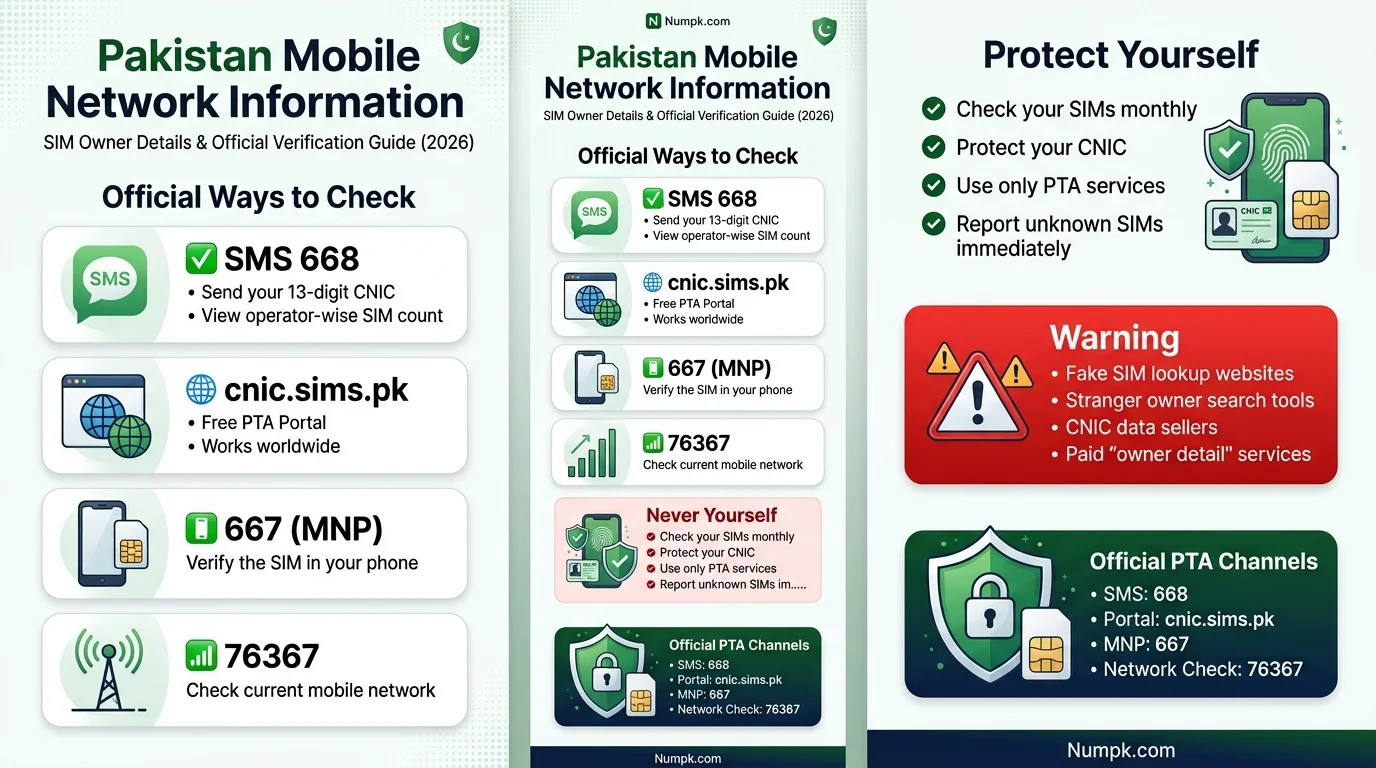
Ten official routes exist: SMS 668, the cnic.sims.pk portal, MNP to 667, your operator's own-number code, the operator's BVS biometric code, the operator app, the operator helpline, the franchise/service centre, 76367 for network lookup, and PTA's own channels. All are free or near-free.
SMS your CNIC to 668 (the classic check)
Text your 13-digit CNIC, no dashes (e.g. 3520112345678), to 668. PTA replies in ~30 seconds with an operator-wise SIM count. Costs roughly Rs 2 per SMS. Works on any phone, no internet needed.
- Open Messages → new SMS
- Type CNIC with no dashes/spaces
- Send to 668, wait ~30s
- Screenshot the reply as your record
cnic.sims.pk (official free portal)
Enter your CNIC, complete the CAPTCHA, view the same SIM count on screen — free, works from any country, no VPN needed. A NICOP works the same way, making this the default for overseas Pakistanis.
MNP to 667 (the SIM in your hand)
Send MNP to 667 from the SIM in your phone. Confirms that SIM's network, status, and a masked CNIC view — handy before linking it to JazzCash, Easypaisa, or a bank account.
- Only checks the SIM physically in your device
- A verification code, not a people-search
Your operator's own-number code
Forgotten your own number? Dial with zero balance:
- Jazz *99#
- Zong *8#
- Telenor *8888#
- Ufone *780*3#
Doesn't replace the 668 check — only shows your own number.
Operator BVS code (biometric status)
Confirms your SIM is biometrically verified:
- Jazz — SMS CNIC to 6001
- Telenor — SMS CNIC to 7751
- Zong / Ufone — send V to 7911
"Not Verified"? Re-verify free at a franchise before the SIM risks suspension.
Operator mobile app
Jazz World, My Zong, My Telenor, My Ufone, and the ONIC app all show your number and registration status on the dashboard after login.
Need your number to sign in first — use the own-number code if forgotten.
Operator helpline (after ID check)
Call Jazz 111 · Zong 310 · Telenor 345 · Ufone 333 · SCO 355. Agents confirm your own SIM details, flag an unknown SIM, or start a block.
Franchise / service centre (in-person)
Bring your original CNIC for a fingerprint match. Staff can print your full record, correct CNIC mismatches, transfer ownership, or process SIM disowning.
Changes reflect in your 668/portal check within 24–48 hours.
76367 network identification
SMS any 11-digit mobile number to 76367 — the reply names its current operator. Useful after MNP porting.
- Returns network name only
- Never the owner's name, CNIC, or address
PTA's own channels
Toll-free consumer line: 0800-55055. Complaints via complaint.pta.gov.pk or the PTA CMS app, or the WhatsApp Digital Assistant.
Which Method Should You Use?
Match your situation to the row below — each one points to the single fastest official channel for that exact need.
| Your situation | Use this |
|---|---|
| Full CNIC SIM check — every SIM on my identity | 668 SMSorcnic.sims.pk |
| I'm holding a SIM — is it mine / which network? | MNP to 667 |
| Which network serves this number now? | 76367 |
| Is my SIM biometrically verified? | BVS code6001 / 7751 / V to 7911 |
| I need a printed record, a fix, or disowning | Franchisewith original CNIC |
| I live abroad | cnic.sims.pkCNIC or NICOP |
| Complaint or guidance | PTA 0800-55055 |
Das official tareeqe hain — 668 par CNIC SMS, cnic.sims.pk portal, apne haath wali SIM ke liye 667 par MNP, apna number janne ke codes, BVS biometric codes, operator app, helpline, franchise, kisi number ka network 76367 se, aur PTA ke apne channels — yehi mukammal CNIC SIM check hai.
How to Check SIMs Registered Against Your CNIC
PTA's Subscriber Verification Management System (SVMS) is the only authoritative record of which SIMs are active on your CNIC. It never shows you someone else's data — only the count tied to the CNIC number you submit yourself, whether you're checking from inside Pakistan or abroad.
This is PTA's genuine web portal for the CNIC SIM check — the same registry that SMS 668 reads from. Only this domain is official; look-alike sites should never receive your CNIC.
- Your valid, unexpired CNIC number
- A mobile phone (SMS method) or a browser (online method)
SMS Verification Method
The fastest and most widely used method.
- Open the messaging app on your phone
- Type your CNIC number without dashes (13 digits)
- Send the message to the official PTA shortcode 668
- Review the reply — an operator-wise count of SIMs registered on your CNIC
Online Verification Method
Best for overseas Pakistanis or anyone who wants a visual, printable record.
- Open a browser and go to cnic.sims.pk, PTA's official SIM information portal
- Enter your CNIC number in the field provided
- Complete the CAPTCHA verification
- Submit the request and review the on-screen breakdown
If an Unknown SIM Appears
Acting quickly matters — an unrecognised SIM on your CNIC could already be in use for fraud, so the sooner you flag it, the smaller the potential damage.
- Report immediately through PTA's complaint channels — complaint.pta.gov.pk or 0800-55055 — rather than ignoring it
- Contact the operator's helpline for that specific SIM to flag it as unauthorised
- Visit a franchise in person, with your original CNIC, to formally request removal or "disowning" of the unauthorised SIM
668 vs cnic.sims.pk vs 667 vs 76367 — Quick Compare
What's the difference between the SIM-check codes? 668 returns a count of all SIMs on your CNIC; cnic.sims.pk shows the same count free and works overseas; 667 verifies only the SIM in your own hand; 76367 identifies which network a number is on. None of them reveals a stranger's SIM owner details.
| Tool | Looks at | Returns | Cost | Works overseas? |
|---|---|---|---|---|
| 668 (SMS) | Your CNIC | Per-operator count of all your SIMs | About Rs 2 with tax | No — needs a Pakistani SIM |
| cnic.sims.pk | Your CNIC / NICOP | Same count, on screen | Free | Yes — worldwide, no VPN |
| 667 (send MNP) | The SIM in your hand | That one SIM's network & registration status | Standard SMS | Only with that SIM active |
| 76367 | Any 11-digit number | Its current network only — never a name | Standard SMS | No — needs a Pakistani SIM |
Think of them as three lenses on one SIM owner details registry. 668 and the portal look at your identity and count every connection under it. 667 looks at one physical SIM and confirms it's properly registered. 76367 looks at a number and names only its operator — useful because after MNP porting the prefix no longer proves the network.
Use 668 or the portal first for the full SIM owner details audit, then 667 for any individual SIM you're unsure about.
668 vs cnic.sims.pk vs 667 vs 76367 compared — which code to use for a SIM owner details check in Pakistan
Official Methods to Verify SIM Ownership
The text outlines the SIM verification processes for different mobile operators in Pakistan through the Pakistan Telecommunication Authority (PTA):
- PTA Verification Services: The PTA provides channels (668 SMS, online portal, complaint line) for checking SIM registration against CNIC, which are reliable and free or low-cost.
- Jazz SIM Verification: Jazz customers can verify their SIM status via SMS or USSD menu, with further assistance available through customer support.
- Zong SIM Verification: Zong offers a similar self-check via SMS or USSD, and further help can be sought through their helpline.
- Ufone SIM Verification: Ufone subscribers can check registration status through a USSD code or customer care. Post-2026 merger, both Ufone and former Telenor numbers can be verified similarly.
- Telenor SIM Verification: Telenor numbers remain verifiable through SMS or customer support despite the corporate merger.
Overall, all operators provide SMS or USSD checks for verification and customer helplines for additional support. It’s advised to check the official app or website for current shortcodes, as they may change.
How SIM Registration Works in Pakistan
Three systems work together behind every active SIM — biometrics, the CNIC record, and regulatory oversight — before a single card ever reaches a buyer's phone.
Biometric Verification
Every new SIM activation requires the buyer's fingerprint to be matched against NADRA's database in real time. This was introduced specifically to stop SIMs being issued on forged or stolen identity documents, and it remains the backbone of Pakistan's SIM registration system.
CNIC-Based Registration
No SIM can be activated without a valid CNIC. The CNIC number becomes the anchor record that ties the SIM to a specific identity, and it's what all official verification checks — like the 668 SMS — query against. You can learn more about how this works in our detailed CNIC data guide.
PTA & Operators' Role
PTA sets the regulatory framework — registration limits, biometric requirements, compliance rules — while individual operators (Jazz, Zong, Ufone) carry out the actual point-of-sale registration and biometric capture. PTA then aggregates this data so a citizen's total SIM count across all networks can be checked in one place using our live number tracker.
The buyer visits an authorized franchise or retail outlet with their original CNIC
Their fingerprint is captured and checked against NADRA's records
Once verification succeeds, the SIM is registered against their CNIC and activated
The buyer generally receives a confirmation SMS once activation is complete
Latest PTA SIM Rules & Updates 2026
The guide includes updates on the nationwide campaign, privacy rules under PECA 2016, official disowning procedures, and answers to frequently asked questions.
- SIM Blocking Campaign: A phased blocking of SIMs linked to expired, cancelled, or deceased-holder CNICs. Keeping CNICs valid and records updated is essential to avoid service interruptions.
- 365-Day SIM Disowning Window: The period to disown and transfer SIMs has been extended to 365 days. Users can report fraudulently issued SIMs through official channels.
- RAABTA WhatsApp: A PTA assistant providing access to SIM-related guidance, device verification, and complaint submission via a menu-driven interface.
- Midnight SIM Sale Restriction: Operators must suspend SIM sales and activations from 12:00 AM to 6:00 AM. Users should verify unexpected activation messages.
- Official SIM Owner Check: The only legitimate way to check SIM owner details linked to a CNIC is through official PTA channels such as SMS 668, the cnic.sims.pk portal, RAABTA WhatsApp Assistant, and the MNP service (667).
How Many SIMs Can Be Registered on One CNIC?
The cap is combined across all operators, set by the Supreme Court of Pakistan on 5 November 2015, and enforced automatically through the registry. It is not 25, not "5 per network", and it was never "reduced to 6".
5 voice + 3 data = 8 — the SIM limit every CNIC SIM check is measured against, unchanged since 2015.
The cap is enforced at activation: the system simply won't let a CNIC cross five voice or three data connections. That's what makes an unauthorised SIM visible — if your own count sits at the limit and you didn't register that many, the gap isn't a glitch; it's someone else's SIM riding on your identity, and your monthly SIM owner details check is how you catch it. Exceeding counts or unverified SIMs can be auto-blocked via the DIRBS-linked enforcement PTA runs.
Foreign nationals and POC holders get two SIMs on a passport/visa
Children can't hold SIMs at all until 18 — a guardian's CNIC carries them
Companies register connections against an NTN, which is how businesses legitimately exceed the personal cap
The CNIC SIM check itself works identically for everyone.
The 365-Day Disowning Rule (24 May 2026)
Since PTA's advisory of 24 May 2026, a newly activated SIM cannot be disowned or transferred for 365 days after activation — extended from the old 60-day window, confirmed by Geo Fact Check quoting PTA.
Be very careful whose SIM you biometrically approve — you'll carry it for a year.
If a SIM was wrongly registered to you, file a PTA complaint the same day you find it — the dated record protects you even while the lock applies.
Your SIM Is Your Identity — And Your Legal Liability
Every SIM registered on your CNIC is legally yours. If a connection in your name is used for fraud, the trail leads to your door first. That is the blunt reason a monthly SIM owner details check is worth two minutes: it lets you find and disown a SIM you never authorised before someone else's crime becomes your problem.
Official PTA SIM Codes & Helplines ⭐
Pakistan's official consumer short codes — 668, 667, 76367, 8484, 9000, 3627, *420#, 8300, 8400 and the helplines — let you check, block and report for free or near-free. The SIM owner details self-checks (668, 667, 76367, cnic.sims.pk) work on every network; the rest cover devices, spam and identity services.
| Code / channel | What it does | How to use | Cost |
|---|---|---|---|
| 668 | Full CNIC SIM check — all SIMs on your identity | SMS 13-digit CNIC (no dashes) | About Rs 2 with tax |
| cnic.sims.pk | Same count on screen (official portal) | Enter CNIC + CAPTCHA | Free |
| 667 | Verify the SIM in your hand | Send "MNP" | Standard SMS |
| 76367 | Identify a number's live network | SMS the 11-digit number | Standard SMS |
| 6001 / 7751 / 7911 | Biometric (BVS) status | Jazz CNIC to 6001 · Telenor CNIC to 7751 · Zong/Ufone V to 7911 | Free/Rs 1 |
| *#06# | Show your device IMEI | Dial it | Free |
| 8484 | DIRBS device status | SMS the 15-digit IMEI | Free |
| 9000 | Report spam SMS/calls | Forward: number [space] message | Near-free |
| 3627 | Do Not Call Register | SMS "reg" / "unreg" (Telenor *3627#) | Standard SMS |
| *420# | Block a number's calls/SMS | Dial it | Free |
| 8300 | ECP voter information NOT a CNIC-status code | SMS your CNIC | Standard SMS |
| 8400 | NADRA application tracking | SMS per NADRA format | Standard SMS |
| 0800-55055 | PTA consumer complaints | Call (toll-free) | Free |
| 0315-0055055 | PTA Digital Assistant (WhatsApp) | Message on WhatsApp | Free (data) |
| 1799 | NCCIA cyber helpline (24/7) | Call / complaint.nccia.gov.pk | Std |
| 1777 | NADRA helpline | Call | Std |
Keep two often-confused codes apart: 8300 is the Election Commission's voter-information service — it does not report "CNIC status", whatever some sites claim — and 8400 is NADRA's application tracking. And none of these codes reveals another person's SIM owner details; they're tools for your own identity, devices and complaints.
Found an Unknown SIM on Your CNIC?
If your SIM owner details show a SIM you didn't register: screenshot the CNIC SIM check result with the date, identify the operator, call its helpline to flag the SIM, then visit the franchise with your original CNIC and ask for "SIM Disowning" (biometric). File a PTA complaint, and secure any linked bank or wallet accounts.
Document it
Screenshot the 668 or cnic.sims.pk CNIC SIM check result with the date visible.
Flag it fast
Call the operator's helpline — Jazz 111, Zong 310, Telenor 345, Ufone 333, SCO 355 — for an emergency block.
Disown it in person
At the franchise with your original CNIC and biometric, use the exact phrase "SIM Disowning" and keep the reference number in writing.
File a PTA complaint
At complaint.pta.gov.pk or 0800-55055 — this creates the dated official record.
Secure downstream accounts
Change banking/wallet/email passwords and switch OTPs to an authenticator app.
Re-check after 24–48 hours
Run your SIM owner details check again and confirm the count has dropped.
The 5-step disowning path when a CNIC SIM check flags a stranger's SIM — evidence, block, dated legal record.
The fee
Disowning costs up to Rs 200 if the SIM was held under six months — waived where it was issued illegally without your consent (PTA, effective 1 January 2024).
The timeline
If the rogue SIM was activated recently, the 365-day lock may delay the formal transfer — file the PTA complaint anyway, the same day; the dated record is what proves the SIM was never yours.
How to Protect Your CNIC and SIM Information
Five habits that keep your identity out of someone else's SIM registration.
Never Share Personal Documents Unnecessarily
Avoid handing over CNIC photocopies unless truly required, and when you must, write the specific purpose on the copy (e.g., "for SIM verification only") to limit how it can be reused.
Verify Active SIMs Regularly
Make the 668 SMS check or the PTA online portal part of a routine — monthly is a reasonable cadence — so unauthorized SIMs are caught quickly rather than months later.
Use Official PTA Resources
Stick to PTA's own SMS shortcodes, the official web portal, and verified operator channels. Avoid random "SIM database" websites that ask for your CNIC upfront.
Secure Your Mobile Devices
Use a lock screen, keep your operating system updated, and be cautious about which apps you grant SMS or contact permissions to — compromised phones are a common entry point for SIM-related fraud.
Report Suspicious Activity Immediately
If you spot an unfamiliar SIM, receive unexpected SIM activation messages, or lose signal unexpectedly, contact your operator and file a PTA complaint the same day rather than waiting to see if it resolves itself.
Reasons to Check Your CNIC's SIM Record Every Month
A monthly SIM owner details check is the cheapest identity defence in Pakistan. In one enforcement year (July 2024–June 2025) PTA blocked 3.2 million SIMs on deceased CNICs, 783,000 on expired CNICs and recycled 891,000 dormant SIMs — proof of how much quiet risk sits in unwatched records.
OTP & Wallet Interception
An unknown SIM on your CNIC can quietly receive your banking OTPs.
Legal Liability
Anything done on a SIM in your name lands at your door first.
The 365-Day Lock
Since 24 May 2026 a new SIM can't be disowned for a year, so catching it early matters more than ever.
SIM-Swap Fraud
Early detection stops a number takeover before accounts empty.
Ghost SIMs
Franchise-level fraud can register SIMs without your knowledge.
Biometric-Expiry Block
An unverified SIM can be suspended; a check warns you first.
Exceeding the 8-SIM Cap
SIMs you didn't activate push you over the limit.
Expired-CNIC Risk
Around 8.1 million SIMs sit on renewal-due CNICs (Apr 2026 advisory); yours shouldn't.
Deceased-CNIC Misuse
A family member's record left unattended is a known fraud route.
Breach Exposure
Leaked CNIC data gets used to register SIMs; monitoring is the defence.
Dormant-SIM Recycling
Old numbers get reassigned; don't leave banking tied to one.
Dated Evidence
A monthly screenshot is a timestamped record if you ever must prove a SIM wasn't yours.
Common SIM Ownership Verification Scams
Fraudsters exploit people's curiosity and fear around SIM registration. Here's how the most common scams work — and how to spot them before you hand over your CNIC.
Fake SIM Database Websites
Sites promising a stranger's name and address from just a phone number are not authorized by PTA to hold or sell this data. At best they're guessing — at worst, they're harvesting the CNIC numbers visitors type in. Always verify through a trusted source like numpk.com instead.
Social Media Scams
Posts and pages offering instant "CNIC to SIM owner lookup" tools usually exist to collect personal data from curious users, or to spread malicious apps disguised as verification tools.
Fraudulent Verification Services
Some services charge a fee for "premium" SIM lookups. PTA's own checks are free or charged only at standard SMS rates — any paid third-party verification is a red flag.
Phishing Attempts
Messages claiming your SIM will be blocked unless you "verify" via a link or by replying with personal details are classic phishing. PTA and legitimate operators never request sensitive info this way.
How to Recognize Red Flags
- ✕Requests for your CNIC before showing any useful information
- ✕Promises to reveal a stranger's private details
- ✕Payment demands for basic verification
- ✕Links to unfamiliar domains rather than official operator or PTA sites
- ✕Urgency and threats, like "your SIM will be blocked in 24 hours"
Only trust SIM verification through PTA's official channels, your operator's helpline, or a reliable platform like numpk.com.
PTA SIM Verification vs Third-Party SIM Lookup Websites
Not all "SIM check" tools are equal. Here's how PTA's official verification stacks up against random third-party lookup websites, feature by feature.
| Feature | PTA Verification | Third-Party Sites |
|---|---|---|
| Accuracy | ✓High | !Uncertain |
| Privacy | ✓Protected | !Risky |
| Legal Compliance | ✓Yes | !Often questionable |
| Security | ✓Strong | !Varies |
🛡️Which Option Is Safer?
PTA's official channels are safer on every measure that matters: they only return data tied to your own CNIC, they don't require you to hand your identity number to an unknown website, and they're backed by the regulator rather than an anonymous operator.
📋Recommended Verification Methods
Stick to the SMS shortcode (668), PTA's official online portal, and your operator's verified self-check tools. If you need help beyond a basic check, contact your operator's official helpline or visit a franchise in person rather than searching for third-party alternatives.
Conclusion
Keeping track of the SIMs registered against your CNIC is one of the simplest, most effective habits for protecting your identity in Pakistan's telecom system. PTA's official methods give you everything you legitimately need to confirm your own registrations, spot unauthorized SIMs early, and act before minor issues become serious fraud or financial loss.
The line is clear: you can verify your own CNIC's records through official channels, but no service — however convincing — should be trusted to reveal someone else's private ownership details.
Sticking to PTA's official tools, protecting your CNIC from unnecessary exposure, and reporting anything suspicious promptly will keep both your telecom identity and your finances significantly safer. You can always run a quick check anytime through our SIM information tool.
Frequently Asked Questions
Quick answers to the most common questions about checking and protecting SIM ownership on your CNIC.
You can check how many SIMs are registered against your own CNIC by sending your 13-digit CNIC number (without dashes) via SMS to PTA's official shortcode 668, or by using PTA's online SIM information portal. Both methods only return results for your own CNIC — not anyone else's.
PTA sets a limit on how many SIMs can be registered per operator against a single CNIC. Because operator-specific and total limits have been adjusted over time, it's best to confirm the current figure directly from PTA's official website or your operator, rather than relying on older articles.
No. Legally, you can only check SIMs registered against your own CNIC. There is no legitimate, PTA-sanctioned way to pull up another person's private SIM ownership details, and websites claiming to offer this are not operating through official channels.
No. SIM ownership data is treated as sensitive personal information linked to your CNIC. It is not published anywhere and is only accessible to you (for your own record) and to authorized regulatory or law enforcement bodies under proper legal process.
Contact your telecom operator's customer helpline to flag the number, then file a formal complaint with PTA. Visiting a franchise outlet in person with your original CNIC is also an effective way to request the SIM be disowned or removed from your record.
Yes. If you've lost a SIM but still remember the number or your CNIC, you can use the 668 SMS check or the PTA portal to confirm whether it's still active under your CNIC, then contact your operator to block or replace it.
File a complaint with PTA and your telecom operator immediately, and consider reporting the matter to Pakistan's cybercrime authorities if fraud or financial loss is involved. Keep records (screenshots, complaint reference numbers) for any follow-up.
A monthly check via the 668 SMS shortcode or the PTA online portal is a reasonable habit for most people, and it's especially worth doing after losing a CNIC copy or phone, or after any suspicious calls or messages.
PTA's own official portal is accurate because it draws directly from the regulator's verified registration data. Independent "SIM database" websites are not authorized to access this data and should not be trusted for accuracy or privacy.
PTA's own SMS shortcode (668) and its official online portal are the safest options, since they don't require sharing your CNIC with an unverified third party and they only return results for your own identity record.