
76367 Network ID in Pakistan: Check SIM Network & Number Details
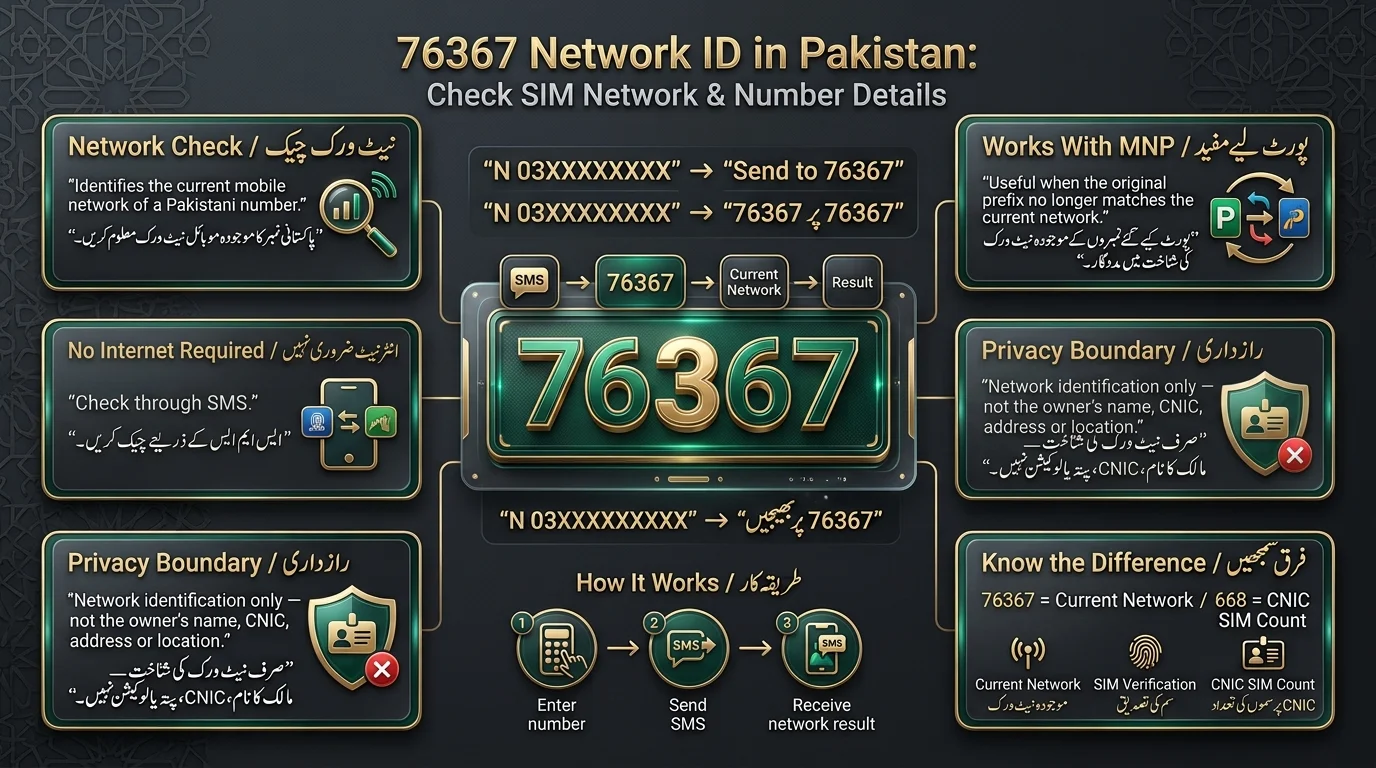
To identify the current mobile network of a Pakistani number, send “N 03XXXXXXXXX” to 76367. This service works on any active Pakistani SIM without needing an internet connection and is especially helpful for numbers that have been ported under Mobile Number Portability (MNP), as the original prefix may not match the current network.
| Detail | Information |
| Code | 76367 |
| Purpose | Network identification |
| Format | N 03XXXXXXXXX |
| Country | Pakistan |
| Main use | Current network check |
| Useful for MNP | Yes |
پاکستانی نمبر کے موجودہ موبائل نیٹ ورک کی شناخت کے لیے، “N 03XXXXXXXXX” کو 76367 پر بھیجیں۔ یہ سروس کسی بھی فعال پاکستانی سم پر انٹرنیٹ کنکشن کی ضرورت کے بغیر کام کرتی ہے اور خاص طور پر ان نمبروں کے لیے مددگار ہے جو موبائل نمبر پورٹیبلٹی (MNP) کے تحت پورٹ کیے گئے ہیں، کیونکہ اصل سابقہ موجودہ نیٹ ورک سے مماثل نہیں ہو سکتا۔
What Is 76367 Network ID in Pakistan?
76367 is a shortcode in Pakistan that identifies the mobile network operator (such as Jazz, Zong, Ufone, or Telenor) associated with a specific mobile number. Users can send a text to this shortcode to receive a reply indicating the current network of the number checked. This service is useful because a number’s current operator may differ from its original prefix, helping users avoid sending airtime to the wrong network or making incorrect assumptions about charges.
What 76367 does not provide?
It’s worth being very clear about this, because a lot of confusion (and some misleading websites) blur these lines:
- It is not a public database of SIM owners.
- It should never be treated as a way to find someone else’s private CNIC, home address, or personal details.
- It is not a live-location tracker.
- It is not a call-record or SMS-log lookup service.
76367 answers one question: “Which network is this number on right now?” It does not provide any other information.
How to Check a SIM Network Using 76367
This is the part most people are actually here for, so let’s walk through it carefully.
Step 1: Open your SMS app
Open the default messaging app on your phone. This works from any Pakistani SIM — your own network doesn’t affect whether the check works.
Step 2: Enter the correct format
Type the following, exactly as shown:
N 03001234567
A few things to keep in mind:
- The letter N comes first.
- Leave one space between N and the number.
- Enter the complete 11-digit Pakistani mobile number.
- Don’t add dashes, plus signs, or any other punctuation.
Step 3: Send the SMS to 76367
Recipient: 76367
Send it just like a normal text message.
Step 4: Read the network response
The service provides a quick confirmation of the current network operator for a checked number, and you will receive a reply shortly.
Example
For illustration only, this is not an actual live response:
Number: 03250877956
Current Network: Example Network
How long does the response take?
Response times can vary based on network load and time of day, with most replies coming quickly. During high traffic, it may take longer to receive a response. If there’s a delay, it’s better to resend the request rather than repeatedly sending it.
What Is the Correct 76367 SMS Format?
The success of your 76367 request depends on using the correct format, which is “N 03XXXXXXXXX.” For example, “N 03001234567” is a valid format.
Common incorrect formats
| Incorrect | Problem |
| 03001234567 | Missing the “N” |
| N03001234567 | Missing space between N and the number |
| N-03001234567 | Unnecessary punctuation (dash) |
| +923001234567 | Wrong number format (international prefix instead of local) |
Why Use 76367 Instead of Checking the Number Prefix?
- A mobile number prefix in Pakistan is the set of digits following “03” (e.g., “00” in 0300).
- Historically, these prefixes indicated specific mobile network operators.
- Prefixes are no longer reliable indicators of a number’s current network due to Mobile Number Portability (MNP), which allows users to switch operators while retaining their original number.
- An example illustrates that a number may initially belong to one network but can be ported to another, confusing if relying solely on the prefix.
- The service 76367 verifies the current operator of a mobile number, providing accurate information beyond what the prefix suggests.
76367 and Mobile Number Portability (MNP) in Pakistan
- Mobile Number Portability (MNP) allows subscribers to switch mobile operators while retaining their existing phone number, preserving contacts and business connections.
- MNP disrupts the link between a number’s prefix and its current operator, meaning a number can have an original network but a different active network.
- A ported number retains its original prefix; the digits remain unchanged despite switching operators.
- The service 76367 is essential for checking the current network of a ported number, as it provides reliable information to prevent issues related to outdated prefixes.
Which Mobile Networks Can Be Checked?
| Network | What users may want to check |
| Jazz | Current network |
| Zong | Current network |
| Ufone | Current network |
| Telenor | Current network |
| SCOM | Current network, where applicable |
| Ported numbers | Current serving network |
Why network names matter
Knowing which network a number is on has practical uses, including:
- Selecting suitable packages that apply to the specific network.
- Understanding the differing call and SMS charges between on-net and off-net rates.
- Troubleshooting network issues when a number is unreachable.
- Identifying whether a number has been ported to a different operator.
- Accessing network-specific services or offers available only to certain operators
76367 vs 667 vs 668: What’s the Difference?
These three short codes get mixed up constantly, but they each answer a completely different question.
Read Also: 667 & 668 SMS Not Working
| Code/service | Main purpose | What it checks |
| 76367 | Network identification | Current network of a number |
| 667 | SIM verification | The SIM is physically in your possession |
| 668 | CNIC SIM check | Number of SIMs registered against your CNIC |
| cnic.sims.pk | Online CNIC check | SIMs associated with your identity are viewable online |
- 76367: Use this to find out which operator serves a specific mobile number.
- 667: Use this to check details of a SIM card in your own phone.
- 668: Use this to see how many SIMs are registered against your CNIC.
- cnic.sims.pk: Use this for an online portal-based version of the CNIC SIM check provided by 668, with more detailed information visible.
76367 Network Check vs SIM Owner Check
- The service 76367 does not show the SIM owner’s name; it only provides the current network operator.
- It cannot be used to find someone’s CNIC, as it deals only with network identification.
- Users cannot find an address or any personal details through 76367.
- For checking SIM registrations linked to one’s own identity, users should use official self-verification channels instead of 76367.
Is 76367 Free or Paid?
The text advises caution when encountering claims about costs related to sending SMS to 76367, as they may not always be accurate. It confirms that sending the SMS generally incurs a standard charge, which varies by operator and tariff plan, and can change over time. It emphasizes the importance of verifying current charges through your own operator or official channels rather than relying on unverified figures from blogs.
76367 Not Working? Common Problems and Solutions
Use the correct SMS format for 76367: N 03001234567.
Common reasons for request failures include:
- Incorrect phone number entry (must be full 11-digit format).
- Missing digits or extra characters/spaces.
- SMS service may experience temporary unavailability; this can happen without issues with your request.
- Ensure you have sufficient SMS balance to cover charges.
- If no reply is received, try again later instead of multiple back-to-back attempts.
- Check official sources if the service remains unavailable for an extended time.
Common Mistakes When Using 76367
- Forgetting the “N” at the start of messages.
- Leaving out the space between “N” and the number.
- Using incomplete or shortened phone numbers.
- Using international format (+92…) instead of local format (03XX).
- Assuming a number’s prefix matches its current network.
- Confusing 76367 with 667.
- Expecting replies to include the SIM owner’s name or CNIC.
- Assuming unofficial third-party websites are affiliated with PTA.
Conclusion
76367 is used to identify mobile networks in Pakistan. To check the current network of a Pakistani mobile number, send an SMS in the format N followed by a space and the number to 76367. This is useful since Mobile Number Portability means the original prefix might not indicate the current operator, making a direct network check more reliable. Remember these three points: 76367 = network identification, 667 = SIM verification, 668 = CNIC SIM count.
76367 پاکستان میں موبائل نیٹ ورکس کی شناخت کے لیے استعمال کیا جاتا ہے۔ پاکستانی موبائل نمبر کے موجودہ نیٹ ورک کو چیک کرنے کے لیے، فارمیٹ N میں ایک ایس ایم ایس بھیجیں اور اس کے بعد اسپیس اور نمبر 76367 پر بھیجیں۔ یہ کارآمد ہے کیونکہ موبائل نمبر پورٹیبلٹی کا مطلب ہے کہ اصل سابقہ موجودہ آپریٹر کی نشاندہی نہیں کر سکتا، جس سے براہ راست نیٹ ورک کی جانچ زیادہ قابل اعتماد ہو جاتی ہے۔ ان تین نکات کو یاد رکھیں: 76367 = نیٹ ورک کی شناخت، 667 = سم کی تصدیق، 668 = CNIC سم کی گنتی۔
Frequently Asked Questions About 76367
What is 76367 in Pakistan?
76367 is an SMS shortcode used in Pakistan to identify the current mobile network operator of a given Pakistani phone number.
What does 76367 check?
It checks only one thing — the current network operator of the mobile number you send it, nothing related to identity or ownership.
How do I send an SMS to 76367?
Open your messaging app, type the correct format, and send it to 76367 like any standard text message.
What is the correct 76367 SMS format?
Type “N” followed by a single space and the full 11-digit number, for example: N 03001234567.
Can 76367 show the SIM owner’s name?
No. It only returns the network name, never the owner’s identity or any personal details.
What is the difference between 76367 and 667?
76367 checks the current network of any number you enter, while 667 relates to verifying the SIM that is physically in your own phone.
Disclaimer
The article provides general information about the 76367 Network ID service in Pakistan, noting that SMS codes, service availability, and charges may change. Users are advised to verify the latest details through official sources. The service is intended for legitimate network identification and does not offer private subscriber details or location data. It warns against using unofficial websites for private information. For reliable telecom services information, refer to official PTA and mobile operator channels.
Sources & References
- Pakistan Telecommunication Authority (PTA): Official information and regulations related to mobile networks, SIM registration, MNP, and telecom services.
- Jazz: Official customer support and mobile network services.
- Zong: Official customer support and mobile network services.
- Ufone: Official customer support and mobile network services.
- Telenor Pakistan: Official customer support and mobile network services.
- SCOM: Official information and customer support for its mobile services.
- Mobile Number Portability (MNP): Official telecom resources for understanding how users can retain their mobile number when changing operators.
Note: Service codes, SMS charges, and availability can change. Always confirm the current information through official telecom sources before relying on a shortcode or service.