Lost Your SIM Card in Pakistan? Here’s How to Block and Replace It
Losing your SIM card can lead to serious risks, including identity theft and financial loss, as it’s linked to various important accounts. It’s crucial to block the SIM immediately if lost. In Pakistan, mobile operators and the Pakistan Telecommunication Authority (PTA) have a process for blocking a lost SIM and obtaining a replacement. The guide covers steps for blocking your number, how to get a new SIM from Jazz, Zong, Telenor, or Ufone, and recovering services like WhatsApp and banking apps. It also discusses the legal process for SIM replacement, required documents, costs, time involved, and post-replacement security measures.
آپ کا سم کارڈ کھو جانا سنگین خطرات کا باعث بن سکتا ہے، بشمول شناخت کی چوری اور مالی نقصان، کیونکہ یہ مختلف اہم اکاؤنٹس سے منسلک ہے۔ اگر سم گم ہو جائے تو اسے فوری طور پر بلاک کرنا بہت ضروری ہے۔ پاکستان میں، موبائل آپریٹرز اور پاکستان ٹیلی کمیونیکیشن اتھارٹی (PTA) کے پاس گم شدہ سم کو بلاک کرنے اور اس کا متبادل حاصل کرنے کا عمل ہے۔ گائیڈ میں آپ کے نمبر کو بلاک کرنے، جاز، زونگ، ٹیلی نار، یا یوفون سے نئی سم کیسے حاصل کی جائے، اور واٹس ایپ اور بینکنگ ایپس جیسی سروسز کو بحال کرنے کے اقدامات شامل ہیں۔ اس میں سم کی تبدیلی کے قانونی عمل، مطلوبہ دستاویزات، اخراجات، اس میں شامل وقت، اور تبدیلی کے بعد کے حفاظتی اقدامات پر بھی تبادلہ خیال کیا گیا ہے۔
What to Do Immediately After Losing Your SIM Card
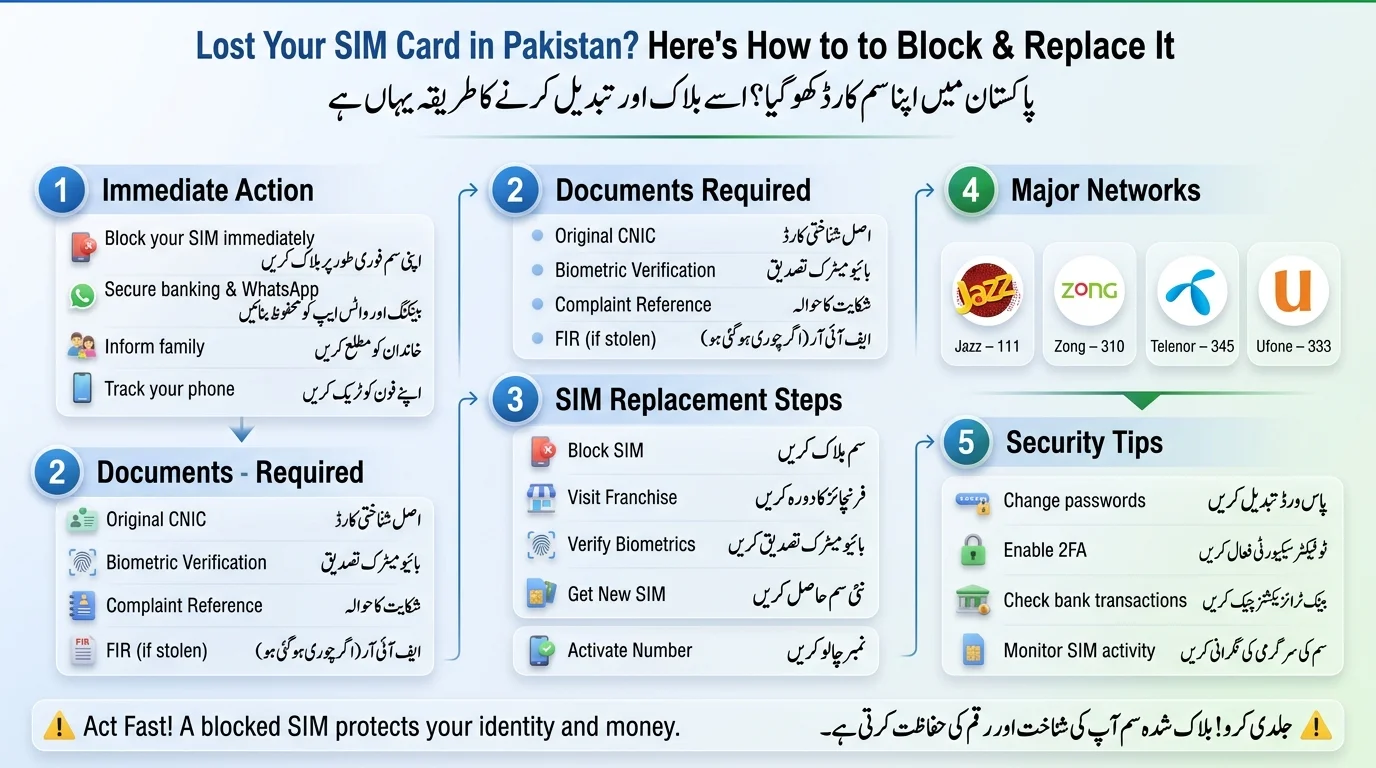
- Block Your SIM Card: Contact your mobile network operator immediately to block your SIM card and obtain a complaint reference number. Temporarily block any linked services like JazzCash or Easypaisa.
- Prepare Required Documents for SIM Replacement: Bring the original CNIC, biometric fingerprint, police FIR (if your phone was stolen), and the complaint reference number to a customer service center.
- Visit Nearest Franchise for SIM Replacement: Go to an official customer service center to verify your identity and receive a new SIM card within 15-30 minutes.
- Confirm Whether the SIM Is Lost or Stolen: Check if your phone is lost or stolen before acting; signs of theft include unusual account activity or immediate disconnection.
- Secure Important Accounts: Log in to and secure banking apps, mobile wallets, social media, and email accounts linked to your phone number.
- Inform Family and Key Contacts: Notify others that your number is compromised to prevent scams.
To check how many sim Regiterd on your CNIC, use our tool
Quick Action Checklist
- Block the SIM with your operator
- Change passwords for accounts
- Freeze or restrict mobile wallets
- Track your device if missing
Why You Must Block a Lost or Stolen SIM Immediately
- Financial Risks: SMS-based OTPs make bank accounts vulnerable; report lost SIMs within 24 hours to prevent unauthorized transactions.
- Identity Theft Risks: A compromised SIM can allow hackers to reset passwords and hijack accounts like WhatsApp.
- SIM Swap Fraud: Criminals can obtain a duplicate SIM using fake documents, gaining control over your communications, highlighting the need for biometric verification for SIM issuance.
How to Block a Lost or Stolen SIM Card in Pakistan
Contact Your Mobile Network
The fastest way to block a compromised number is to call your operator’s helpline from any other phone:
| Network | Helpline |
| Jazz | 111 |
| Zong | 310 (or UAN 051-111-222-111) |
| Telenor | 345 |
| Ufone | 333 (or 033-11-333-100 from other networks) |
- To block a SIM, you can visit a franchise or customer service center in person for security.
- Be prepared to provide your CNIC number, the mobile number to be blocked, and verification details (like your mother’s name or last recharge amount).
- PTA guidelines require SIMs in Pakistan to be registered to the owner’s CNIC and verified through NADRA.
- This verification is necessary for blocking, replacing, or transferring a SIM to prevent fraud.
- After blocking, the SIM stops working immediately, but the number remains frozen under your CNIC until the original SIM is recovered or a duplicate is requested.
Requirements for Getting a Duplicate SIM Card
Documents Required for SIM Replacement
- Original CNIC (no photocopies)
- Biometric verification at the franchise
Ownership Requirements
- SIM must be registered under your own CNIC.
- If registered under a family member’s CNIC, they must apply or provide formal authorization for ownership transfer.
Collecting the SIM
- Generally, only the registered owner can collect the SIM. Authorization is needed for someone else to collect it.
Common Reasons for Application Rejection
- CNIC doesn’t match the registered owner.
- CNIC is expired.
- Fingerprint fails to match NADRA’s records.
Step-by-Step Process to Replace a Lost or Stolen SIM Card
- Block Existing SIM: Contact your operator to block the current SIM.
- Visit Official Outlet: Go to the nearest authorized franchise or service center.
- Complete Verification: Provide your original CNIC and undergo a biometric fingerprint scan.
- Request Duplicate SIM: Fill out the replacement form and pay the fee.
- Receive New SIM: Get a new SIM card with your original number.
- Activate New SIM: Insert the SIM and wait for automatic network registration.
- Processing Time: Activation typically occurs within a few hours, but may take up to 24 hours.
Jazz Duplicate SIM Procedure
- To request a replacement SIM, bring your original CNIC to a Jazz franchise or Experience Center. Only the registered owner can make the request.
- Identity verification involves NADRA biometric fingerprint matching by an agent before issuing the new SIM.
- New SIMs are usually activated within a few hours but can take up to 24 hours in some cases.
- The duplicate SIM fee ranges from Rs. 100 to Rs. 550, varying by outlet and number category. It’s advisable to confirm the current fee by calling 111 or checking with a local Jazz outlet.
Zong Duplicate SIM Procedure
- Visit Requirement: Go to a Zong Customer Service Center or franchise with your original CNIC.
- Biometric Verification: Your thumbprint will be scanned and matched against your CNIC for a new SIM.
- Activation Timeline: Generally completed within 24 hours after successful verification.
- Duplicate SIM Fee: Charges range from Rs. 100 to Rs. 300; verify current rates by calling 310 or checking with a local franchise.
Telenor Duplicate SIM Procedure
- Procedure: Visit a Telenor service center with your CNIC for verification to get a new SIM.
- Merger Update: Telenor Pakistan is merging with Ufone, and the Telenor brand will eventually be phased out. Keep an eye on official announcements regarding changes in service centers and processes.
- Required Documents: Original CNIC and biometric fingerprint verification.
- Activation Timeline: Usually completed the same day, but may vary due to the merger.
- Duplicate SIM Fee: Historically around Rs. 65; verify with 345 or local outlets due to the ongoing merger.
Ufone Duplicate SIM Procedure
- Reporting Loss: Call 333 (or 033-11-333-100 from other networks) to report the lost SIM.
- Visit Requirement: Go to a Ufone service center or franchise with your CNIC for replacement. Home delivery may be available in some areas.
- Verification: Provide original CNIC and undergo biometric fingerprint verification with NADRA.
- Activation: SIM typically activates within a few hours to 24 hours after verification.
- Fees: Replacement fees vary by channel and should be confirmed with Ufone’s helpline or at your nearest outlet.
SIM Replacement Fees and Processing Time Comparison
| Network | Duplicate SIM Fee (approx.) | Processing Time | Biometric Verification |
| Jazz | Rs. 100 – Rs. 550 | A few hours – 24 hrs | Yes |
| Zong | Rs. 100 – Rs. 300 | Up to 24 hrs | Yes |
| Telenor | From ~Rs. 65 (confirm — merger in progress) | Same day (typical) | Yes |
| Ufone | Varies by channel | A few hours – 24 hrs | Yes |
- Fastest activation is often same-day after biometric verification; arriving early at a franchise can expedite the process.
- Fees for all networks are generally modest, typically under Rs. 500, but can vary by outlet and promotions.
- Always verify fees directly with the operator before visiting, as prices can change and third-party information may be outdated.
How to Recover WhatsApp After SIM Replacement
- Reinsert the Replacement SIM: Insert the active duplicate SIM into your phone.
- Verify Your Number: Open WhatsApp, enter your number, and request a verification code via SMS or call.
- Restore Backups: If using cloud backups, WhatsApp will prompt you to restore your chat history and media after verification.
- Common Verification Problems: If verification issues occur, wait for network registration to sync, or use WhatsApp’s in-app support for help.
Recovering Banking Apps and Mobile Wallets
- JazzCash Recovery: Automatically resumes once the Jazz SIM is reissued and active. Contact support for any unusual activity.
- Easypaisa Recovery: Reactivates when the linked number is live. Check transaction history and update app PIN as a precaution.
- Banking OTP Services: Log in to bank accounts after SIM activation to confirm receipt of OTPs; verify passwords if changed from another device.
- Security Checks: Review recent transactions and change PINs/passwords for linked wallets/accounts even if no issues are apparent.
Can You Replace a Pakistani SIM Card While Abroad?
- Current Restrictions: Duplicate SIM issuance in Pakistan requires in-person biometric verification, complicating the process for those overseas.
- Biometric Verification Challenges: NADRA fingerprint matching must occur at physical outlets in Pakistan, with no remote completion option available.
- Alternative Solutions: Overseas Pakistanis can authorize a trusted family member to assist with verification or wait until they return to Pakistan. Some operators offer limited support through overseas registration centers.
- Important Considerations: Keep your CNIC valid and updated to avoid rejection of SIM-related requests, and maintain a secondary recovery method for important accounts to prevent reliance on SMS OTPs sent to a Pakistani number.
eSIM Replacement After Phone Loss or Theft
- eSIM and Device Loss: An eSIM profile remains embedded in your device, so losing your phone can prevent you from accessing the profile until you transfer or reissue it. Unlike a physical SIM, you cannot simply remove an eSIM from the device.
- eSIM Reissue: To reissue an eSIM, visit your operator’s service center with your CNIC and complete the required biometric verification. The operator can then issue a new QR code for your existing number.
- Replacement Verification: Operators generally use the same identity and biometric verification requirements for eSIM and physical SIM replacements. The main difference is that you receive a QR code instead of a physical SIM card.
- Security Benefits: eSIMs provide an added layer of security because thieves cannot physically remove the SIM from a stolen phone. However, your overall security still depends on protecting the device and its accounts.
How to Protect Yourself from Future SIM Loss and Fraud
- Enable Two-Factor Authentication: Use an authenticator app instead of SMS for enhanced security on banking and social accounts.
- Secure Mobile Wallets: Set strong, unique PINs for mobile payment apps and enable additional security features like app-lock or biometric login.
- Monitor SIM Registration: Regularly check the number of SIMs registered under your CNIC to spot unauthorized registrations early.
- Avoid SIM Swap Attacks: Be cautious about sharing personal details to prevent fraudsters from impersonating you.
- Keep Ownership Records Updated: Ensure your CNIC and registered details with NADRA are current for smooth replacement requests.
Final Checklist for Replacing a Lost or Stolen SIM Card
Before Visiting a Franchise
- Have original CNIC (not expired).
- Confirm SIM registration under your CNIC.
- Back up important contacts and accounts linked to the number.
After Receiving the New SIM
- Test calls and SMS for activation.
- Restore WhatsApp and verify backups.
- Re-enable banking apps and mobile wallets.
- Update passwords and security settings for linked accounts.
Conclusion
Losing a SIM card can be stressful, but fixing it in Pakistan is simple: block it right away, grab your original CNIC, visit your operator’s franchise for biometric verification, and request a duplicate — usually available within a day. The main risk is how long it remains active; every hour it’s active increases the chance someone will misuse it, so blocking it should be your top priority. Act quickly, verify in person, and secure your linked accounts to minimize disruption.
سم کارڈ کا کھو جانا دباؤ کا باعث ہو سکتا ہے، لیکن پاکستان میں اسے ٹھیک کرنا آسان ہے: اسے فوراً بلاک کریں، اپنا اصل CNIC حاصل کریں، بائیو میٹرک تصدیق کے لیے اپنے آپریٹر کی فرنچائز پر جائیں، اور ڈپلیکیٹ کی درخواست کریں — جو عام طور پر ایک دن کے اندر دستیاب ہوتا ہے۔ اہم خطرہ وہ وقت ہے جب یہ فعال رہتا ہے۔ ہر گھنٹہ کسی کے لیے اس کا غلط استعمال کرنے کا موقع لاتا ہے، اس لیے اسے بلاک کرنا آپ کی اولین ترجیح ہونی چاہیے۔ فوری عمل کریں، ذاتی طور پر تصدیق کریں، اور رکاوٹ کو کم کرنے کے لیے اپنے لنک کردہ اکاؤنٹس کو محفوظ بنائیں۔
Frequently Asked Questions
How long does it take to get a duplicate SIM in Pakistan?
Typically a few hours to 24 hours after successful biometric verification, though this can vary by network and outlet workload.
Can I get a duplicate SIM online?
The core verification step, biometric fingerprint matching, currently requires an in-person visit to a franchise or service center; it isn’t available as a fully remote online process.
Can someone else collect my replacement SIM?
Generally no, since the process is tied to your own biometric verification. Some operators may allow authorized exceptions in specific cases — check directly with your network.
How much does SIM replacement cost?
Fees are generally modest under Rs. 500 across all four major networks, but exact amounts vary by operator, outlet, and number category, so confirm with your provider directly.
Will I lose my contacts after replacing my SIM?
Contacts stored directly on the SIM card won’t transfer automatically to the new one, so it’s worth backing them up to your phone’s cloud account (Google or iCloud) rather than relying on SIM storage.
Disclaimer
The article emphasizes that the information provided is for general educational purposes and may change over time, particularly regarding SIM registration, biometric verification, and telecom policies. Readers are advised to verify details with their mobile network operator, PTA, or NADRA. The website does not offer access to personal subscriber information and discourages the use of unauthorized databases or third-party services. It stresses the importance of using official channels for SIM-related requests.
Sources & References
- Pakistan Telecommunication Authority (PTA): Official information about SIM registration, verification, subscriber regulations, and telecom services.
- National Database and Registration Authority (NADRA): Official information related to CNIC records and biometric verification.
- Jazz: Official customer support and SIM replacement information.
- Zong: Official customer support and SIM replacement information.
- Telenor Pakistan: Official customer support and SIM-related services.
- Ufone: Official customer support and SIM replacement information.
- PTA SIM Information System: Official service for checking SIMs registered against a CNIC.
- Mobile Network Operators: Official helplines, service centers, and authorized franchises for SIM-related requests.
[…] Read Also: Lost Your SIM Card in Pakistan […]
[…] Read Also: Lost Your SIM Card in Pakistan […]