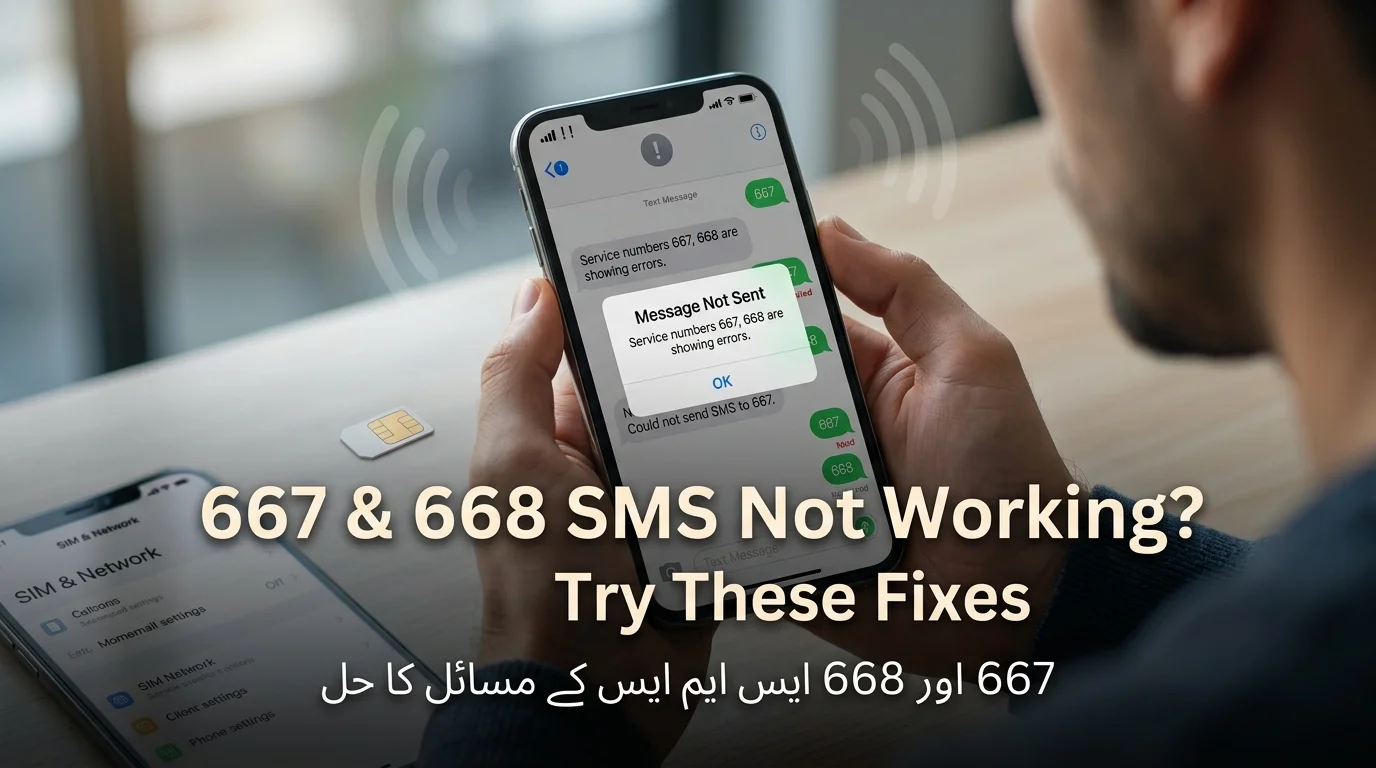
667 & 668 SMS Not Working? Try These Fixes
If you’ve sent an SMS to 667 or 668 and received no reply or an error, you’re not alone. These PTA shortcodes are commonly used in Pakistan, but issues often occur due to network or formatting problems. Ensure you’re using the correct service and format; for 668, your CNIC must be 13 digits without dashes or spaces. If problems persist, check the PTA SIM Information System online or verify the required keyword for 667. Weak signals or temporary outages may also be reasons for failure. If issues continue, consider contacting your operator or the PTA.
اگر آپ نے 667 یا 668 پر ایس ایم ایس بھیجا ہے اور کوئی جواب یا غلطی موصول نہیں ہوئی تو آپ اکیلے نہیں ہیں۔ یہ PTA شارٹ کوڈز عام طور پر پاکستان میں استعمال ہوتے ہیں، لیکن مسائل اکثر نیٹ ورک یا فارمیٹنگ کے مسائل کی وجہ سے پیش آتے ہیں۔ یقینی بنائیں کہ آپ صحیح سروس اور فارمیٹ استعمال کر رہے ہیں۔ 668 کے لیے، آپ کا CNIC بغیر ڈیشز یا اسپیس کے 13 ہندسوں کا ہونا چاہیے۔ اگر مسائل برقرار رہتے ہیں تو PTA سم انفارمیشن سسٹم کو آن لائن چیک کریں یا 667 کے لیے مطلوبہ کلیدی لفظ کی تصدیق کریں۔ کمزور سگنلز یا عارضی بندش بھی ناکامی کی وجوہات ہو سکتی ہیں۔ اگر مسائل جاری رہتے ہیں تو اپنے آپریٹر یا PTA سے رابطہ کرنے پر غور کریں۔
667 vs 668: Which Code Should You Use?
People often confuse two codes, which can lead to them seeming like they fail. The issue usually arises from using the incorrect code for the intended check.
Read Also: SMS to 668: How to Check SIMs Registered on Your CNIC
| Feature | 667 | 668 |
| Main purpose | SIM verification tied to Mobile Number Portability (MNP) | Checking how many SIMs are registered against your CNIC |
| How it works | Send a specific keyword by SMS | Send your CNIC number by SMS |
| Common problem | No response or error | No response or error |
| Official alternative | Contact your operator | PTA’s official SIM Information System (online portal) |
| Typical search intent | Is this SIM legitimately registered / portable? | How many SIMs are under my name? |
- 667: Used in the Mobile Number Portability (MNP) process to confirm details about a current SIM registration. It’s primarily for checking registration status before moving numbers between networks.
- 668: Used to check how many SIMs are registered against a specific CNIC. It provides a breakdown of active SIMs linked to an individual’s identity.
- Interchangeability: 667 and 668 cannot be used interchangeably as they serve different purposes and refer to different aspects of the verification process.
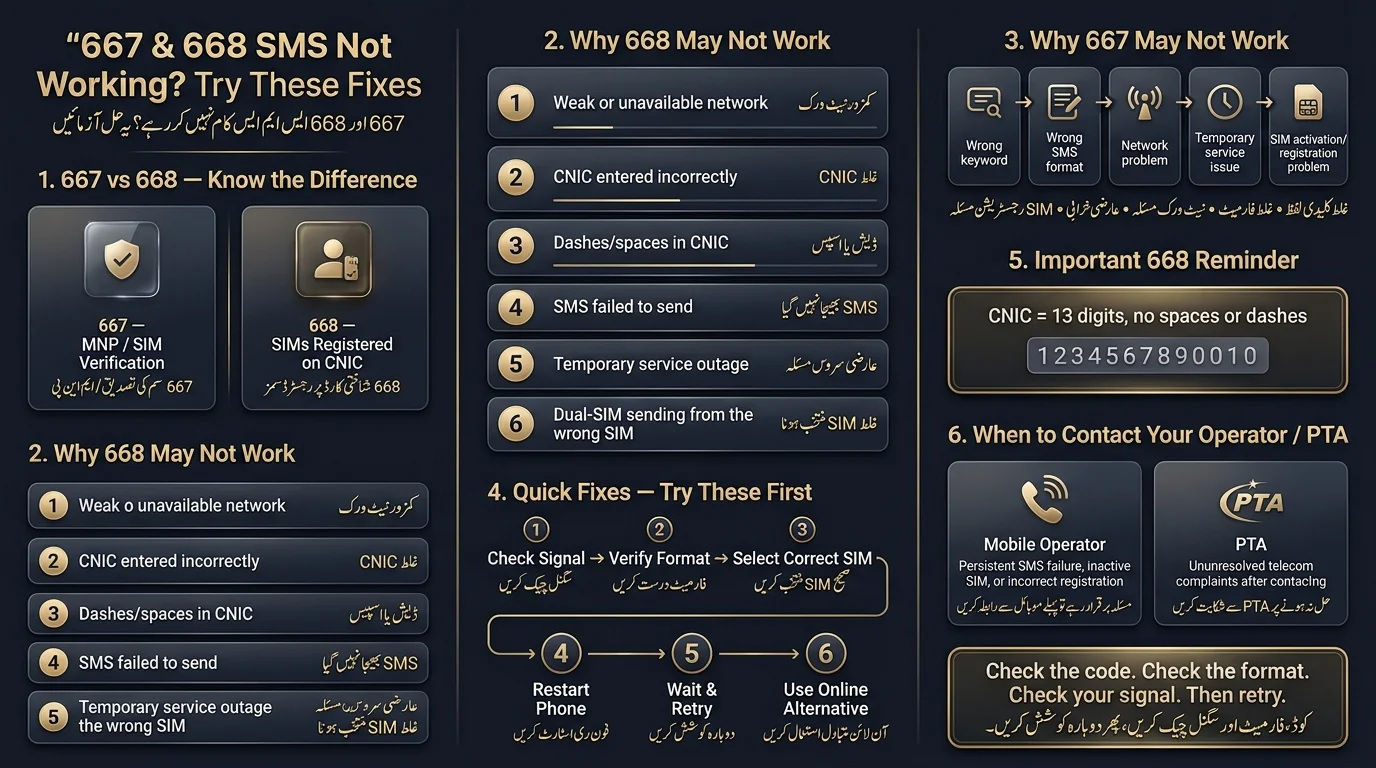
668 Not Working? Common Errors and Solutions
668 SMS sent but no reply
Common complaint with SMS related to PTA system.
Possible causes include:
- Temporary routing or network issues.
- Short backend delays.
- Unsuccessful message sending (more common with dual-SIM phones).
- Temporary service outages.
Suggested troubleshooting steps:
- Check network signal and SMS functionality.
- Confirm the message left the outbox.
- Resend the CNIC in the correct format.
- Restart your phone to resolve minor issues.
- Wait 10–15 minutes before retrying.
- Use the official online alternative if issues persist.
668 says the request is invalid
An invalid request reply is typically due to issues with how the CNIC is typed, including:
- Incorrect or mistyped CNIC number
- Wrong format (dashes, spaces, or extra characters)
- Extra text added before or after the CNIC
- Sending old message drafts by mistake
CNIC format is incorrect
- The CNIC must be entered as a single string of digits without dashes or spaces.
- Example of correct format: 1234512345671; avoid using any other format.
- It’s important to double-check the number to prevent errors, as a mistyped digit can lead to no useful information being returned.
668 SMS failed to send
- Check if your SIM balance is low, as standard SMS charges may apply.
- There could be a temporary issue with your SIM or network registration.
- The SMS center of your operator might be experiencing problems.
- The shortcode service may be facing a brief interruption.
- Test sending a normal SMS to determine if the issue is with your SMS service overall.
668 is temporarily unavailable
Identify the cause of SMS issues:
- Phone/SIM problem: other SMS fail, no signal, or roaming restrictions.
- Operator/service-side problem: other SMS work fine but 668 times out or bounces.
- If it’s the second case, wait and retry rather than repeatedly resending.
668 returns no useful information
If you receive an incomplete or unexpected reply, don’t jump to conclusions. First, verify that your CNIC is typed correctly. Wait a short while and try again. If the issue continues, use the official online portal to cross-check before deciding there’s a registration problem.
667 Not Working? Common Errors and Solutions
667 SMS gets no response
- Confirm you have an active signal.
- Check if the message was sent.
- Use the exact keyword required for the service.
- Restart your phone and try again after a few minutes.
MNP request to 667 is not working
The text explains that 667 is used for checking the portability and registration status of the SIM currently in your phone, not for general SIM lookups. To check all SIMs against your CNIC, you should use 668 instead of 667. Many reports of 667 not working stem from confusion about its intended purpose.
667 returns an error
Common causes for issues can include:
- Incorrect keyword usage
- Wrong SMS format
- Inactive or newly issued SIM not fully registered
- General network problems
- Temporary service issues
667 says service unavailable
Before escalating an issue, follow these steps: check the signal, restart your phone, verify the keyword, and wait a bit before retrying, as most service unavailable replies are temporary.
667 works on another SIM but not yours
If a friend’s SIM receives a reply while yours doesn’t on the same network, possible reasons could include:
- Restrictions or flags on your SIM.
- A wider SMS service issue affecting certain subscribers.
- An operator-side processing delay specific to your number.
- Incomplete activation or registration of your SIM.
A dual-SIM phone causing problems
On dual-SIM phones, it’s common to mistakenly send an SMS from the incorrect SIM. Before troubleshooting, check the messaging app to confirm which SIM is selected for sending the message.
667 and 668 Errors at a Glance
| Error/Problem | Possible Cause | What To Do |
| 668 no reply | Network/service issue | Retry, then use the official online alternative |
| 668 SMS failed to send | SMS/network problem | Check your SMS service generally |
| Invalid CNIC error | Wrong format | Enter all 13 digits correctly, no dashes/spaces |
| 667 no response | Wrong keyword or service issue | Verify the exact SMS format required |
| 667 says unavailable | Temporary issue | Retry after a short wait |
| Wrong SIM count on 668 | Registration record issue | Contact your operator |
| Unknown SIM appears | Possible unauthorized registration | Report it to your operator and PTA |
| Website/portal unavailable | Browser or network issue | Try another browser or network connection |
667 or 668 Not Working on Your Network
- Issues with SMS codes 667 and 668 are often temporary and resolve on their own.
- Jazz users may experience delays or missing replies, typically due to weak signals. Common troubleshooting steps usually help.
- Zong users report similar issues mainly due to formatting errors or brief service interruptions.
- Ufone users often encounter errors due to incorrect CNIC formatting.
- Telenor users may face temporary delays; waiting a few minutes before retrying can resolve issues.
- Other networks might support these codes, but coverage and behavior can vary, and customer support can confirm compatibility.
668 Not Working? Use the Official Online SIM Check
If SMS to 668 is failing, you can use the PTA’s official web-based SIM Information System to check the number of SIMs registered against your CNIC. To use it:
- Open the official PTA SIM Information System in your browser.
- Enter your CNIC number.
- Complete the verification steps.
- Review the registered SIMs.
Use the website instead of SMS if you’re not receiving a response, can’t send SMS, are troubleshooting from a computer, or prefer a visual format.
What If 668 Shows an Incorrect SIM Count?
A count that looks off doesn’t necessarily mean something is wrong. Common, harmless explanations include:
- Outdated registration records that haven’t synced yet
- A SIM you recently purchased that hasn’t fully registered
- A SIM you recently deactivated that hasn’t dropped off the count yet
- An operator-side record that needs correction
- A mismatch between what you remember owning and what’s actually on file
What if you see a SIM you don’t recognize?
- Act promptly if you notice an unrecognized SIM.
- Identify the operator and contact their customer support.
- Request verification or disown the SIM if it’s not yours.
- Escalate to PTA if the issue isn’t resolved satisfactorily.
- Avoid sharing personal information publicly to prevent further risk.
Should you use third-party SIM databases?
Be cautious of websites or apps claiming to provide private SIM ownership details outside of official PTA and operator channels. These services are often unauthorized, may misuse personal data, and might even be designed to collect CNIC numbers. Always use official SMS shortcodes and the PTA portal for verification.
667/668 Not Working? Try These Fixes in Order
- Check mobile signal and SMS sending capability.
- Verify the correct code (667 vs 668) and SMS format.
- Double-check the CNIC number for accuracy.
- Remove unnecessary spaces or dashes from the message.
- Ensure the correct SIM is used on dual-SIM phones.
- Restart the phone and wait a few minutes before retrying.
- Use the official online option for 668 checks.
- Contact the mobile operator if issues persist.
- Escalate to PTA only if previous steps do not resolve the issue.
When Should You Contact Your Mobile Operator?
Reach out to your operator directly if:
- Your SIM can’t send SMS at all, even to other numbers
- Your SIM appears inactive or suspended
- Your registration information looks incorrect
- An unknown SIM shows up under your CNIC
- The service repeatedly fails despite trying every troubleshooting step
When Should You Contact PTA?
The PTA is the appropriate escalation point for unresolved telecom complaints, but it should not be contacted for minor issues like a single SMS failure. The recommended sequence is to first attempt self-check steps, then reach out to the telecom operator, and only escalate to PTA if the issue remains unresolved.
Common 667 and 668 Mistakes to Avoid
- Use 668, not 667, for the correct purpose.
- Ensure your CNIC is entered correctly to avoid errors.
- Avoid adding unnecessary text to your SMS.
- Don’t send repeated requests in a short time frame.
- Use only authorized SIM databases to protect personal data.
- Keep your CNIC and results private; do not share online.
- Not every failure indicates a blocked SIM; many issues are temporary.
Final Verdict
667 and 668 have different uses, and confusion arises from using the wrong one. If issues occur, start by checking your CNIC or keyword format, confirming your signal, and restarting your phone. For 668, use the official online SIM Information System if SMS fails. If registration issues persist, contact your operator first, with PTA as the escalation point. Avoid unofficial SIM-lookup sites due to security risks.
667 اور 668 کے مختلف استعمال ہیں، اور غلط استعمال کرنے سے الجھن پیدا ہوتی ہے۔ اگر مسائل پیش آتے ہیں تو، اپنے CNIC یا مطلوبہ الفاظ کی شکل کو چیک کرکے، اپنے سگنل کی تصدیق کرکے، اور اپنے فون کو دوبارہ شروع کرکے شروع کریں۔ 668 کے لیے، اگر SMS ناکام ہو جاتا ہے تو آفیشل آن لائن سم انفارمیشن سسٹم استعمال کریں۔ اگر رجسٹریشن کے مسائل برقرار رہتے ہیں، تو پہلے اپنے آپریٹر سے رابطہ کریں، پی ٹی اے کے ساتھ اضافہ پوائنٹ کے طور پر۔ حفاظتی خطرات کی وجہ سے غیر سرکاری سم تلاش کرنے والی سائٹوں سے گریز کریں۔
Frequently Asked Questions About 667 and 668
Why is 668 not working?
Usually a temporary network or service issue, or a formatting mistake in your CNIC. Check the format first, then retry after a few minutes before assuming there’s a bigger problem.
Why am I not receiving a reply from 668?
This can happen due to network congestion, a brief backend delay, or the message not actually sending. Confirm the SMS left your outbox and try again shortly.
Why is 667 not responding?
Often it’s an incorrect keyword, weak signal, or a short service interruption. Double-check the exact wording required and retry.
What should I do if 668 SMS fails?
Retry after checking your CNIC format and signal. If it keeps failing, use the official online SIM Information System instead.
Can I check my SIMs online if 668 doesn’t work?
Yes, PTA’s official SIM Information System website performs the same check without relying on SMS delivery.
What is the difference between 667 and 668?
667 relates to Mobile Number Portability verification for the SIM currently in your phone; 668 checks how many SIMs are registered against your CNIC overall.
Why does 668 show the wrong number of SIMs?
It could reflect outdated records, a recently activated or deactivated SIM, or a registration mismatch on the operator’s end. Contact your operator if the count still looks wrong after a retry.
Disclaimer
The article discusses PTA shortcodes 667 and 668, emphasizing that the information is for general educational purposes only. It notes that SMS services and procedures may change, and response times can vary by mobile network. Users are advised to verify procedures through official channels and that there is no guarantee of immediate responses due to potential network issues. Lastly, it warns against sharing personal information, such as CNIC numbers or OTPs, with unauthorized parties.
Sources & References
- Pakistan Telecommunication Authority (PTA) provides information on SIM registration, CNIC verification, telecom regulations, and complaints.
- PTA SIM Information System allows checking of SIMs registered against a CNIC.
- Mobile Number Portability (MNP) Services offer details on SIM portability and verification.
- Major telecom operators like Jazz, Zong, Ufone, and Telenor Pakistan provide customer support and SIM-related information.
- NADRA is responsible for CNIC and identity verification.