CNIC Stolen in Pakistan? 7 Things You Should Do Immediately
If your CNIC is stolen, treat it as an emergency and take immediate action. Document the theft, check registered SIMs, notify relevant organizations, and begin the replacement process. A stolen CNIC poses a higher risk than a lost one, so it’s important to be proactive in monitoring for misuse. This guide provides emergency steps and the replacement process, referencing official service information from NADRA and PTA. Note that this article is for general information only and not a substitute for direct legal advice or the latest official procedures. Always confirm details on the NADRA and PTA websites.
اگر آپ کا CNIC چوری ہو جاتا ہے تو اسے ہنگامی طور پر سمجھیں اور فوری کارروائی کریں۔ چوری کی دستاویز کریں، رجسٹرڈ سمز چیک کریں، متعلقہ اداروں کو مطلع کریں، اور تبدیلی کا عمل شروع کریں۔ چوری شدہ CNIC گمشدہ کے مقابلے میں زیادہ خطرہ لاحق ہوتا ہے، اس لیے غلط استعمال کی نگرانی میں فعال ہونا ضروری ہے۔ یہ ہدایت نامہ نادرا اور پی ٹی اے سے سرکاری خدمات کی معلومات کا حوالہ دیتے ہوئے ہنگامی اقدامات اور تبدیلی کا عمل فراہم کرتا ہے۔ نوٹ کریں کہ یہ مضمون صرف عام معلومات کے لیے ہے اور براہ راست قانونی مشورے یا تازہ ترین سرکاری طریقہ کار کا متبادل نہیں ہے۔ نادرا اور پی ٹی اے کی ویب سائٹس پر ہمیشہ تفصیلات کی تصدیق کریں۔
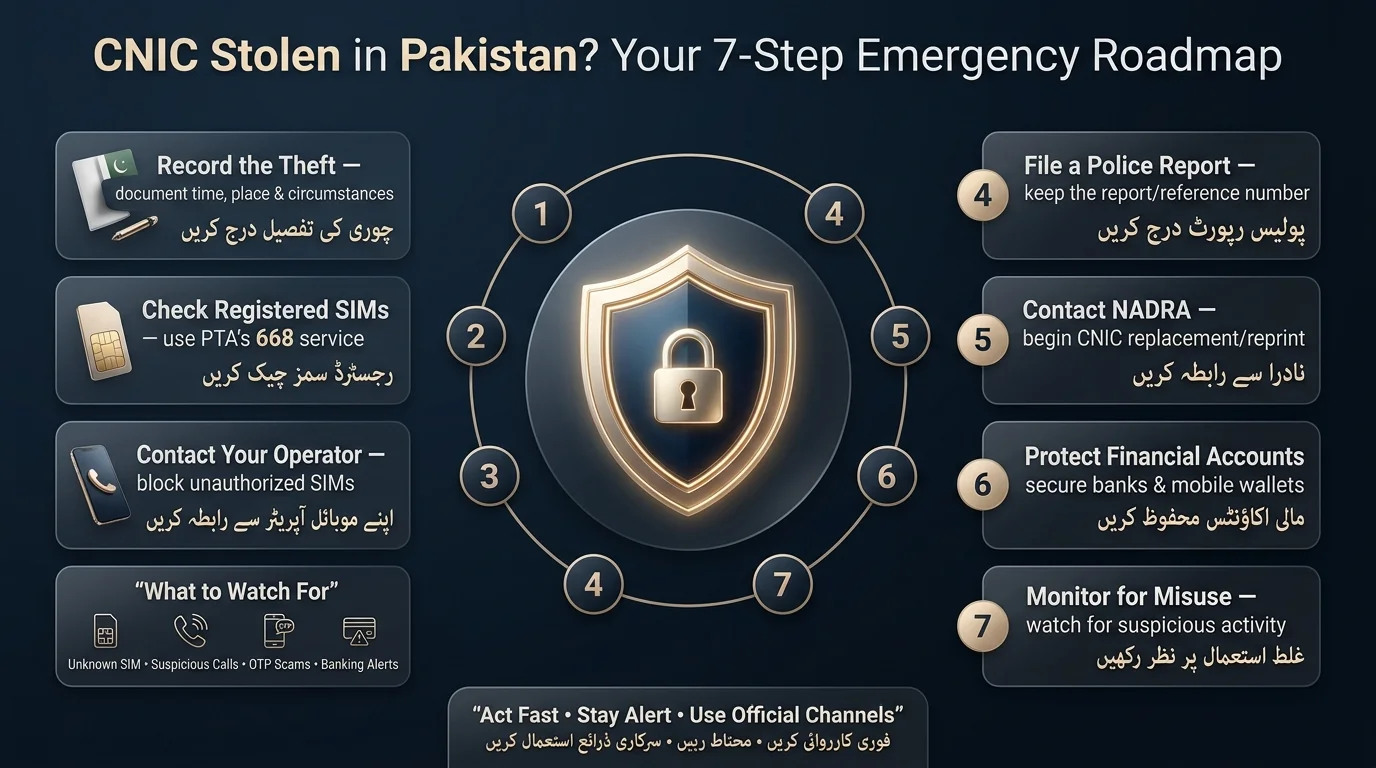
CNIC Stolen? Do These 7 Things Immediately
- Record the Theft: Document the time, location, circumstances, and items stolen along with your CNIC.
- Check Registered SIMs: Verify how many SIMs are registered to your CNIC and block any unauthorized ones.
- Contact Telecom Operator: If your phone or SIM was stolen, immediately block it through your telecom operator.
- File a Police Report: Create an official record of the theft to aid in future issues.
- Contact NADRA: Use NADRA’s services for reprinting or replacing your identity card.
- Protect Financial Accounts: Notify banks and payment services about the theft and enhance account security.
- Monitor for Misuse: Stay vigilant for any unauthorized SIMs, calls, or banking activities in the weeks following the theft.
Can Someone Misuse a Stolen CNIC?
A stolen CNIC is a real security risk, but it’s worth understanding the risk without exaggerating it. What a thief could potentially attempt includes:
- Exposure of your basic identity information (name, CNIC number, address, photograph)
- SIM-related fraud, such as attempting to register a new connection in your name
- Impersonation in situations where a physical ID is checked
- Attempts to open financial or other accounts using your identity
- Financial scams that reference your CNIC to sound more convincing
- Social-engineering attempts, for example, a caller who quotes your CNIC number to gain your trust before asking for an OTP or password
- A stolen CNIC (computerized national identity card) does not guarantee that someone can register anything in your name due to biometric verification processes.
- NADRA emphasizes that the CNIC is Pakistan’s official identity document, and verification increasingly relies on biometrics like fingerprint matching.
- It’s important to treat a stolen CNIC as an identity-security incident.
- Recommended actions include reporting the theft, checking SIM registrations, securing financial accounts, and replacing the card.
- Don’t assume biometric verification eliminates all risk, nor should you panic about potential fraud.
How to Check SIMs Registered on Your CNIC After Theft
This is one of the most useful things you can do, and it takes about a minute.
Read Also: SMS to 668: How to Check SIMs Registered on Your CNIC
Check SIMs through 668 (PTA’s SMS service)
- Open your phone’s messaging app.
- Type your 13-digit CNIC number with no dashes and no spaces (for example, 3520112345678).
- Send it as a plain SMS to 668.
- You’ll get a reply within roughly 30 seconds showing how many SIMs are registered against your CNIC, broken down by operator (Jazz, Zong, Telenor, Ufone, and so on). There is a small charge for this SMS, typically a couple of rupees plus tax.
- Take a screenshot of the reply and note the date and time; this becomes your evidence if anything looks wrong.
PTA offers an online SIM-check portal where users can enter their CNIC number to access information about their SIMs. This service is particularly helpful for those who are abroad or do not have a Pakistani SIM available.
What if you see an unknown SIM?
- Screenshot the unfamiliar registration result.
- Identify the registered operator.
- Contact the operator’s customer service or visit a center.
- Request to block or disown the SIM from your CNIC.
- Obtain a complaint/reference number.
- If unresolved, escalate to PTA through official channels.
Why you should save evidence
For every SIM check, record the date, time, total SIM count, involved operators, any complaint or reference numbers, and take screenshots. This documentation will support your case in the event of a dispute.
Don’t use random SIM-check websites
Use PTA’s official SMS shortcode (668) or web portal to check SIM registrations. Avoid entering your full CNIC number on unfamiliar third-party websites to protect your data. Only provide your CNIC to sites operated by PTA or NADRA.
Unknown SIM Registered on My CNIC: What Should I Do?
If your 668 check reveals an unfamiliar SIM, follow these steps:
- Remain calm; unfamiliar SIMs may not indicate fraud.
- Save the SIM registration result with a screenshot and timestamp.
- Identify the telecom operator of the unknown SIM.
- Contact the operator through official channels to block or disown the SIM linked to your CNIC.
- Retain the complaint or reference number provided by the operator.
- If unresolved, escalate the issue to PTA.
- You can request the removal of a SIM from your CNIC through your operator.
- If you don’t recognize a number, follow the same steps and escalate if needed.
- If the operator doesn’t resolve the issue, keep your reference number for PTA escalation.
- Telecom operators use biometric verification for SIM activation, but fraud is still possible, highlighting the importance of regular checks.
Should You File an FIR for a Stolen CNIC?
Filing a police report (FIR) for a stolen CNIC is not legally required but can be helpful, especially if fraud occurs later. When reporting, include any CNIC details you have, another form of ID if available, and the theft’s time, location, and circumstances. Bring any remaining identification, a written note of the theft details, and a list of other stolen items to the police station. Keep a copy or reference number of the report for future use with NADRA, banks, or telecom operators.
How to Replace a Stolen CNIC in Pakistan
NADRA lists “Reprint / Lost” among its official CNIC services, and lost or stolen identification cards can be replaced through this process. You have two main options.
Option 1: Visit a NADRA Registration Centre (NRC)
- Visit your nearest NRC.
- Bring whatever identification you have, plus details of the theft.
- Complete identity verification, including biometrics (fingerprint scan and photo).
- Fill out and submit the application.
- Pay the applicable fee for your chosen processing speed.
- Track your application using the tracking ID or slip you’re given.
Option 2: Apply through PakID
NADRA’s PakID platform supports CNIC reprint/lost applications, letting you start much of the process without visiting an NRC first.
- Sign in to the PakID app or the id.nadra.gov.pk portal.
- Choose the relevant service (Reprint/Lost, sometimes labeled Duplicate CNIC).
- Complete the application form with your existing details.
- Upload any required documents or information.
- Complete identity verification as prompted.
- Pay online and track your application status in the app.
How much does CNIC replacement cost?
NADRA offers Duplicate/Reprint CNIC services in three tiers: Normal, Urgent, and Executive, with Urgent and Executive costing more for faster processing. Fees for chip-based Smart NICs are typically higher than for older CNICs. NADRA’s fee schedule can change, so it’s important to verify current fees through official channels like their website, the PakID app, their helpline, or local Registration Centres before making a payment. Urgent processing is quicker than Normal at a higher cost, while Executive is the fastest and most expensive option. Delivery fees may apply for card courier service.
Does Replacing a Stolen CNIC Change Your CNIC Number?
- Replacing or reprinting a CNIC after theft is considered a duplicate issuance, not a new registration.
- You receive a new physical card with the same identity record.
There are three distinct processes with NADRA:
- Replacing/reprinting the card (new card, same record)
- Modifying identity information (correcting details like address or photo)
- Changing identity records (for significant changes like legal name changes)
- CNIC numbers generally remain the same after a routine theft/loss replacement, unless NADRA specifies otherwise.
- For specific inquiries, it is recommended to contact an NRC or the NADRA helpline.
What to Do If Your CNIC Was Stolen and You Use Banking Apps
- Notify Banks: Inform your bank if you suspect your identity documents may be compromised to flag your account for extra caution.
- Mobile Wallets: Extend the same precaution to mobile wallet services like Easypaisa and JazzCash.
Secure Important Information
- Change account passwords.
- Update app PINs.
- Secure your email account and recovery options.
Monitor for Unusual Activity
- Watch for unauthorized password-reset alerts.
- Check for unknown transactions and notifications of new accounts in your name.
- Be cautious of unexpected OTP messages and suspicious calls referencing your CNIC.
Critical Warning: Never share your OTP, PIN, password, or authentication code with unsolicited callers, even if they claim to help due to a CNIC compromise. Legitimate institutions do not ask for this information over the phone.
CNIC and Mobile Phone Stolen Together: Do This First
- Use another phone to take immediate action.
- Block the stolen SIM through your operator.
- Secure mobile-wallet and banking access by changing passwords and checking for suspicious activity.
- Change critical passwords, starting with email.
- Report the phone theft to your operator and possibly to the police.
- Check SIM registrations via the 668 process.
- Report the stolen CNIC to the police.
- Start the CNIC replacement process through NADRA or PakID.
Lost vs Stolen CNIC: Is There a Difference?
| Situation | Immediate priority |
| CNIC lost | Report to NADRA / replace, then monitor for misuse |
| CNIC stolen | Police report + SIM check + replacement |
| CNIC and phone stolen together | SIM blocking + account security + CNIC replacement |
| Unknown SIM detected | Operator complaint + evidence + escalation to PTA |
| CNIC used fraudulently | Preserve evidence + relevant complaint/police report |
7 Mistakes to Avoid After Your CNIC Is Stolen
- Act promptly by checking SIMs or contacting NADRA on the same day.
- Do not publish your CNIC online or share photos of lost/stolen notices.
- Avoid sending CNIC photos to unverified websites claiming to offer services.
- Never share OTPs with anyone, regardless of their claims.
- Be cautious of unsolicited callers pretending to be from PTA or NADRA.
- Follow up on unknown SIMs instead of ignoring them.
- Keep all complaint messages, SMS replies, or screenshots for future reference.
Read Also: Lost Your SIM Card in Pakistan
How to Protect Your CNIC From Future Misuse
- Only share physical or photocopied CNIC copies when necessary and watermark them for specific use.
- Avoid posting CNIC photos publicly, including on social media and messaging groups.
- Do not share biometric information with unauthorized parties.
- Regularly check your SIM registrations and buy SIMs from official channels.
- Use official websites and apps for CNIC and SIM-related activities.
- Keep bank and mobile-wallet transaction alerts enabled.
- Securely destroy unneeded CNIC photocopies instead of discarding them intact.
Official Pakistan Resources for CNIC and SIM Security
| Need | Official resource |
| CNIC replacement | NADRA (nadra.gov.pk) |
| Online applications & tracking | PakID (id.nadra.gov.pk) |
| SIM registration check | PTA — SMS to 668, or PTA’s official SIM-check portal |
| SIM complaint | Your telecom operator, then PTA if unresolved |
| Theft report | Your local police station |
| NADRA helpline | 1777 (mobile users), +92 51 111 786 100 (landline / international) |
Conclusion
If your CNIC is stolen in Pakistan, take immediate action to mitigate risks. Document the theft, check registered SIMs, block unauthorized connections, and secure your bank and mobile-wallet accounts. Report the theft as necessary and start the CNIC replacement process with NADRA or PakID, keeping all documentation. Never share your OTP, PIN, password, or biometric information with unauthorized individuals. Always verify the latest procedures and requirements through official channels before proceeding.
اگر آپ کا CNIC پاکستان میں چوری ہو جاتا ہے تو خطرات کو کم کرنے کے لیے فوری کارروائی کریں۔ چوری کی دستاویز کریں، رجسٹرڈ سمز چیک کریں، غیر مجاز کنکشن بلاک کریں، اور اپنے بینک اور موبائل والیٹ اکاؤنٹس کو محفوظ کریں۔ ضرورت کے مطابق چوری کی اطلاع دیں اور تمام دستاویزات کو رکھتے ہوئے نادرا یا پاک آئی ڈی کے ساتھ CNIC کی تبدیلی کا عمل شروع کریں۔ کبھی بھی اپنا OTP، PIN، پاس ورڈ، یا بائیو میٹرک معلومات غیر مجاز افراد کے ساتھ شیئر نہ کریں۔ آگے بڑھنے سے پہلے ہمیشہ سرکاری چینلز کے ذریعے تازہ ترین طریقہ کار اور تقاضوں کی تصدیق کریں۔
Frequently Asked Questions
What should I do immediately if my CNIC is stolen?
Record the theft details, check which SIMs are registered against your CNIC (SMS to 668), file a police report, and start the NADRA replacement process. Secure your bank and wallet accounts along the way, and keep monitoring for anything unusual over the following weeks.
How can I check SIMs registered on my CNIC?
Send your 13-digit CNIC number, without dashes, as an SMS to 668. PTA will reply within about 30 seconds with a count of SIMs registered against your CNIC, broken down by operator. You can also use PTA’s official online SIM-check portal.
Can someone use my stolen CNIC to register a SIM?
It’s harder than it sounds, since operators are required to biometrically verify a new SIM registration, usually with a fingerprint scan. It isn’t impossible, though, which is exactly why checking your SIM registrations periodically is worthwhile.
What if I find an unknown SIM on my CNIC?
Screenshot the result, identify the operator, contact them directly to request the SIM be blocked or disowned, keep the complaint reference number, and escalate to PTA if the operator doesn’t resolve it.
Do I need an FIR for a stolen CNIC?
It isn’t automatically required in every case, but for a stolen (rather than simply lost) card, filing a police report creates a useful official record, particularly valuable if the document is later linked to suspected fraud.
How do I replace a stolen CNIC?
Apply for a Duplicate/Reprint CNIC either at a NADRA Registration Centre or online through the PakID app, choosing your preferred processing speed (Normal, Urgent, or Executive).
How much does a duplicate CNIC cost?
NADRA charges different fees depending on the processing tier you choose (Normal, Urgent, Executive), and the exact figures do change over time. Confirm the current fee directly on nadra.gov.pk, through the PakID app at checkout, or by calling the NADRA helpline (1777) before you pay.
Disclaimer
The text emphasizes that the article is for general informational purposes only and does not provide legal, financial, or official government advice. It highlights that procedures, fees, and requirements from various official bodies like NADRA, PTA, telecom operators, banks, and the police may change. Readers are encouraged to verify current details directly with these official organizations, particularly NADRA, before making any decisions or payments.
Sources & References
- NADRA (National Database and Registration Authority) has an official website (nadra.gov.pk) and a Centralized Complaint Management System with helplines 1777 and +92 51 111 786 100.
- The PakID platform is available at id.nadra.gov.pk.
- The Pakistan Telecommunication Authority (PTA) provides guidance on SIM registration and checking through SMS to 668 and an online SIM-check portal.
- Readers are advised to verify current NADRA fees directly as they are updated periodically.