Biometric SIM Verification in Pakistan
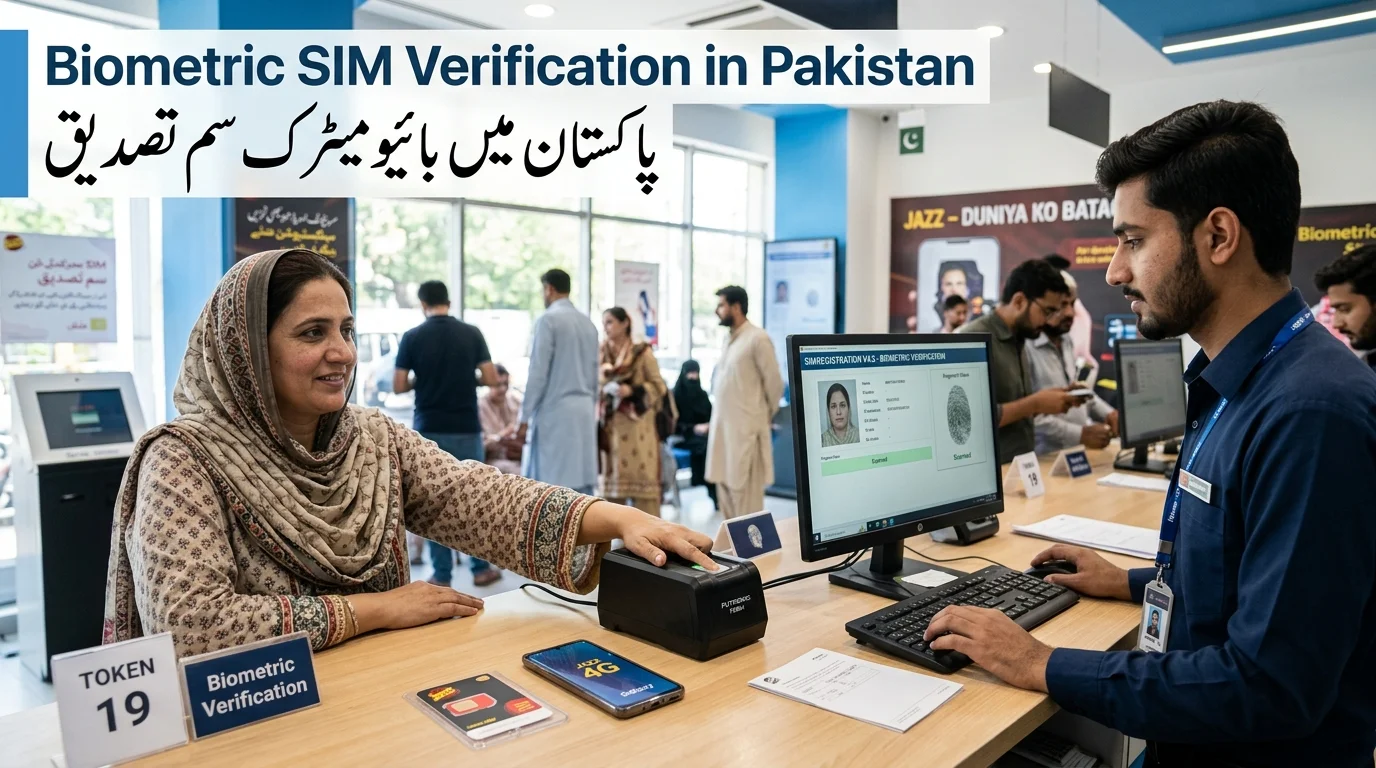
Biometric SIM verification in Pakistan requires users to place their thumb on a scanning device when purchasing a SIM card. This process, mandated by the Pakistan Telecommunication Authority (PTA), ensures that a SIM is linked to a real person through fingerprint matching with the National Database and Registration Authority (NADRA) records. Successful biometric verification is necessary for activating new SIM cards, transferring ownership, or reactivating a SIM. Every SIM registration, replacement, or ownership transfer requires biometric verification.
پاکستان میں بائیو میٹرک سم کی تصدیق کے لیے صارفین کو سم کارڈ خریدتے وقت اپنے انگوٹھے کو سکیننگ ڈیوائس پر رکھنے کی ضرورت ہوتی ہے۔ پاکستان ٹیلی کمیونیکیشن اتھارٹی (پی ٹی اے) کی طرف سے لازمی قرار دیا گیا یہ عمل، اس بات کو یقینی بناتا ہے کہ نیشنل ڈیٹا بیس اینڈ رجسٹریشن اتھارٹی (نادرا) کے ریکارڈ کے ساتھ فنگر پرنٹ میچنگ کے ذریعے ایک سم کسی حقیقی شخص سے منسلک ہے۔ نئے سم کارڈز کو فعال کرنے، ملکیت کی منتقلی، یا سم کو دوبارہ فعال کرنے کے لیے کامیاب بائیو میٹرک تصدیق ضروری ہے۔ ہر سم کی رجسٹریشن، تبدیلی، یا ملکیت کی منتقلی کے لیے بائیو میٹرک تصدیق کی ضرورت ہوتی ہے۔
What Is Biometric SIM Verification?
Biometric SIM verification uses fingerprint matching to confirm identity, linking a SIM to a specific person’s CNIC instead of relying on potentially forged documents.
- Biometric Verification System (BVS): PTA developed this system in collaboration with telecom operators to conduct real-time identity checks. It captures and verifies fingerprints against NADRA’s database within seconds, standardizing the process across mobile network operators.
Importance of Biometric Verification
- Identity Protection: Prevents unauthorized SIM registrations using stolen CNICs.
- Fraud Prevention: Reduces the risk of SIM purchases with fake documents, which have been associated with scams.
- Legal Compliance: Ensures that the person linked to a CNIC does not face legal issues from unverified SIMs.
Why Pakistan Introduced Biometric SIM Verification
- Security Challenges Before BVS: Before biometric checks, SIM cards could be acquired with minimal ID verification, leading to issues like extortion, terrorism-related communication, and financial scams.
- PTA’s Nationwide SIM Verification Campaign: In 2013-2014, Pakistan implemented mandatory biometric verification for all SIM registrations, requiring matching against NADRA’s fingerprint database. Existing SIMs required re-verification, culminating in the Multi-Finger Biometric Verification System (MBVS) launched in December 2022 to enhance security against fraud.
Benefits of Biometric Verification
- Enhances national security by linking SIMs to verified individuals.
- Reduces fraud by making bulk SIM purchases under false identities more difficult.
- Improves customer protection by allowing subscribers to monitor and block unauthorized SIMs linked to their CNIC.
Purpose: The primary aim of biometric SIM verification is to ensure all active SIM cards are linked to real, verified individuals, thereby reducing anonymous ownership, preventing fraud, and empowering citizens to manage their registered identities.
Organizations Involved in SIM Verification
There are three key parties involved in the system:
- Pakistan Telecommunication Authority (PTA): Acts as the regulator, establishing SIM registration rules, enforcing deadlines, managing complaints, and operating the SIM Information System.
- National Database and Registration Authority (NADRA): Manages identity data, storing CNIC records and fingerprint templates, and handling real-time biometric checks.
- Mobile Network Operators: These include Jazz, Zong, Telenor, Ufone, and SCO, which serve as the contact point for subscribers by capturing fingerprints, installing the necessary hardware, and activating SIMs after NADRA confirms matches.
| Organization | Role |
| PTA | Regulation and enforcement |
| NADRA | Identity verification (fingerprint matching) |
| Telecom Operators | SIM registration and activation |
How the Biometric Verification System Works
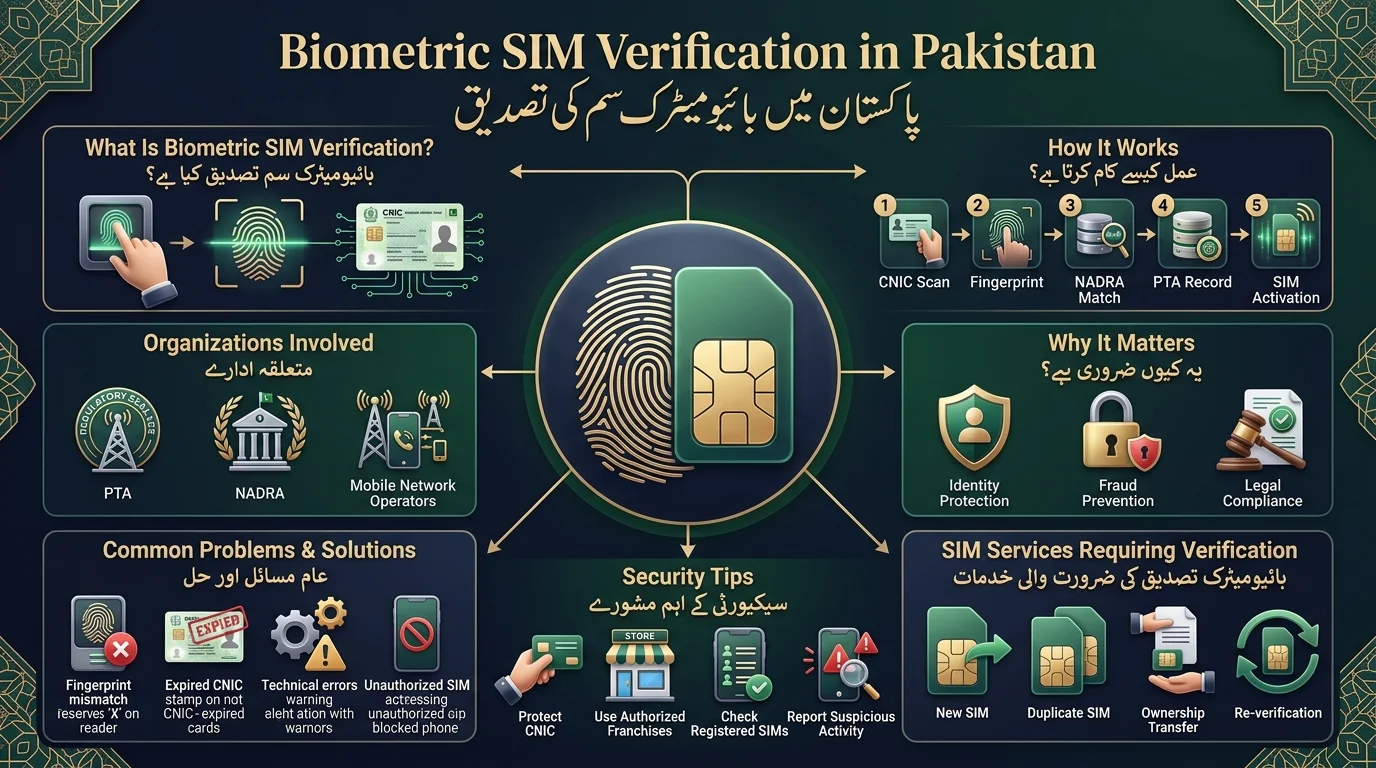
The process of obtaining a SIM, whether for the first time or as a replacement, involves five main steps:
- CNIC Verification: The sales agent scans your CNIC to access your identity details from NADRA.
- Fingerprint Capture: You provide your fingerprint(s) on a biometric scanner for verification.
- NADRA Database Matching: Your fingerprint is securely matched against NADRA’s records.
- PTA Approval: If there is a match, the transaction is logged in the PTA’s system.
- SIM Activation: The SIM is activated on the spot, with an explanation provided if the match fails.
Overall process flow: CNIC Scan → Fingerprint Capture → NADRA Match → PTA Record → SIM Activation.
MBVS uses multiple finger impressions for all new SIMs, replacements, MNP, and ownership transfers.
Why Biometric Verification Is Required in Pakistan
The biometric verification system for Pakistan’s mobile network ensures that SIM cards are registered to their legitimate owners, preventing identity theft and enhancing subscriber protection. Key advantages include:
- Prevents unauthorized SIM registration through biometric fingerprint verification.
- Improves public security by aiding in criminal investigations and reducing anonymous communications.
- Protects mobile subscribers by minimizing unknown SIM cards registered under their CNIC.
- Supports accurate customer records for reliable account management and ownership verification.
How to Complete Biometric SIM Verification in Pakistan
- New SIM Card: Visit an authorized franchise with your original CNIC for activation via fingerprint verification.
- Existing SIM: If flagged for re-verification, visit a franchise with your original CNIC and undergo a fingerprint scan to keep the number active.
- Duplicate SIM: To obtain a duplicate for a lost or damaged SIM, visit the operator’s franchise with your original CNIC and mobile number for biometric verification.
- SIM Ownership Transfer: Both the current and new owner must be present at the franchise with their original CNICs for biometric verification to transfer ownership.
| Service | Documents Required |
| New SIM | Original CNIC |
| Duplicate SIM | Original CNIC + existing mobile number |
| Ownership Transfer | Both parties’ original CNICs |
Multi-Biometric Verification System (MBVS) Explained
It is an updated version of BVS introduced in December 2022, involving multiple finger impressions for transactions instead of just one.
- Reason for Introduction: The update addresses vulnerabilities in the old system, particularly against silicone fingerprint molds used by fraudsters.
Benefits
- Reduces silicone-based fingerprint fraud
- Makes issuance of fake SIMs more difficult
- Enhances the reliability of the national SIM registry
- Provides additional identity protection
Application: MBVS is utilized in new SIM issuance, SIM replacement, mobile number portability (MNP) requests, and ownership transfers, employing a multi-finger check for these processes.
How to Check SIM Verification Status
You can check the registered SIMs under your name through the following methods:
- SMS: Send your 13-digit CNIC (without dashes) to 668 for an instant reply regarding SIMs registered against your CNIC.
- PTA SIM Information System: Use the online portal to look up your registered numbers for a clearer, saved record.
- Franchise or Service Center: Visit an authorized franchise or customer service center for assistance with verification status if needed.
| Method | Time Required | Cost |
| SMS (668) | Instant | Standard SMS charges |
| Online Portal | Instant | Free |
| Franchise Visit | A few minutes | Free |
Common Biometric Verification Problems
Verification issues often occur on the first try due to various reasons.
- Fingerprint Not Matching: Manual labor, injuries, or dry skin can lead to mismatches for the correct person.
- NADRA Record Issues: Outdated or poorly captured fingerprints on file can cause problems that need direct resolution with NADRA.
- Expired CNIC: Verification fails if the CNIC is expired; it must be renewed at NADRA first.
- Damaged Fingerprints: Manual work or skin conditions can render some fingers unreadable; multiple fingers can be used for verification.
- Technical System Errors: Sync delays or outages can affect verification attempts, which may be resolved by trying again later.
- SIM Registered to Another Person: If a SIM is registered under someone else’s name using your CNIC, it must be reported and blocked immediately.
| Problem | Solution |
| Fingerprint mismatch | Update biometrics at NADRA |
| Expired CNIC | Renew CNIC first |
| System/technical error | Wait and retry, or try another franchise |
| Unknown SIM on your CNIC | Report and block through your operator or PTA |
How to Fix Failed Biometric Verification
- Update Biometrics at NADRA: Visit a NADRA center to have your fingerprints re-captured if they have changed or the stored template is of poor quality.
- Use Alternate Finger Verification: Try using a different finger for verification under the MBVS system if one finger consistently fails.
- Visit Another Franchise: If you face issues at one location, try another franchise, as hardware problems may vary.
- Contact Your Telecom Operator: Reach out to your operator’s customer care for assistance with persistent verification issues.
- Escalate Through PTA Complaint Channels: File a formal complaint with the PTA if other methods fail, as they can investigate and help resolve the issue.
- Initial Steps if Failed Verification Occurs: Ensure your CNIC hasn’t expired, try again with a different finger or location, and update your fingerprints if the problem persists.
SIM Re-Verification Process in Pakistan
- Older SIMs registered before biometric checks may have a “Not Verified” status and require re-verification by the PTA.
- Subscribers flagged for re-verification receive SMS notices with deadlines; failure to comply can lead to service restrictions.
- The re-verification process is similar to initial SIM registration, requiring a visit to a franchise with the original CNIC and a fingerprint scan.
- If a SIM is suspended due to missed re-verification, service can be restored the same day after completing biometric checks at a franchise, pending NADRA confirmation.
PTA SIM Ownership Rules and SIM Limits
- Maximum Number of SIMs: The PTA limits the number of SIMs one person can hold across all networks. The exact limit may vary; check the SIM Information System or SMS 668 for confirmation.
- Checking Registered SIMs: Use SMS 668 or the online portal to view how many SIMs you have and which operators they are with.
- Removing Unauthorized SIMs: If you find a SIM not registered by you, request to block or disown it through your operator’s helpline or by filing a complaint with the PTA.
- Legal Responsibilities: As each SIM is linked to your CNIC, you are responsible for activities on those numbers, making it crucial to regularly check for unauthorized registrations.
- Changes in Regulation: SIM limits may change over time, so always verify the current regulations directly with PTA.
Security Tips to Protect Your SIM Identity
- Beware of Fake Calls: Scammers may impersonate PTA or NADRA staff; re-verification should only happen in person at authorized centers.
- Protect CNIC Information: Do not share CNIC photos or photocopies unless necessary; avoid providing fingerprints outside authorized franchises.
- Check Registered SIMs: Regularly verify your CNIC’s registered SIMs using the 668 SMS service to catch unauthorized SIMs early.
- Report Suspicious Activity: Immediately report any unknown SIMs or misuse of your CNIC to your operator and PTA.
- Secure Your Mobile Account: Treat your SIM security like a bank card; don’t let others use your number for verification.
Future of Biometric SIM Verification in Pakistan
- Facial Recognition Option: PTA is developing a facial recognition feature in collaboration with NADRA’s Pak ID app to assist senior citizens and manual laborers who find fingerprint scans difficult.
- Digital Identity Systems: Biometric SIM verification is becoming more integrated with broader digital identity initiatives, linking it to government and financial verification.
- AI-Powered Verification: There will be continued investment in advanced fraud detection systems that automatically identify unusual registration patterns.
- Enhanced Anti-Fraud Measures: As fraud techniques evolve, PTA will implement tighter re-verification cycles, stricter checks between operators, and quicker complaint resolutions.
Tips for Completing Biometric Verification
- Bring the original CNIC.
- Wash and dry hands before scanning, ensuring no greasy substances are present.
- Inform the representative about any finger injuries.
- Visit an approved franchise, not an unauthorized dealer.
- Check that the CNIC information is current and not expired.
- These measures help ensure clear and problem-free fingerprint scanning.
How to Fix Biometric Verification Issues
- Try Another Finger: If your fingerprint doesn’t match, try using a different finger, especially if the leading hand is injured.
- Clean Your Fingers: Ensure your finger is clean and dry, as dirt or moisture can lead to reading errors.
- Verify Your CNIC: Check that the CNIC information provided is accurate to avoid verification errors.
- Contact Customer Service: If issues persist, reach out to the operator’s customer care helpline for assistance.
- Visit a NADRA Registration Centre: For problems at multiple outlets, visit a NADRA registration centre for resolution.
Privacy and Security of Biometric Data
The verification process uses your fingerprints solely to confirm your identity against NADRA’s biometric records through authorized systems. Mobile operators do not create a public fingerprint database. This process helps prevent identity theft and unauthorized SIM registration, and protects subscribers from fraud while improving telecom record accuracy. It’s important to only use authorized channels for biometric verification and never share fingerprints or personal documents with unauthorized sources.
Final Thoughts
Biometric SIM verification in Pakistan links mobile connections to identifiable individuals, enhancing national security and preventing fraud. To stay compliant, ensure your CNIC is up to date, promptly complete re-verification when notified, and know how to address fingerprint scan issues. A valuable practice is to regularly check your registered SIMs using the 668 SMS service or PTA’s online portal, which is free and quick, helping to identify unauthorized SIMs before they become a problem.
پاکستان میں بایومیٹرک سم کی تصدیق موبائل کنکشن کو قابل شناخت افراد سے جوڑتا ہے، قومی سلامتی کو بڑھاتا ہے اور دھوکہ دہی کو روکتا ہے۔ تعمیل کرنے کے لیے، یقینی بنائیں کہ آپ کا CNIC اپ ٹو ڈیٹ ہے، اطلاع ملنے پر فوری طور پر دوبارہ تصدیق مکمل کریں، اور فنگر پرنٹ اسکین کے مسائل کو حل کرنے کا طریقہ جانیں۔ ایک قابل قدر عمل یہ ہے کہ 668 ایس ایم ایس سروس یا پی ٹی اے کے آن لائن پورٹل کا استعمال کرتے ہوئے اپنی رجسٹرڈ سمز کو باقاعدگی سے چیک کریں، جو کہ مفت اور فوری ہے، غیر مجاز سموں کو مسئلہ بننے سے پہلے ان کی شناخت کرنے میں مدد فراہم کرتا ہے۔
Frequently Asked Questions
What is biometric SIM verification?
It’s the process of confirming SIM ownership by matching a subscriber’s fingerprint against their NADRA-held record before the SIM is activated.
Is biometric verification mandatory in Pakistan?
Yes. Every SIM registration, replacement, or ownership transfer requires biometric verification.
How can I check if my SIM is verified?
Send your CNIC number to 668, use the PTA SIM Information System online, or visit a franchise.
How many SIMs can I register on one CNIC?
There’s a combined limit across all operators covering voice and data SIMs. Check your exact current allowance through 668, since the figure has been adjusted over time.
What happens if verification fails?
The transaction is stopped, and the agent should explain why. You can retry, use a different finger, visit another franchise, or escalate to PTA if the problem continues.
Can I verify my SIM online?
You can check your verification status online through PTA’s portal, but the actual biometric scan itself must be done in person at a franchise.
Is biometric verification free?
Yes, verification and re-verification are free of charge at authorized franchises.
How long does verification take?
The fingerprint-to-NADRA-match step typically completes within seconds; the whole in-person process usually takes just a few minutes.
Disclaimer
The article provides information on biometric SIM verification, fingerprint verification, and related procedures. It emphasizes that telecom rules and verification processes may change, so readers should check for the latest requirements through official channels like PTA and NADRA. The article is for general informational purposes and does not serve as official advice. Users are advised to share personal information only through authorized channels and to avoid unauthorized agents. If biometric verification fails or there’s an issue with a SIM registered against a CNIC, users should contact their mobile operator or use PTA’s complaint channels. For CNIC or fingerprint issues, NADRA’s official channels should be used.
Sources & References
- PTA – Official Website: The Pakistan Telecommunication Authority regulates the telecommunications sector in Pakistan and provides information on SIM registration and consumer protection.
- PTA – SIM Information System: Users can check the number of SIMs registered against their CNIC and view operator-wise registration details through this system.
- NADRA – Official Website: The National Database and Registration Authority manages national identity services and verification processes in Pakistan.
- Jazz – SIM Purchase Terms & Conditions: Jazz outlines requirements for SIM issuance, including the need for a valid CNIC and biometric verification.
[…] Biometric verification is mandatory for SIM issuance and re-verification in Pakistan for NICOP and CNIC holders to confirm identity before activation. […]
[…] If already at this limit, individuals must block or transfer an existing SIM to obtain a new one. Biometric verification at retail counters can lead to unauthorized SIMs being registered under someone’s identity, […]