Check SIM Owner Details by CNIC Online in Pakistan
To check how many mobile SIMs are linked to your CNIC in Pakistan, use the official Pakistan Telecommunication Authority (PTA) system. This guide outlines the importance of verifying SIM ownership to combat SIM-based fraud and identity theft. It details the official methods for checking registrations, interpreting results, and actions to take if unauthorized SIMs are found. Regular verification is encouraged to protect your identity.
یہ چیک کرنے کے لیے کہ پاکستان میں آپ کے CNIC سے کتنی موبائل سمیں منسلک ہیں، پاکستان ٹیلی کمیونیکیشن اتھارٹی (PTA) کا آفیشل سسٹم استعمال کریں۔ یہ گائیڈ سم پر مبنی دھوکہ دہی اور شناخت کی چوری سے نمٹنے کے لیے سم کی ملکیت کی تصدیق کی اہمیت کو بیان کرتا ہے۔ اس میں رجسٹریشن کی جانچ پڑتال کے سرکاری طریقوں، نتائج کی ترجمانی، اور غیر مجاز سمز پائے جانے پر کیے جانے والے اقدامات کی تفصیل دی گئی ہے۔ آپ کی شناخت کی حفاظت کے لیے باقاعدہ تصدیق کی حوصلہ افزائی کی جاتی ہے۔
How to Check SIM Owner Details by CNIC in Pakistan
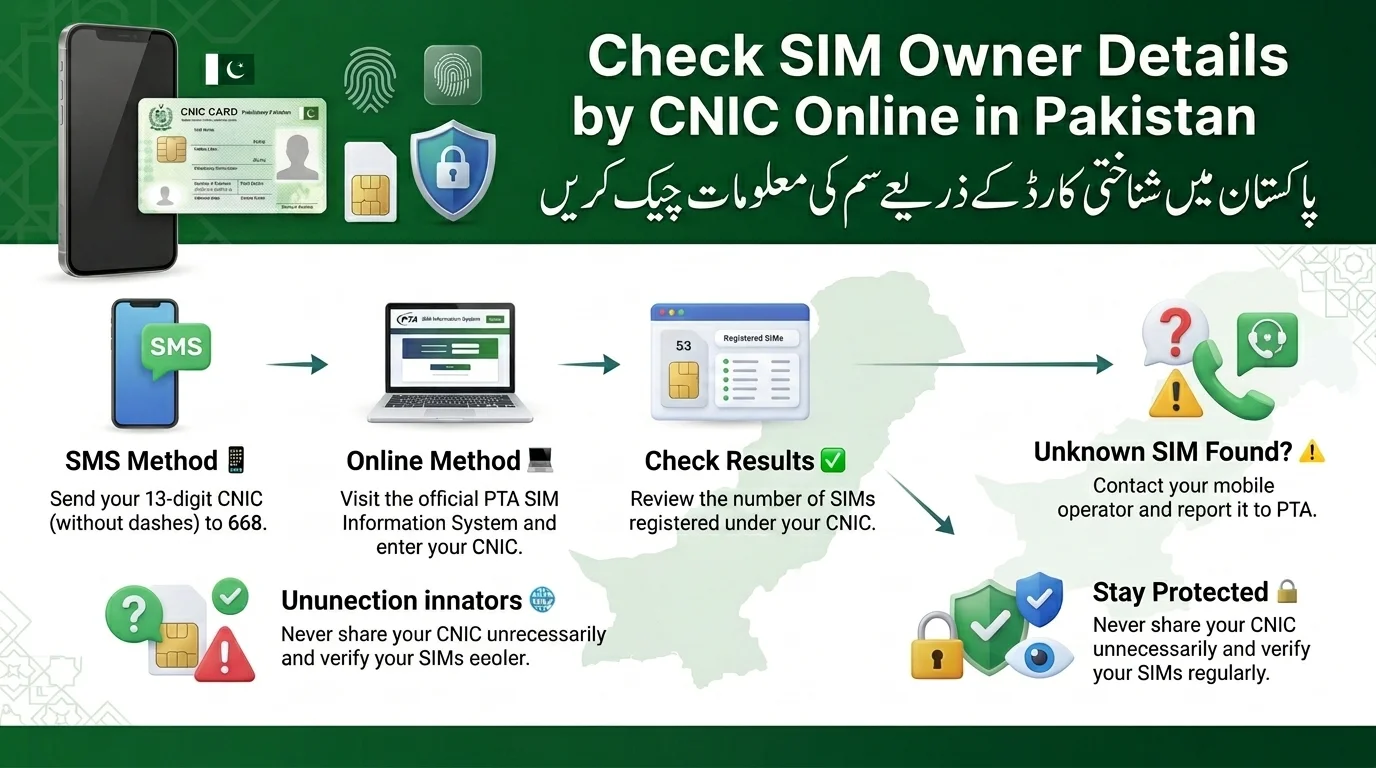
To check SIMs linked to your CNIC in Pakistan, you can either SMS your 13-digit CNIC (without dashes) to 668 or visit the PTA SIM Information System online for details on active SIMs by network (Jazz, Zong, Ufone, Telenor).
| Method | Time Required | Cost |
| SMS to 668 | About 1 minute | Standard SMS charges apply (a small fee plus tax) |
| PTA Online Portal | About 2 minutes | Free |
| Network Franchise Visit | 10–20 minutes | Free |
All methods access the same PTA database, ensuring consistent results. You can choose whichever method is most convenient for you.
What Is the PTA SIM Information System?
The PTA SIM Information System, run by the Pakistan Telecommunication Authority, allows citizens to check SIM cards registered to their CNIC across mobile networks and supports the 668 SMS shortcode and online portal.
Why PTA Created This System
Pakistan’s telecom sector faced SIM-related fraud, including registrations with stolen IDs and unverified connections for scams. The Pakistan Telecommunication Authority (PTA) implemented mandatory biometric verification to combat these issues.
- Prevent illegal SIM issuance by tying every connection to a biometrically verified identity
- Reduce telecom-based fraud, including financial scams and impersonation
- Improve national security by closing the gap that let anonymous or falsely registered SIMs operate freely
What Information You Can Actually Check
When performing a SIM check, you can see the total number of SIMs registered under your CNIC, a breakdown by network, and the general registration status of those connections. However, you cannot look up another person’s SIM identity from a phone number, as this information is restricted to protect privacy. Any websites claiming to offer such services are not official PTA channels.
Method 1: Check SIMs Registered Against Your CNIC Through SMS 668
Check SIMs linked to your CNIC via SMS.
Steps
- Type your 13-digit CNIC without dashes or spaces.
- Send it to the short code 668.
- Receive a response within 30 seconds detailing linked SIMs by operator.
Benefits
- Works on any phone, no internet needed.
- Quick response, typically under a minute.
- No website or app required; works across all networks
Common SMS Errors and Fixes
| Problem | Likely Fix |
| No reply received | Check your CNIC digits for typos and resend |
| “Invalid CNIC” reply | Make sure there are no dashes, spaces, or extra characters |
| Message fails to send | Confirm your SIM has SMS balance/bundle active |
| Delayed response | Wait a few minutes and try again during off-peak hours |
Method 2: Check SIM Registration Online Through PTA Portal
Open any web browser and go to https://numpk.com.
To check your registered SIMs online, visit the PTA SIM Information System website and input your 13-digit CNIC number. Complete the verification step (usually a CAPTCHA) to view your results, which are displayed in an easy-to-read table.
Advantages of Online Verification
- Free
- Convenient and easy to save or screenshot
Common Issues
- If the page doesn’t load, try again later.
- If CNIC isn’t recognized, check for typing errors.
- If the verification fails, refresh the page and re-enter your CNIC.
How Many SIMs Can Be Registered on One CNIC in Pakistan?
- The current maximum limit for SIM connections per CNIC in Pakistan is five voice SIMs and three data-only SIMs, totaling eight connections, based on a Supreme Court ruling.
- There is widespread misinformation about SIM limits, with some sources claiming different figures, so it’s best to check the PTA’s official website for the most accurate information.
- The limit aims to prevent fraudulent activities by controlling the number of connections registered under a single identity.
- Exceeding the SIM limit, often due to fraudulent registrations, can lead to the suspension of all SIMs linked to the affected CNIC until the issue is resolved.
| Rule | Details |
| Maximum SIMs | Widely cited as 5 voice + 3 data (8 total) — confirm current figure with PTA |
| Verification Required | Biometric verification at the point of sale |
| Authority | Pakistan Telecommunication Authority (PTA) |
How to Check SIM Owner Details for Each Mobile Network
The text outlines the SIM verification processes for different telecom operators in Pakistan:
- Jazz: Verify connections at a Jazz franchise with CNIC, through the My Jazz app, or by contacting customer support.
- Zong: Verification can be done at a Zong service center with CNIC or using the My Zong app.
- Ufone: Customers can verify connections via customer support or by visiting a Ufone franchise with CNIC.
- Telenor: Check registration details using the My Telenor app or at a Telenor franchise with a valid CNIC.
- ONIC: New SIM registration and verification are handled through a digital onboarding process with identity checks.
Useful Operator Codes
| Purpose | Code / Method | Network | Details |
| Check all SIMs on CNIC | SMS CNIC to 668 | All | Official PTA method |
| Jazz verification check | SMS CNIC to 6001 | Jazz | Must be sent from a Jazz SIM |
| Telenor verification status | Blank SMS to 7751 | Telenor | Shows if the SIM is biometrically verified |
| Zong verification | Type V and send to 7911 | Zong | Quick verification status check |
| Ufone self-service menu | Dial *336# | Ufone | Access account/self-service options |
| PTA Helpline | Call 0800-55055 | All | Toll-free PTA support |
| File PTA Complaint | complaint.pta.gov.pk | All | Online PTA complaint system |
What Should You Do If Unknown SIMs Are Registered on Your CNIC?
- Discovering a SIM card that you don’t recognize can be alarming, but it’s a problem that can be resolved if you take action quickly.
Signs to Look Out For
- Unfamiliar SIM cards appearing in your 668 or portal results
- Unexpected phone calls or messages related to accounts or services you never subscribed to
- Risks associated with mobile wallets — because mobile numbers are frequently linked to easypaisa, JazzCash, and similar services, an unauthorized SIM could lead to financial fraud
Steps to Take Immediately
- Reach out to PTA via their official hotline or website to report the issue
- Visit the appropriate network franchise — specifically go to the provider where the unknown SIM is registered
- Request the deactivation of the unfamiliar number
- File a formal complaint if the provider does not address the issue quickly, ensuring there is a documented record
How to Block Unauthorized SIMs Registered Against Your CNIC
- Verify the SIM status via 668 or the online portal.
- Identify the unauthorized number(s) along with operator details.
- Contact the mobile operator through their franchise or customer support.
- Submit CNIC verification in person, as remote completion is not possible.
- Complete biometric confirmation to validate your identity as the CNIC holder.
- The process of disowning or blocking an unauthorized SIM typically takes a few business days after in-person verification, but timelines can vary.
SIM Ownership Transfer Process in Pakistan
Reasons for Ownership Transfer
- Family members taking over a number from another’s CNIC.
- Business transfers to a new company representative.
- Lost or outdated ownership records.
Required Documents
- Original CNICs of both current and new owners.
- The SIM/number in question.
Biometric Verification
- Both parties must complete in-person biometric verification as mandated by PTA rules.
Processing Timeline
- Same-Day Transfer: You can typically complete the transfer on the same day when both parties are present with valid documents and complete the required verification.
- New SIM Waiting Period: Operators may require newly activated SIMs to remain active for a certain period before allowing an ownership transfer.
SIM Verification for Overseas Pakistanis and Foreign Nationals
Overseas Pakistanis
- Can verify SIM ownership using SMS 668 or the online portal with a Pakistani number, or directly through their CNIC/NICOP.
- Requires a valid CNIC or NICOP for verification.
Foreign Nationals
- Register SIMs using passport details instead of CNIC.
- Follow a separate verification process that includes biometric and documentary checks.
Common SIM Registration Errors and Their Solutions
| Error | Solution |
| CNIC Not Found | Double-check the number for typos; confirm your CNIC is active in NADRA’s records |
| SIM Not Showing | Allow time for new registrations to sync with the PTA system, then recheck |
| Verification Failed | Retry the process, ensuring biometric or portal steps are completed correctly |
| Expired CNIC | Renew your CNIC with NADRA — expired CNICs can cause SIM verification issues |
| Biometric Mismatch | Visit the operator’s franchise for re-verification |
Why SIM Ownership Verification Is Important
Regularly checking your SIM ownership is important for several reasons:
- Fraud Protection: Early detection of unauthorized SIMs can prevent scams.
- Identity Theft Prevention: SIMs can be used to open accounts fraudulently.
- Banking Security: Unknown SIMs pose risks to financial apps that rely on SMS-based OTPs.
- Compliance: Adhering to PTA regulations helps avoid suspension of legitimate lines.
- General Digital Security: A simple check every few months can save you significant hassle.
PTA SIM Registration Rules and Updates (2026)
Biometric verification is mandatory for new SIM activations.
- An expired CNIC can lead to verification and renewal issues for SIMs.
- Consumers have the right to dispute unauthorized registrations and request investigations through PTA and NADRA.
- It’s important to check PTA’s official website regularly for updated rules and requirements.
Can I check the SIM owner’s name by CNIC Online?
No, you cannot check the SIM owner’s name online by CNIC in Pakistan. This type of information is protected under privacy and telecommunications regulations.
Difference Between SIM Owner Details and SIM Verification
Many users think SIM Owner Details and SIM Verification are the same, but they are different.
| SIM Owner Details | SIM Verification |
| Refers to the owner of a SIM card. | Refers to checking how many SIMs are registered on your CNIC. |
| The owner’s personal information is not available to the public. | You can check your own registered SIMs using the official PTA SIM Information System. |
| Mobile operators can verify ownership only after confirming your identity. | The system shows the total number of SIMs registered under each mobile network. |
| Used when confirming who legally owns a SIM. | Used to find unknown or unauthorized SIMs linked to your CNIC. |
| Protects the privacy of mobile users. | Helps keep your CNIC and mobile identity secure. |
Why Is It Important to Check SIMs Linked to Your CNIC?
- Regularly check the SIMs registered under your CNIC to protect your identity.
- Prevent fraud by identifying unknown SIMs linked to your name.
- Remove unauthorized SIMs to avoid misuse of your CNIC.
- Maintain privacy by monitoring the number of SIMs associated with your CNIC.
Safety Warning
- Official PTA systems display information only linked to your own CNIC, not other individuals’ details.
- Unauthorized websites or apps claiming to reveal personal data of random mobile numbers are often illegal and risky to your privacy.
- It is important to use official methods for verifying mobile information.
- numpk.com provides verified and official PTA procedures to ensure safety.
Conclusion
For reliable telecom guides based on official PTA methods, visit numpk.com. Check the number of SIM cards registered against your CNIC in Pakistan by sending your CNIC to 668 or using the PTA SIM Information System. Every SIM linked to your CNIC carries legal responsibility. Verifying ownership is quick via SMS or the PTA portal. Use only PTA-approved methods and report unauthorized SIMs to your operator and the PTA. Protect your CNIC details and share this information with family, especially older relatives at risk of SIM-related fraud.
PTA کے سرکاری طریقوں پر مبنی قابل اعتماد ٹیلی کام گائیڈز کے لیے numpk.com ملاحظہ کریں۔ 668 پر اپنا CNIC بھیج کر یا PTA سم انفارمیشن سسٹم کا استعمال کرکے پاکستان میں اپنے CNIC کے خلاف رجسٹرڈ سم کارڈز کی تعداد چیک کریں۔ آپ کے CNIC سے منسلک ہر سم کی قانونی ذمہ داری ہوتی ہے۔ ایس ایم ایس یا پی ٹی اے پورٹل کے ذریعے ملکیت کی تصدیق فوری ہے۔ صرف PTA سے منظور شدہ طریقے استعمال کریں اور اپنے آپریٹر اور PTA کو غیر مجاز سمز کی اطلاع دیں۔ اپنے CNIC کی تفصیلات کی حفاظت کریں اور اس معلومات کو خاندان کے ساتھ شیئر کریں، خاص طور پر پرانے رشتہ داروں کے ساتھ جو سم سے متعلق دھوکہ دہی کے خطرے میں ہیں۔
Frequently Asked Questions
Can I check SIM owner details using only a mobile number?
No. Official channels only let you check SIMs registered against your own CNIC, not look up the owner of an arbitrary phone number. Sites promising that are not official PTA services.
How do I know how many SIMs are registered on my CNIC?
Send your 13-digit CNIC (no dashes) to 668, or check through the PTA online portal.
Is checking SIM information online free?
Yes, the online portal check is free. The SMS method involves a small standard SMS charge.
Can someone register a SIM using my CNIC without my knowledge?
It’s possible if someone obtains a copy of your CNIC and bypasses proper checks, which is exactly why biometric verification and periodic self-checks exist.
How many SIMs can I own on Jazz specifically?
Per-network limits apply, but your overall combined limit across all operators is what ultimately matters; confirm current figures with PTA.
Can I block a SIM remotely, without visiting a franchise?
Generally no — most operators require in-person biometric verification to process a block or disownment request.
Does PTA provide the owner’s name when I check a SIM?
No. The system confirms details tied to your own CNIC only; it doesn’t expose another person’s identity from a number.
How can overseas Pakistanis verify SIMs registered in their name?
Through the online portal using their CNIC/NICOP, or via SMS if they have access to a Pakistani-registered number.
What happens if my CNIC expires?
An expired CNIC can create complications with SIM verification and registration; renewing it with NADRA resolves this.
Disclaimer
- The guide provides general information regarding SIM registration and verification in Pakistan.
- Procedures and regulations, such as SMS shortcodes, fees, and biometric requirements, may change over time.
- Own SIM Verification: The 668 SMS service and PTA SIM Information System allow individuals to verify SIMs registered under their own CNIC. These services do not provide access to another person’s private information.
- Verify Official Information: Confirm important SIM registration details directly through the PTA or your mobile network operator.
- Service Limitations: We do not guarantee SMS response times, SIM count accuracy, or uninterrupted service availability.
- Unknown SIMs: If you discover an unknown SIM registered against your CNIC, contact the relevant mobile operator and follow its official complaint process. If the operator does not resolve the issue, you can escalate the complaint to the PTA
- Avoid sharing sensitive information with unofficial sources or websites.
- Always use official channels for SIM registration and inquiries.
Sources & References
To verify information about SIM registration and related services in Pakistan, refer to the following sources:
- Pakistan Telecommunication Authority (PTA): The main regulatory body for telecom regulations, SIM procedures, and consumer information.
- Visit the PTA Official Website for updates.
- PTA SIM Information System: A platform for checking SIMs linked to an individual’s CNIC.
- PTA National Telecom CERT (NTCERT): Offers guidance on SIM security and telecom-related fraud.
- PTA Consumer Complaint Management System: For submitting telecom complaints that mobile operators haven’t resolved.
- Mobile Network Operators: For specific procedures and customer support, always consult the official website or service center of the respective operator.