eSIM in Pakistan: Complete Guide to Prices, Activation, PTA & Compatible Phones
eSIM is now offered by major telecom operators in Pakistan: Jazz, Zong, Ufone, and Onic. It allows users to activate mobile connections without a physical SIM card on compatible smartphones. Activation involves more than just scanning a QR code; users must complete biometric verification, SIM registration, IMEI checks, and ensure PTA/DIRBS compliance. eSIMs are digital profiles embedded in smartphones, and operators can issue them after the necessary registration and verification processes are fulfilled.
eSIM اب پاکستان میں بڑے ٹیلی کام آپریٹرز کے ذریعہ پیش کیا جاتا ہے: Jazz، Zong، Ufone، اور Onic۔ یہ صارفین کو موازن سمارٹ فونز پر بغیر کسی فزیکل سم کارڈ کے موبائل کنکشن چالو کرنے کی اجازت دیتا ہے۔ ایکٹیویشن میں صرف QR کوڈ کو اسکین کرنے سے زیادہ شامل ہے۔ صارفین کو بائیو میٹرک تصدیق، سم رجسٹریشن، IMEI چیک مکمل کرنا چاہیے اور PTA/DIRBS کی تعمیل کو یقینی بنانا چاہیے۔ eSIMs اسمارٹ فونز میں سرایت شدہ ڈیجیٹل پروفائلز ہیں، اور آپریٹرز ضروری رجسٹریشن اور تصدیقی عمل کی تکمیل کے بعد انہیں جاری کر سکتے ہیں۔
What Is an eSIM and How Does It Work?
An eSIM (embedded SIM) is a rewritable chip embedded in a phone, eliminating the need for a removable SIM card. It is activated digitally, often by scanning a QR code from the mobile operator. Once activated, the eSIM functions like a regular SIM, with the mobile number linked to the operator’s network and retaining existing packages, tariffs, and services.
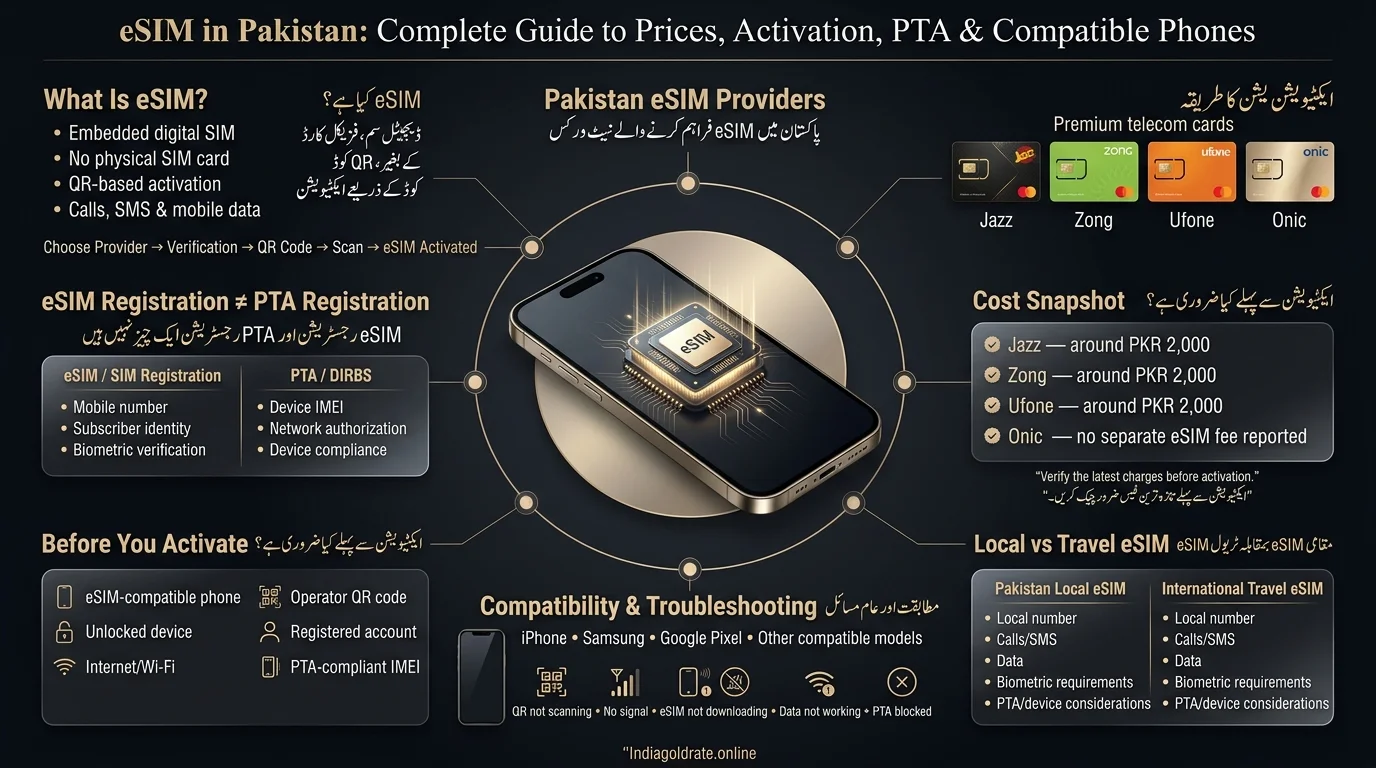
eSIM vs Physical SIM
| Feature | eSIM | Physical SIM |
| Physical card | No | Yes |
| Installation | Digital (QR code) | Insert card |
| Switching profiles | Easier, done in phone settings | Requires physically replacing the card |
| Device compatibility | Required (not all phones support it) | Broad, works on almost any phone |
| Security | Digital profile, tied to device | Physical card, can be removed/stolen |
How eSIM Technology Works
- An operator issues a profile linked to a QR code.
- Scanning the QR code on a smartphone allows the eSIM profile to download and connect to the network.
- The operator maps the user’s number and biometric identity (in Pakistan) to a digital profile, instead of using a physical chip.
- Functions like calls, SMS, data, and roaming operate the same way as with a regular SIM.
Is eSIM Available in Pakistan in 2026?
As of 2026, eSIM is available from Jazz, Zong, Ufone, and Onic. Each operator has its own registration and biometric verification process, and availability may vary by device model, city, and outlet. It’s advisable to check current requirements with the chosen operator before visiting.
Read Also: Telenor SIM Owner Details
| Provider | eSIM Available | New Number | Physical → eSIM Conversion | Biometric Verification | Activation Method |
| Jazz | Yes | Yes | Yes | Required | QR code |
| Zong | Yes | Yes | Yes | Required | QR code |
| Ufone | Yes | Yes | Yes | Required | QR code |
| Onic | Yes | Yes (app-based) | Digital process | Digital biometric workflow | App / online, doorstep delivery |
Zong and Ufone use a process that combines biometric verification with QR-based activation at service centers, while Jazz follows a similar approach through its franchises and Experience Centers. In contrast, Onic handles the entire signup, verification, and activation process through its mobile app, eliminating the need for in-person visits.
eSIM Registration vs PTA Registration: What’s the Difference?
The text clarifies that obtaining an eSIM in Pakistan is often misunderstood. It emphasizes that eSIM registration and the phone’s PTA/DIRBS status are separate matters, and activating an eSIM does not guarantee the phone is approved for long-term use on Pakistani networks.
What Is eSIM/SIM Registration?
This is about you as a subscriber. It covers:
- Your mobile number and subscriber identity
- Your operator account
- Biometric verification (matching your CNIC/NICOP/passport to your fingerprint)
- Proof of SIM ownership
What Is PTA/DIRBS Registration?
This is about your device. It covers:
- Your phone’s unique IMEI number
- Whether that IMEI is authorized to work on Pakistani mobile networks
- DIRBS (the Device Identification, Registration and Blocking System) status
- PTA compliance and any applicable device taxes or registration fees
Why Does This Matter?
Activating an eSIM does not automatically mean your phone is PTA-approved, as SIM registration and device registration operate on separate systems. Zong and Ufone emphasize that activating an eSIM registers a distinct eSIM IMEI, and users must report both IMEIs to DIRBS to avoid connectivity issues. Remember: SIM registration is linked to your mobile number, while PTA/DIRBS registration is linked to your device’s IMEI.
PTA & DIRBS eSIM Guide
Does an eSIM Phone Need PTA Registration?
eSIM does not bypass PTA/DIRBS rules; it is just a different method for provisioning a SIM profile. The requirement for a device’s IMEI to be authorized for use on Pakistani networks remains applicable, regardless of using a physical SIM or an eSIM.
How to Find Your IMEI
- Dial *#06# on your phone to display the IMEI instantly.
- Or check under phone settings (usually Settings → About Phone → Status/IMEI Information).
- Dual-SIM and eSIM-capable phones typically show two numbers: IMEI 1 and IMEI 2.
What Happens With Dual-SIM/eSIM Phones?
Many modern phones can use both a physical SIM and an eSIM or have two eSIM profiles simultaneously, resulting in two separate IMEIs. When activating an eSIM, operators like Zong require customers to submit both IMEIs via SMS to ensure DIRBS recognizes the new eSIM-linked IMEI and does not flag it.
How to Check PTA/DIRBS Status
To check if your device’s IMEI is PTA-compliant, send your IMEI via SMS to PTA’s DIRBS short code or visit their official DIRBS web portal. This process is independent of your mobile operator and remains the same when switching from a physical SIM to an eSIM.
Read Also: Check Jazz SIM Owner Name and Registration Details
What If the Phone Is Not PTA Compliant?
If a device isn’t PTA-registered:
- It may eventually be blocked from using local mobile networks (cellular service, not Wi-Fi).
- You may need to pay applicable device registration/tax charges to get it compliant.
- Each operator can walk you through the specific IMEI-reporting steps needed after eSIM activation.
- Travelers and temporary visitors may have different, time-limited allowances — check current PTA guidance for your exact situation, since these rules can change.
The text advises that the section reflects common practices among operators regarding PTA/DIRBS but emphasizes the importance of verifying against PTA’s official rules, as the device-registration policy may change.
eSIM Prices in Pakistan
Current eSIM activation charges are one-time issuance fees, and users will still need to purchase a prepaid or postpaid package in addition.
| Provider | Current eSIM Charge | New Number | Existing Number Conversion |
| Jazz | PKR 2,000 (excluding standard number charges) | Yes | Yes |
| Zong | PKR 2,000 | Yes | Yes |
| Ufone | PKR 2,000 (excluding special number charges) | Yes | Yes |
| Onic | No separate eSIM fee reported; standard plan/SIM charges apply | Yes (app-based) | — |
The current average charge across Jazz, Zong, and Ufone for plans is PKR 2,000, although some third-party sites may show outdated figures. Onic does not impose additional fees for eSIMs compared to physical SIMs; users only pay for their selected plan. It is important to check the official website or app of the operator for the most accurate and current pricing information before making a purchase.
Jazz eSIM Pakistan: Registration & Activation
How to Get a Jazz eSIM
To obtain an eSIM from Jazz, follow these steps:
- Visit an eligible Jazz Franchise or Experience Center.
- Complete biometric verification using your CNIC, NICOP, or passport.
- Receive a QR code on a physical voucher.
- Connect your phone to the internet.
- Scan the QR code from your phone’s cellular/eSIM settings and confirm activation.
Additional Details:
- In-person biometric verification is required for eSIM issuance.
- The eSIM charge is PKR 2,000, excluding standard number charges.
- Available for both new and existing Jazz customers.
- Converting from a physical SIM to eSIM deactivates the old SIM.
- Treat the QR code like a password, as it’s linked to your number.
- Activation is typically quick, often within minutes once connected to the internet
Zong eSIM Pakistan: Registration & Activation
How to Get a Zong eSIM
- Visit a Zong Customer Service Centre, Franchise, or Self Service Booth.
- Choose either Book Your Number (BYN) for a new number, or request a SIM Replacement to convert an existing Zong number.
- Complete BVS (Biometric Verification System) registration.
- Receive an eSIM voucher containing your QR code.
- Scan the QR code under your phone’s cellular settings.
- The eSIM profile downloads and activates — you may be prompted for a default PIN during setup.
Zong allows both new-number and existing-number conversions for eSIM, requires BVS, activates via QR code, and currently charges PKR 2,000 for eSIM issuance (previously listed at PKR 1,500). It’s advisable to verify the current rate before proceeding.
Zong eSIM & PTA/DIRBS
Zong advises that activating an eSIM generates a new eSIM-specific IMEI. To prevent blocking due to DIRBS, customers should report both their physical and eSIM IMEIs via SMS to Zong’s designated short code shortly after activation.
Ufone eSIM Pakistan: Registration & Activation
How to Get a Ufone eSIM
- Visit a Ufone Service Center, Franchise, or a Self-Service Booth (many operate 24/7).
- Complete BVS registration.
- Receive your eSIM jacket, which contains the QR code.
- Scan the QR code from your phone’s settings.
- The profile downloads, and your eSIM is ready to use.
Ufone charges a flat fee of PKR 2,000 for both new eSIM numbers and for converting an existing physical Ufone SIM into an eSIM, not including any charges for special numbers.
Ufone eSIM & PTA/DIRBS
Activating a Ufone eSIM creates a unique IMEI for that profile. It’s important to ensure your device complies with PTA/DIRBS regulations and to follow Ufone’s guidelines for reporting IMEIs if necessary.
Ufone eSIM Restrictions
A few limitations are worth knowing before you switch to Ufone’s eSIM service:
- Carrier-Locked Devices: Ufone does not support carrier-locked handsets. Unlock your device before downloading the eSIM.
- Apple Watch Support: Ufone currently does not support Apple Watch with its eSIM service.
- Device Compatibility: Check Ufone’s official list of compatible devices before visiting a service center to make sure your handset supports the eSIM service.
Onic eSIM & Digital SIM in Pakistan
Onic is a digital-first telecom brand in Pakistan that operates on Ufone’s network. Its onboarding process is completed entirely through its app, rather than requiring a visit to a franchise.
How it works:
- Download the Onic app and sign up with your email.
- Browse and select a plan.
- Choose the eSIM option during setup (a physical SIM with doorstep delivery is also available if you prefer).
- Pick a new number or port in an existing one.
- Complete your profile and payment details.
- Complete biometric verification for the physical SIM route; this happens via a delivery rider; for pure eSIM activation, it’s handled digitally through the app’s workflow.
- Once verified, your eSIM activates directly on your device.
Onic’s eSIM activation is app-based, unlike Jazz, Zong, and Ufone, eliminating the need for in-person visits. This supports Onic’s digital network focus. Users should check the app for updates on availability and requirements, as these are frequently updated.
How to Activate an eSIM on iPhone & Android
The steps to add an eSIM vary by device but are generally similar:
- iPhone: Settings → Cellular/Mobile Data → Add eSIM → Use QR Code
- Samsung: Settings → Connections → SIM Manager → Add eSIM
- Google Pixel: Settings → Network & Internet → SIMs → Add SIM
Menu wording may differ based on the iOS or Android version, so look for options like “Add eSIM,” “Add Cellular Plan,” or “Add Mobile Plan.
What You Need Before Activation
- An eSIM-compatible phone
- An unlocked device (required by some operators, like Ufone)
- An active internet connection (Wi-Fi is usually easiest)
- Your operator’s QR code
- A registered account/number with the operator
- A valid, PTA-compliant device/IMEI status
Zong requires a Wi-Fi connection before scanning the QR code on iPhone and Android, a common need among operators for downloading the eSIM profile.
How to Convert a Physical SIM to eSIM
Can you convert a physical SIM to eSIM in Pakistan? Yes, and the process is broadly consistent across operators:
- Request the conversion from your operator (in-store or via app, depending on the provider).
- Complete the required biometric or identity verification.
- Receive your QR code or digital profile.
- Install the profile on your device.
- Confirm the new eSIM connects to the network.
- Your old physical SIM becomes inactive once the eSIM takes over, following the operator’s standard process.
Both Zong and Ufone explicitly support this exact workflow for existing numbers; you don’t need to give up your current mobile number to make the switch.
Which Phones Support eSIM in Pakistan?
- Apple: iPhone XR, XS, and later support eSIM, but availability depends on regional model variants.
- Samsung: Selected Galaxy S, Note, Fold, and Flip series devices may support eSIM based on model year and region.
- Google: Pixel 3 and later generally support eSIM, with regional variations based on carriers.
- Other Brands: Some models from Motorola, Xiaomi, OnePlus, Oppo, Huawei, etc., support eSIM, but availability is inconsistent.
Important Note: Not all phones in a series necessarily support eSIM. Always check specific models and regions for eSIM support by looking for an EID in settings and consulting carrier lists.
Can You Use eSIM on a Non-PTA Phone?
- Pakistani Local eSIM: Requires the device’s IMEI to meet PTA/DIRBS requirements for service, similar to a physical SIM. eSIM technology doesn’t change device authorization rules.
- International Travel eSIM: Typically data-only and tied to foreign networks, may not require PTA registration. It’s not equivalent to a local Pakistani subscription.
- Wi-Fi vs Cellular Service: eSIMs do not bypass device-network authorization. Non-PTA-compliant phones can use Wi-Fi but may face cellular service restrictions.
- Dual-SIM/Non-PTA Scenarios: Users must check the IMEI status of each slot individually, especially in dual-SIM or eSIM devices, instead of assuming overall compliance.
Local eSIM vs International Travel eSIM
| Feature | Pakistani Local eSIM | Travel eSIM |
| Pakistani mobile number | Usually yes | Often no |
| Local operator | Yes (Jazz/Zong/Ufone/Onic) | Usually a roaming/partner network |
| Biometric verification | Relevant, typically required | Provider-dependent |
| Calls/SMS | Usually included | Often data-only |
| PTA/device considerations | Important, ongoing | Depends on the specific scenario |
| Best for | Residents, long-term users | Visitors, short-term travel |
- For residents of Pakistan needing a local number with full calling and messaging, a local operator eSIM is recommended.
- For short visits primarily focused on data, a travel eSIM is more convenient.
- A travel eSIM is not suitable as a substitute for local registration for long-term stays.
eSIM Troubleshooting Guide
| Problem | Possible Cause | Fix |
| QR code won’t scan | Invalid or already-used QR code | Contact your operator for a new one |
| No signal after activation | Network or profile issue | Restart the device, recheck cellular/eSIM settings |
| eSIM won’t download | No internet connection during setup | Connect to Wi-Fi and retry |
| Data doesn’t work | Incorrect APN or network settings | Check/update operator APN settings |
| eSIM disappeared | Profile deleted (often after a factory reset) | Contact your operator for a fresh QR code |
| Phone shows as blocked | PTA/DIRBS non-compliance | Check IMEI status and complete required registration |
| Can’t install eSIM | Device incompatibility | Confirm your exact model supports eSIM |
| Transfer to new phone fails | Carrier-imposed limitations on QR reuse | Request a new profile/QR code from your operator |
Is eSIM Safe? Security & Privacy
- eSIM is considered at least as secure as a physical SIM, with precautions necessary for safety.
- Treat the QR code for eSIM like a password, as it is directly linked to your number.
- Secure your operator account and identity verification to prevent SIM-swap risks.
- While eSIM profiles are harder to remove, losing your device still compromises your account.
- Manage eSIM profiles only through official operator channels.
- Jazz and Zong advise customers not to share their eSIM QR code.
- Follow standard mobile security practices: use a screen lock, enable security options, and report lost devices promptly.
eSIM vs Physical SIM: Which Is Better?
| Category | eSIM | Physical SIM |
| Convenience | Higher no-card handling | Lower: requires physical swap |
| Security | Strong, but device-dependent | Strong, but card can be lost/stolen |
| Switching phones | Requires new QR code from operator | Simple move the card |
| Multiple numbers | Easier on supported devices | Requires multiple physical cards |
| Travel | Very convenient with supported eSIMs | Requires local SIM purchase abroad |
| Compatibility | Limited to newer/supported devices | Works on nearly any phone |
| Activation | Digital, in-store biometric visit still required in Pakistan | In-store biometric visit required |
| Repair/replacement | Needs operator visit for a new QR | Needs operator visit for a new card |
The Future of eSIM in Pakistan
eSIM adoption in Pakistan is in its early stages, but several trends indicate its potential growth:
- eSIM + 5G: As 5G rolls out, eSIM will streamline the onboarding of new devices, eliminating physical SIM logistics.
- eSIM + IoT: eSIM’s remote provisioning capability is ideal for IoT devices such as smart meters and sensors, reducing the need for manual SIM swaps.
- eSIM + Smartwatches: Cellular smartwatches utilize eSIM technology, and while support among operators is uneven, this area is expected to expand.
- eSIM + Connected Cars: eSIM provisioning is becoming essential for automotive applications like navigation and diagnostics.
- eSIM + International Roaming: eSIM simplifies switching roaming profiles while traveling, enhancing convenience for users.
- eSIM as a Digital-First Telecom Model: Initiatives like Onic’s app-only onboarding suggest a shift towards digital identity and remote provisioning, though widespread adoption will depend on regulatory developments.
Conclusion
eSIM technology in Pakistan is evolving, but keep in mind two important points: eSIM registration is linked to your operator account and mobile number, while PTA/DIRBS pertains to your device’s IMEI and network compatibility. Jazz, Zong, Ufone, and Onic offer eSIM services. Jazz, Zong, and Ufone charge about PKR 2,000 with biometric verification, while Onic uses an app-based process. Ensure your device is eSIM compatible, check its IMEI/PTA status, and verify the latest requirements and pricing from your provider before activation.
پاکستان میں eSIM ٹیکنالوجی تیار ہو رہی ہے، لیکن دو اہم نکات کو ذہن میں رکھیں: eSIM رجسٹریشن آپ کے آپریٹر اکاؤنٹ اور موبائل نمبر سے منسلک ہے، جبکہ PTA/DIRBS آپ کے آلے کے IMEI اور نیٹ ورک کی مطابقت سے متعلق ہے۔ Jazz، Zong، Ufone، اور Onic eSIM خدمات پیش کرتے ہیں۔ Jazz، Zong، اور Ufone بائیو میٹرک تصدیق کے ساتھ تقریباً 2,000 روپے چارج کرتے ہیں، جبکہ اونک ایپ پر مبنی عمل کا استعمال کرتا ہے۔ یقینی بنائیں کہ آپ کا آلہ eSIM سے مطابقت رکھتا ہے، اس کا IMEI/PTA اسٹیٹس چیک کریں، اور ایکٹیویشن سے پہلے اپنے فراہم کنندہ سے تازہ ترین تقاضوں اور قیمتوں کی تصدیق کریں۔
Frequently Asked Questions
Is eSIM available in Pakistan?
Yes. Jazz, Zong, Ufone, and Onic all currently offer eSIM services, though exact requirements and pricing can vary by operator and should be confirmed before activation.
Which networks offer eSIM in Pakistan?
Jazz, Zong, Ufone, and Onic. Jazz, Zong, and Ufone use franchise-based biometric verification, while Onic runs primarily through its app.
How much does an eSIM cost in Pakistan?
Jazz, Zong, and Ufone currently list around PKR 2,000 for eSIM issuance, excluding special number charges. Onic doesn’t charge a separate eSIM fee beyond the selected plan.
Does eSIM require PTA registration?
eSIM issuance is separate from PTA/DIRBS device registration. Your phone’s IMEI still needs to meet PTA compliance requirements independently of your SIM/eSIM registration.
Does eSIM work on a non-PTA phone?
A non-PTA-compliant device may face cellular service restrictions whether it’s using a physical SIM or an eSIM. PTA compliance is a device-level requirement, not a SIM-type issue.
Can I convert my physical SIM to an eSIM?
Yes, Zong and Ufone (among others) explicitly support converting an existing number from a physical SIM to an eSIM through their service centers.
Can I use multiple eSIMs on one phone?
Many modern phones can store multiple eSIM profiles, though usually only one can be active for cellular service at a time. Check your specific device’s limits.
Disclaimer
The article provides general information about eSIM services in Pakistan, including pricing, activation procedures, biometric verification, PTA/DIRBS requirements, device compatibility, and operator policies. Key points include:
- eSIM policies and fees may change, so always check with the operator for the latest information.
- Activation and PTA/DIRBS registration are separate processes; an active eSIM does not guarantee PTA approval.
- Device compatibility varies by model and region.
- Users should consult official sources for accurate and current information.
- It’s important to keep eSIM QR codes, biometric info, and account credentials secure and only use official channels for transactions.
Sources & References
- Pakistan Telecommunication Authority (PTA): Guides SIM registration, device compliance, IMEI registration, and DIRBS.
- PTA DIRBS: A system for managing mobile device compliance in Pakistan.
- Jazz: Information on eSIM availability, registration, biometric verification, activation, and charges.
- Zong: Details on eSIM registration, BVS verification, QR-code activation, IMEI requirements, and pricing.
- Ufone: Information regarding eSIM availability, registration, biometric verification, activation, supported devices, and costs.
- Onic: App-based eSIM signup details, digital verification, plans, activation, and supported devices.
- GSMA: General technical information and standards for eSIM technology.
- NADRA: Identity verification related to subscriber verification with CNIC/NICOP.
Note: eSIM details such as prices and activation procedures can change, so it’s important to verify information with network operators or PTA.
[…] Read Also: eSIM in Pakistan: Complete Guide to Prices, Activation & PTA […]