How to Block Unauthorized SIM Online in Pakistan: PTA Guide 2026
If you find a mobile number registered against your CNIC that you didn’t activate, don’t panic. You can check which SIMs are registered to your CNIC online and report any unauthorized ones through your mobile operator or the PTA to block or remove them, usually without visiting a franchise. Unauthorized SIMs can result from data entry mistakes, reused details by shopkeepers, or misuse of your CNIC. It’s crucial to act quickly to protect yourself from potential fraud or identity theft, as unrecognized SIMs can be used for illegal activities. The guide provides steps to verify, report, and manage unauthorized SIMs through official PTA services to safeguard your identity and mobile records.
اگر آپ کو اپنے CNIC کے خلاف رجسٹرڈ موبائل نمبر ملتا ہے جسے آپ نے چالو نہیں کیا ہے، تو گھبرائیں نہیں۔ آپ چیک کر سکتے ہیں کہ کون سی سمز آپ کے CNIC میں آن لائن رجسٹرڈ ہیں اور کسی بھی غیر مجاز کی اطلاع اپنے موبائل آپریٹر یا PTA کے ذریعے بلاک یا ہٹانے کے لیے کر سکتے ہیں، عام طور پر کسی فرنچائز پر گئے بغیر۔ غیر مجاز سمیں ڈیٹا انٹری کی غلطیوں، دکانداروں کی جانب سے دوبارہ استعمال شدہ تفصیلات، یا آپ کے CNIC کے غلط استعمال کے نتیجے میں ہو سکتی ہیں۔ اپنے آپ کو ممکنہ دھوکہ دہی یا شناخت کی چوری سے بچانے کے لیے فوری کارروائی کرنا بہت ضروری ہے، کیونکہ غیر تسلیم شدہ سمز کو غیر قانونی سرگرمیوں کے لیے استعمال کیا جا سکتا ہے۔ یہ گائیڈ آپ کی شناخت اور موبائل ریکارڈ کی حفاظت کے لیے PTA کی آفیشل سروسز کے ذریعے غیر مجاز سمز کی تصدیق، رپورٹ اور ان کا نظم کرنے کے اقدامات فراہم کرتا ہے۔
Can I Block an Unauthorized SIM Online in Pakistan?
Verify SIMs linked to your CNIC via PTA’s service. For unrecognized numbers, contact the operator or file a PTA complaint to block it. Biometric re-verification may require a visit to the franchise.
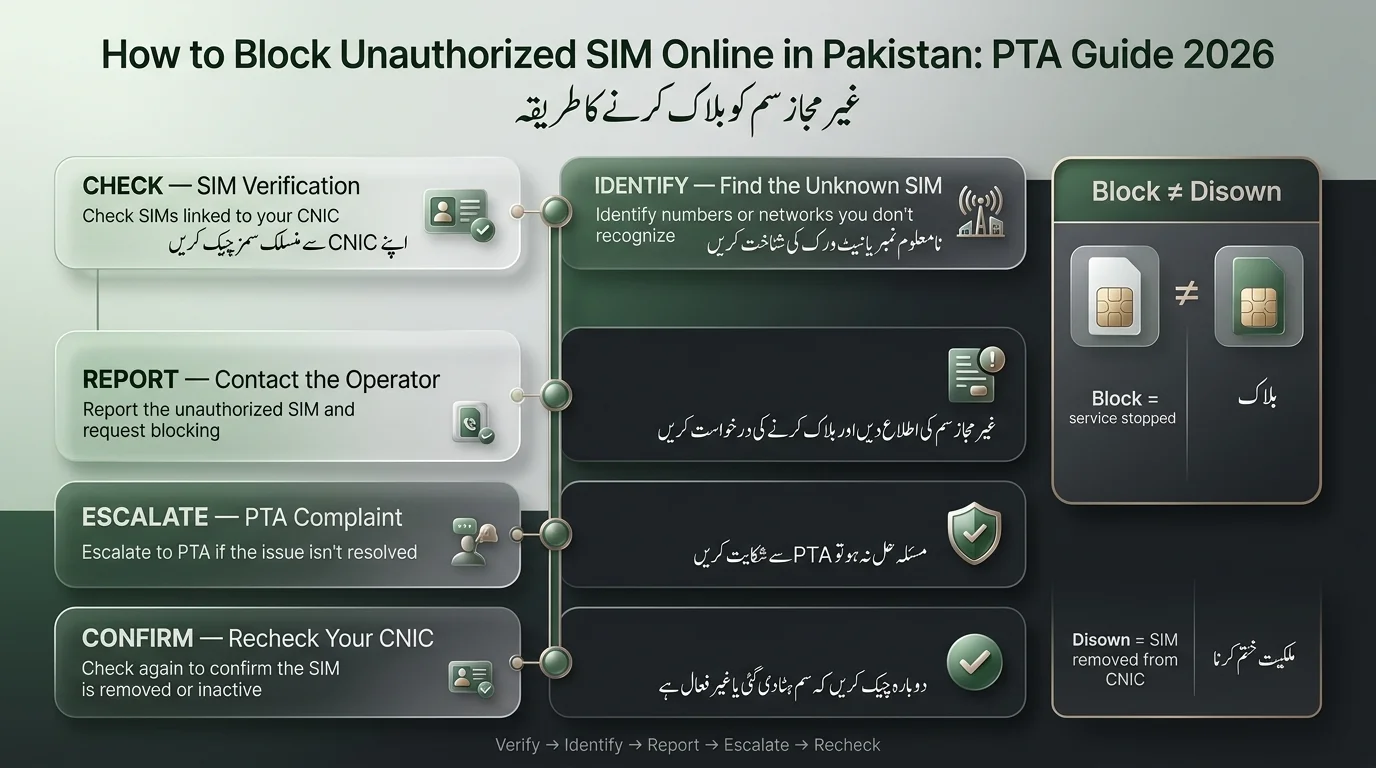
Here’s the general flow:
- Check which SIMs are registered against your CNIC using PTA’s official system.
- Identify the network and number you don’t recognize.
- Contact that operator directly and report it as unauthorized.
- If the operator doesn’t resolve it, escalate with a formal PTA complaint.
- Complete any verification or disowning paperwork the operator requires.
- Recheck your CNIC afterward to confirm the SIM is gone.
The text highlights that blocking a SIM suspends its use, while removing it from your CNIC disassociates the number from your identity card. Both actions can be necessary, and understanding this difference is important.
What Is an Unauthorized SIM Registered on Your CNIC?
An unauthorized SIM is a mobile connection on your PTA records that you did not register or recognize. It can include:
- A SIM that you never purchased or used.
- A connection issued using your CNIC without your knowledge.
- An old SIM you thought you surrendered but is still active.
- A record affected by a data mismatch, possibly misattributed to the wrong CNIC.
- A potential sign of identity theft or SIM fraud.
While not all cases are malicious, some may be administrative errors; it’s important to address them, as an unverified number linked to your CNIC remains your responsibility until formally removed.
How to Check SIMs Registered on Your CNIC
To check how many SIMs are registered against your identity card, you can use the PTA’s SIM Information System, which is a free service.
- Method 1: Visit PTA’s official website (pta.gov.pk) and enter your 13-digit CNIC number to see the count of registered SIMs by operator.
- Method 2: Send your CNIC number without dashes to 668 via SMS to receive the registration details, which incurs a small charge.
When reviewing the results, note the operators of each SIM, the total number per operator, and identify any numbers that you don’t recognize.
Important: Only use PTA’s official channels to check your information to avoid potential data harvesting by unofficial sites.
How to Identify an Unauthorized SIM on Your CNIC
After compiling a list of registered SIMs, confirm which ones belong to you.
Signs of potentially unauthorized SIMs include:
- Not purchased or activated by you.
- Unrecognized operator or number.
- Previously surrendered but still active.
- Associated with someone else’s number on record.
- Registered without your consent.
Caution against assuming fraud: Not all unfamiliar SIMs indicate identity theft. Numbers can be recycled by operators, and old records may carry forward incorrectly. Investigate with the operator before jumping to conclusions.
How to Block an Unauthorized SIM in Pakistan
- Identify the Mobile Network: Check your SIM status using 668 or the PTA portal to determine which operator issued the SIM (Jazz, Zong, Ufone, Telenor, SCO, or ONIC).
- Contact the Relevant Operator: Reach out to the operator’s customer support and report the unauthorized SIM, requesting to register a complaint, suspend/block the connection, and inquire about disowning it. Note details of the conversation.
- File a PTA Complaint Online: If the operator does not act, file a complaint with the PTA through their online Complaint Management System, providing necessary details like your CNIC, operator name, and complaint reference number.
- Complete Biometric Verification if Required: If necessary, visit an authorized franchise with your CNIC for re-verification or to disown the SIM, especially in ownership disputes.
- Confirm the Resolution: After being informed of any action taken, verify that the SIM has been removed or marked as inactive by checking your CNIC status again.
How to Remove an Unauthorized SIM From Your CNIC
Blocking a SIM stops it from working, while removing (or disowning) it permanently detaches the number from your CNIC record.
You can start the removal process for an unauthorized SIM online, including submitting a complaint, but not all cases can be resolved without visiting a franchise.
In-person visits may be necessary if:
- Biometric re-verification is needed.
- There’s an active ownership dispute.
- Corrections to your CNIC or registration details are required.
- The operator’s policy mandates a signed physical undertaking for disowning.
How to Report an Unauthorized SIM to PTA
When to File a PTA Complaint
- If the operator hasn’t resolved your complaint in a reasonable time.
- If the SIM was registered without your consent.
- If you suspect misuse of your identity documents.
- If registration details are incorrect after the operator addressed the SIM count.
Information to Keep
- Your CNIC number.
- The mobile network involved.
- Details of the unauthorized SIM/number.
- Operator complaint/reference number.
- PTA complaint number after filing.
- Screenshots of SIM check results and confirmation messages.
After Filing a Complaint
- PTA logs the complaint and forwards it to the relevant operator for action.
- Resolution times vary based on case complexity, so check your complaint status periodically.
How to Block an Unauthorized SIM by Network
The process for reporting unauthorized SIMs is consistent across operators, but each has different support channels:
- Jazz: Call 111 or use the Jazz World app; report the issue and request blocking. Verification may require a visit with your CNIC.
- Zong: Dial 310 or use the My Zong app; report the number and request it be blocked. May require a franchise visit for biometric confirmation.
- Ufone: Call 333 or use the Ufone app; report and get a complaint number. In-person disowning is available at franchises if needed.
- Telenor: Dial 345 or use the My Telenor app; report the unauthorized SIM and request suspension, following any verification steps required.
- SCO: Contact SCO’s customer support directly or visit a local service center, as complaint channels are more regionally based.
- ONIC: Use the ONIC app for support; if unresolved, the Ufone helpline can also assist due to shared infrastructure.
How to Block a SIM If You Don’t Know the Number
- Check your CNIC for registered SIMs using the PTA portal or 668.
- Note the number of SIMs registered per operator.
- Identify the unrecognized SIM based on the count mismatch.
- Contact the operator of the extra SIM to explain the situation.
- Follow their identity verification process to resolve the issue.
- If unresolved, escalate the matter to PTA as a formal complaint.
What to Do If Someone Registered a SIM Using Your CNIC
Report Unauthorized Registration: If you suspect your identity documents were misused, file complaints with both the operator and the PTA, specifying that it was done without your consent.
Protect Your CNIC Information
- Avoid sharing copies of your CNIC unless necessary.
- Do not enter your CNIC number on unofficial SIM check websites.
- Never share OTPs with anyone purporting to be from your operator or PTA.
Use Official Channels: Always communicate through official telecom and PTA channels regarding your CNIC and SIM registration.
Keep Evidence: Maintain a record of all relevant documentation, including screenshots, complaint numbers, and SMS confirmations, to facilitate future processes.
Block vs Disown vs Deactivate: What’s the Difference?
The text highlights that certain terms are often used interchangeably, but they have distinct meanings. Understanding these differences is crucial for reducing confusion when communicating with customer support.
| Action | Meaning | Main Purpose |
| Block | Restricts or stops SIM service temporarily | Immediate protection while a complaint is reviewed |
| Disown | Removes the ownership association from your CNIC | Fixing unknown/unauthorized SIM registrations |
| Deactivate | Terminates the connection entirely | Ending service for a number you no longer need |
| Complaint | Formally reports a disputed registration | Triggers investigation and resolution by the operator/PTA |
What Happens After Blocking an Unauthorized SIM?
When a SIM is blocked, its service calls, texts, and data are suspended, but this does not guarantee that the related CNIC records have been updated. The number may still be linked to the CNIC unless an explicit disowning step is taken. It’s important to confirm with the operator if blocking includes a CNIC update and to perform a SIM check afterward for verification.
How to Check If the Unauthorized SIM Was Removed From Your CNIC
To ensure an issue is resolved, perform a CNIC check through 668 or the PTA portal to confirm that the SIM count for the operator has decreased or the number has disappeared. This cycle of checking, reporting, resolving, and rechecking is essential whenever there’s uncertainty about the fix.
Common Problems When Blocking an Unauthorized SIM
- SIM Still Appears After Complaint: Wait a few days for CNIC updates; if still unresolved, follow up using the PTA complaint reference number.
- Visit Franchise Required: This usually involves biometric re-verification; bring your original CNIC and existing complaint numbers.
- SIM Number Unknown: Identify the operator and let their support team retrieve the number after verifying your identity.
- SIM Belongs to Someone You Know: If it’s a family member using your CNIC, the operator can transfer or re-register it instead of treating it as fraud.
- PTA Complaint Not Resolved: Check the status using your complaint reference number; request an update if it’s been open too long.
- Accidentally Blocked Wrong SIM: Contact the operator quickly to explain and request a reversal of the block.
Read Also: 667 & 668 SMS Not Working
How to Prevent Unauthorized SIMs From Being Registered on Your CNIC
- Check registered SIMs regularly.
- Avoid sharing CNIC copies unless necessary.
- Purchase SIMs only from authorized sellers.
- Never share OTPs, even with supposed operators.
- Verify details at the time of purchase.
- Report suspicious activity promptly.
Final Verdict
The entire procedure, from beginning to end, revolves around one straightforward cycle: verify your CNIC, identify any unauthorized SIMs, reach out to the operator, escalate the matter to PTA if necessary, complete either the verification process or disown the SIM, and check again to ensure it’s been removed. Most of this can be handled directly from your phone. Make it a routine to check your registered SIMs regularly instead of only doing it when something seems off. This is the simplest way to detect identity misuse early on, preventing it from escalating into a larger issue.
شروع سے آخر تک پورا طریقہ کار ایک سیدھے سائیکل کے گرد گھومتا ہے: اپنے CNIC کی تصدیق کریں، کسی بھی غیر مجاز سم کی شناخت کریں، آپریٹر تک پہنچیں، اگر ضروری ہو تو معاملے کو PTA تک پہنچائیں، یا تو تصدیق کا عمل مکمل کریں یا سم کو مسترد کریں، اور اس بات کو یقینی بنانے کے لیے دوبارہ چیک کریں کہ اسے ہٹا دیا گیا ہے۔ اس میں سے زیادہ تر کو براہ راست آپ کے فون سے ہینڈل کیا جا سکتا ہے۔ اپنی رجسٹرڈ سمز کو باقاعدگی سے چیک کرنا معمول بنالیں بجائے اس کے کہ جب کوئی چیز بند نظر آئے۔ شناخت کے غلط استعمال کا ابتدائی طور پر پتہ لگانے کا یہ سب سے آسان طریقہ ہے، اسے کسی بڑے مسئلے میں بڑھنے سے روکتا ہے۔
Frequently Asked Questions
How can I block an unauthorized SIM online in Pakistan?
Check your CNIC through PTA’s 668 shortcode or online portal, identify the network, then contact that operator or file a PTA complaint online to have the number blocked.
How do I remove an unknown SIM from my CNIC?
Report it to the operator and request disowning; some cases resolve online, while others need a franchise visit for biometric verification.
Can I block a SIM without knowing its number?
Yes, identify the operator from a mismatch in your SIM count, then let their support team pinpoint and act on the specific connection.
Can PTA block an unauthorized SIM?
PTA can direct operators to block or investigate a SIM through a formal complaint filed via its Complaint Management System.
How do I report a fake SIM registered on my CNIC?
Contact the relevant operator first, then escalate to PTA’s online complaint system if it isn’t resolved satisfactorily.
Does blocking a SIM remove it from my CNIC?
Not automatically; blocking suspends service, but full removal from your CNIC record usually requires a separate disowning step.
Do I need to visit a franchise to disown a SIM?
Sometimes. It’s often required when biometric verification or an ownership dispute is involved, though many simple cases can be handled remotely.
Disclaimer
This article serves as a general informational guide regarding SIM verification and telecom policies. Key points include:
- Information may change over time, so users should check official channels for the latest requirements.
- Unauthorized SIM registrations may require additional verification and cannot always be resolved online.
- Users should never share sensitive information like CNIC details or passwords with unofficial sources.
- For issues related to identity misuse or fraud, contact the relevant telecom operator or PTA through their official channels.
- The article’s publisher is not affiliated with PTA or any telecom operators unless stated.
Sources & References
- PTA / National CERT Cyber Crime Guide: Advises checking and blocking illegal SIMs.
- PTA Complaint Management System (CMS) allows consumers to register and track telecom complaints.
- NADRA National Registration & Biometric Policy: Requires fingerprint matching with CNIC for SIM transactions.