Check Zong Owner Details Online in Pakistan
The text highlights the need to verify SIM ownership in Pakistan to prevent fraud and identity misuse. It encourages checking the number of SIMs linked to one’s CNIC and describes methods for verifying Zong details through channels like SMS to 668, the My Zong App, the PTA SIM Information System, or Zong service centers, ensuring safe checks without accessing others’ personal information.
متن میں دھوکہ دہی اور شناخت کے غلط استعمال کو روکنے کے لیے پاکستان میں سم کی ملکیت کی تصدیق کرنے کی ضرورت پر روشنی ڈالی گئی ہے۔ یہ کسی کے CNIC سے منسلک سمز کی تعداد کو چیک کرنے کی حوصلہ افزائی کرتا ہے اور Zong کی تفصیلات کی تصدیق کے طریقوں کو بیان کرتا ہے جیسے کہ 668 پر SMS، My Zong App، PTA سم انفارمیشن سسٹم، یا Zong سروس سینٹرز، دوسروں کی ذاتی معلومات تک رسائی کے بغیر محفوظ چیک کو یقینی بنانا۔
What Are Zong Owner Details?
- Zong owner details refer to the ownership information of a SIM card in Pakistan, but it’s not a public directory for anyone to access.
- SIM owner details include the registered owner’s name, CNIC association, and registration status (active, verified, or flagged).
- SIM ownership verification is important for security, fraud prevention, and identity protection.
- Access to SIM ownership information is restricted to the registered owner, PTA-authorized channels, and telecom operators like Zong.
- For checking the number of SIM cards linked to your identity across all networks, a guide on how to check SIM Owner Details in Pakistan is available.
Is It Legal to Check Zong Owner Details Online?
This is one of the most common questions people ask, and the answer is nuanced.
PTA Rules Regarding SIM Ownership
Pakistan’s telecom regulations classify CNIC-linked SIM data as protected personal information. Key points include:
- Privacy laws prohibit telecom operators and the PTA from sharing another person’s registered name or CNIC number with third parties.
- You can only verify SIM ownership for those registered under your own CNIC.
- Authorized channels for verification are limited to PTA’s SMS system, the operator’s official app, or in person at service centers, and are restricted to your own records.
What Information Is Publicly Available?
- You can confirm the number of SIMs registered against your CNIC and their networks through official channels.
- You can check the status of your SIM (active, inactive, or pending biometric re-verification).
- It is illegal to obtain another person’s personal information by entering their phone number online.
Risks of Using Unofficial SIM Lookup Websites
- Many websites and Telegram channels claim to provide “instant Zong number tracker” or “SIM database” services, but these are often unsafe.
- Risks include data theft, scams involving fake verification fees, and privacy violations due to outdated or illegally obtained information.
- There is no legal way to check someone else’s Zong SIM details online; individuals can only verify SIMs registered under their own CNIC.
- To report harassment or fraud involving a number, it’s advised to contact Zong customer support or file a complaint with PTA, rather than using third-party lookup tools.
Why People Check Zong Owner Details
Users often search for Zong Owner Details or SIM Number Details primarily to verify that their SIM card is registered under their own CNIC and to check for any unauthorized mobile numbers linked to their identity.
Common reasons for checking Zong SIM ownership include:
- Verify SIM registration linked to your CNIC.
- Check the number of active SIMs registered on your CNIC.
- Confirm the ownership details of your SIM.
- Protect against fraud and identity theft.
- Manage personal or business SIM cards.
- Resolve issues related to lost or blocked SIMs.
- Keep mobile information updated.
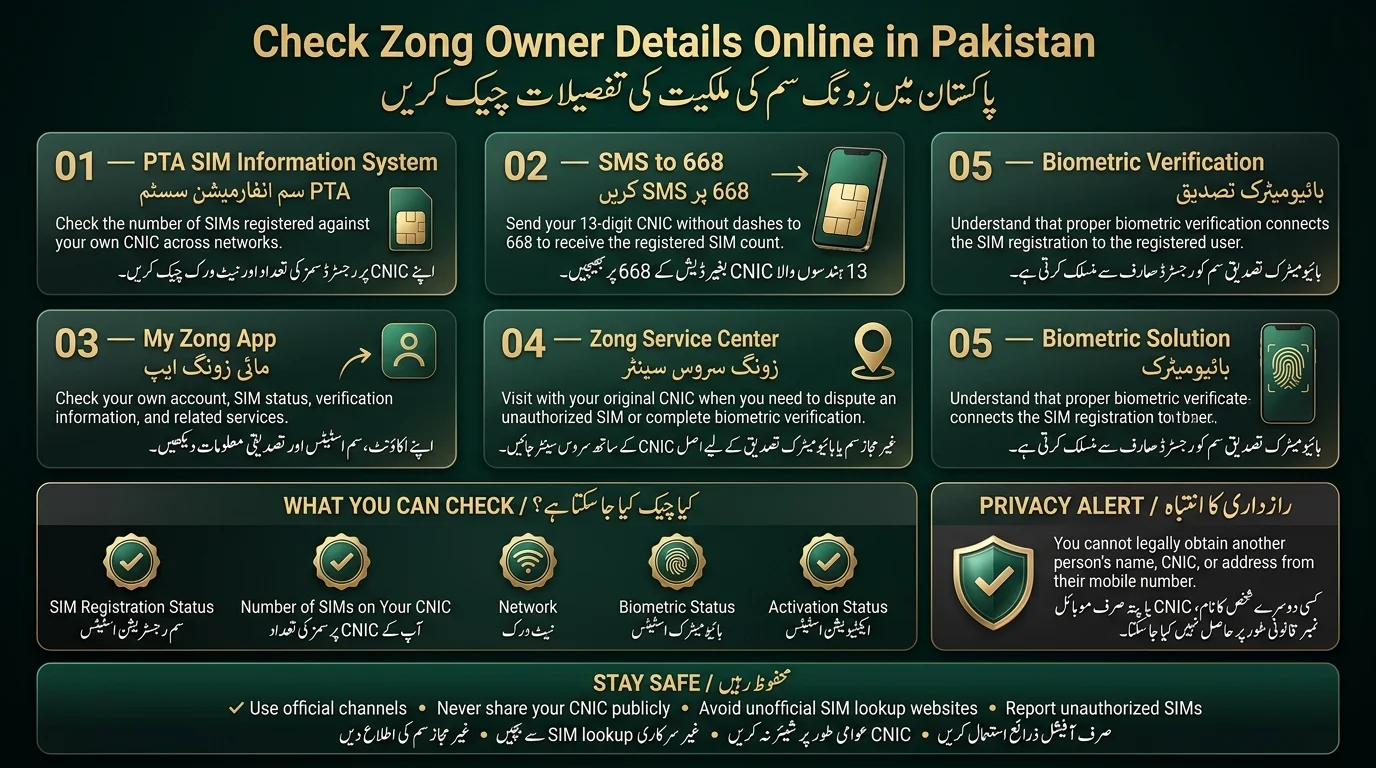
5 Official Ways to Check Zong Owner Details
Here are the legitimate, PTA-recognized methods for checking SIM ownership and registration information tied to your CNIC.
Method 1: Check Through the PTA SIM Information System
The PTA offers a system for citizens to check the number of SIMs registered against their CNIC across all telecom operators, including Zong.
Steps to Use
- Visit the PTA SIM Information System portal.
- Enter your CNIC number.
- Submit to view the total count of SIMs by operator.
Benefits
- Covers all networks in one place.
- Free to use, no app download required.
Limitations
- Provides only count and operator information, not personal details.
- May face downtime during high traffic.
Pro Tip: Check regularly if you’ve shared your CNIC photocopy, as it can lead to unauthorized SIM registrations.
Method 2: Send CNIC to 668
Method: Fastest way to check SIMs registered against a CNIC without internet; requires a working SIM and SMS balance.
Procedure
- Open the messaging app.
- Type 13-digit CNIC (no dashes) in the message.
- Send to 668.
Expected Response: Automated SMS with the number of SIMs registered to that CNIC.
Common Errors
- No reply: Due to network congestion or service outage.
- Invalid CNIC format: Caused by dashes, spaces, or extra digits.
- Delayed response: Longer wait times during peak hours.
Method 3: Check via My Zong App
Zong’s official app offers account holders personalized SIM information.
Steps to use the app
- Download the My Zong App from Google Play or Apple App Store.
- Log in with your registered mobile number and verify via OTP.
- Access the account or SIM information section for status details.
Benefits
- View real-time balance, package, and verification status.
- Manage biometric re-verification reminders and account actions conveniently.
- Ideal for existing Zong customers with accounts.
Method 4: Visit a Zong Service Center
For disputing unauthorized SIM registrations, visiting a Zong Customer Service Center is recommended.
Required Documents
- Original CNIC
- The phone number (if known)
Verification Process
- Staff can access your CNIC’s registration record to verify linked numbers and assist with discrepancies or deactivation requests.
When Physical Verification Is Necessary
- To formally dispute or block an unauthorized SIM
- When online or SMS methods provide unclear results
- For biometric re-verification of a new or existing SIM
Method 5 – Biometric Verification Check
- PTA has made biometric verification mandatory to ensure SIMs are properly and legally registered.
- Biometric verification ties the SIM to a fingerprint at registration, preventing fraudulent registrations using stolen CNICs.
- Users can check their Zong SIM’s biometric status via the My Zong App, helpline codes, or at service centers.
- If a SIM’s biometric status has lapsed or wasn’t completed, users must visit a Zong franchise or service center with their original CNIC for re-verification.
- SIMs lacking proper biometric verification may experience service restrictions, including suspension of calls, SMS, or mobile data.
How to Check How Many Zong SIMs Are Registered on Your CNIC
- Users want to know how many SIMs are registered under their name, regardless of the telecom operator.
- The PTA SIM Information System portal provides comprehensive data across all networks.
- To quickly check the number of SIMs, send your 13-digit CNIC (no dashes) to 668 via SMS for an automated response.
Results may show
- Active SIMs: Currently in use.
- Inactive SIMs: Registered but not in use.
- Unknown registrations: Numbers that are not recognized, prompting further investigation.
Zong Number Prefix List in Pakistan
Knowing Zong’s number prefixes can help you quickly identify which network a number belongs to before you even start the verification process.
Read Also: Check Jazz SIM Owner Name and Registration Details
| Prefix | Network |
| 0310 | Zong |
| 0311 | Zong |
| 0312 | Zong |
| 0313 | Zong |
| 0314 | Zong |
| 0315 | Zong |
| 0316 | Zong |
| 0317 | Zong |
| 0318 | Zong |
- Prefixes Identify Networks: Each operator in Pakistan has specific number ranges assigned by the PTA, allowing prefixes to indicate which company issued the SIM. This helps direct complaints or verification requests.
- Number Portability Considerations: Pakistan’s Mobile Number Portability (MNP) service enables users to switch operators while retaining their original number. As a result, a number with a Zong prefix could now be on a different network, so it’s important to verify the current operator if there are discrepancies.
What to Do If an Unknown Zong SIM Is Registered on Your CNIC
- Verify the Registration: Confirm the unauthorized SIM via multiple channels (SMS to 668, PTA portal, service center).
- Contact Zong Support: Report the unauthorized number to Zong’s helpline and inquire about deactivation.
- Visit a Service Center: Bring your original CNIC to a Zong service center to start the dispute process.
- File a PTA Complaint: If the issue remains unresolved, escalate it through the PTA’s complaint system.
Action Checklist
- Check CNIC status via SMS/PTA portal
- Gather evidence (screenshots, dates)
- Report the unauthorized SIM to Zong
- Request formal deactivation and follow-up.
What Information Can Be Verified?
The official verification system of Zong and PTA allows you to verify the details about your own SIM card. However, if you need to validate details for someone else’s SIM card, then you must follow privacy laws in order to attain that information.
| Information | Verification Status |
| SIM Registration Status | Yes |
| Mobile Network (Zong) | Yes |
| Number of SIMs on Your CNIC | Yes |
| Biometric Verification Status | Available through official channels |
| SIM Activation Status | Yes |
| Personal Details of Another User | No |
| CNIC or Address of Another Person | Not Available |
Difference Between SIM Owner Details, SIM Verification & SIM Registration
The text emphasizes that certain terms are often used interchangeably but have distinct meanings. Recognizing the difference is important for users when checking their Zong SIM Owner Details or managing their mobile connection.
| Term | Meaning |
| SIM Owner Details | Information related to the registered owner of a SIM card, accessible only through authorized verification methods. |
| SIM Verification | The process of verifying that a SIM card is valid, active, and associated with the correct user through official channels. |
| SIM Registration | The initial process of registering a SIM card involves using a valid CNIC and biometric verification before activation. |
| SIM Ownership | Refers to the legal person under whose CNIC the SIM card is registered. |
| SIM Number Details | General information about a SIM, such as its network, registration status, and associated services. |
Benefits of Verifying SIM Ownership
Verifying your SIM ownership provides several benefits, including:
- Enhanced Security: Protects against unauthorized use of SIMs linked to your CNIC.
- Fraud Protection: Allows early identification of unknown or suspicious registrations.
- Accurate Registration: Ensures your SIM is registered under your name.
- Easy Account Management: Helps track all SIMs associated with your CNIC.
- Quick SIM Recovery: Simplifies replacing lost or blocked SIMs.
- Compliance with Regulations: Meets Pakistan’s telecom verification requirements.
- Peace of Mind: Ensures secure and properly managed mobile connections.
Common Problems When Checking Zong Owner Details
Verification doesn’t always go smoothly on the first try. Here are the issues people run into most often, and why they happen.
No Response From 668
If your SMS to 668 doesn’t get a reply, it’s usually one of these:
- Network issue: temporary connectivity problems on your end
- Incorrect CNIC format, extra spaces, dashes, or wrong digit count
- Service outage: PTA’s system is undergoing maintenance or experiencing high traffic
Information Does Not Match
Sometimes the results you get don’t line up with what you expected:
- Old registration records: your details may not have been updated after a past change
- Ported numbers: a number switched between operators via MNP, may show inconsistent info temporarily
- Verification delays: recent changes, which can take time to reflect across all systems
SIM Not Showing in PTA Records
If a SIM you know is active doesn’t appear in your count:
- Recently activated SIM new registrations sometimes take a short while to sync
- Database synchronization delay: occasional lag between the operator’s system and PTA’s central database
How to Stay Safe from SIM Ownership Scams
As SIM-related fraud increases, there has been a rise in scams targeting individuals seeking to verify SIM ownership. Many fake websites claim to provide instant SIM-to-owner lookups but lack legitimate access to official databases, often using outdated or guessed information. Entering personal details, such as a CNIC, on these sites can lead to data harvesting and potential misuse. Additionally, scams on social media and platforms like Telegram advertise access to SIM databases for a fee, typically to collect payment or personal information.
To protect your identity, it’s important to:
- Never share your CNIC publicly.
- Avoid suspicious verification tools outside of official channels.
- Utilize official methods for SIM-related inquiries, such as SMS to 668 or apps from legitimate providers.
- Regularly check your CNIC’s SIM count every few months to catch unauthorized registrations early.
Zong Customer Support Channels for Ownership Verification
Zong offers several support channels for direct assistance:
- Helpline: For SIM ownership, biometric re-verification, and account issues, with guidance to service centers if needed.
- My Zong App: Built-in support/chat option for ownership queries without calling or visiting.
- Franchise and Service Centers: Locations for in-person verification, biometric re-registration, and disputes over unauthorized SIMs.
- Official Website: Offers FAQs, complaint forms, and contact details for regional offices for written correspondence.
Conclusion
To verify Zong SIM ownership safely, use official channels like SMS to 668, the PTA SIM Information System, the My Zong App, or visit a service center. Protect your CNIC information by avoiding unreliable third-party websites and services. Regularly verify the numbers linked to your CNIC to guard against unauthorized registrations and identity misuse.
زونگ سم کی ملکیت کی بحفاظت تصدیق کرنے کے لیے، آفیشل چینلز جیسے 668 پر ایس ایم ایس، پی ٹی اے سم انفارمیشن سسٹم، مائی زونگ ایپ، یا سروس سینٹر کا دورہ کریں۔ غیر معتبر تھرڈ پارٹی ویب سائٹس اور سروسز سے گریز کرکے اپنی CNIC کی معلومات کو محفوظ رکھیں۔ غیر مجاز رجسٹریشن اور شناخت کے غلط استعمال سے بچنے کے لیے اپنے CNIC سے منسلک نمبروں کی باقاعدگی سے تصدیق کریں۔
Frequently Asked Questions
How can I check the Zong owner’s details online?
Use PTA-approved methods only: send your CNIC to 668 via SMS, use the PTA SIM Information System portal, check through the My Zong App, or visit a Zong service center in person. These methods confirm SIMs registered under your own CNIC.
Can I check SIM owner details using a mobile number?
Not for someone else’s number. You can only verify ownership information tied to your own CNIC through official channels. There’s no legitimate service that returns another person’s identity from just their phone number.
Is it legal to find someone else’s SIM ownership details?
SIM ownership data in Pakistan is protected, and accessing it through unofficial websites may be illegal.
How do I verify Zong SIM registration?
The quickest way is to send your CNIC to 668 via SMS, or check directly through the My Zong App if you already have an account set up.
How many SIMs can be registered on one CNIC?
PTA limits SIM registrations per CNIC. Check and deactivate any unused or unrecognized SIMs if you’re near the limit.
What should I do if a SIM is registered without my permission?
Report it to Zong customer support immediately, visit a service center with your original CNIC to formally dispute it, and escalate to PTA if the issue isn’t resolved promptly.
Disclaimer
- The article is for general informational and educational purposes only.
- SIM registration and ownership procedures and requirements may change over time.
- SIM ownership information is private and should be verified through official channels like PTA and Zong.
- Avoid relying on unofficial sources, such as social media or third-party databases, for SIM-owner information.
- Some SIM-related issues may require in-person visits to authorized service centers.
- Do not share sensitive information like CNIC, OTP, or PIN with unauthorized sources.
- The publisher is not responsible for any issues arising from reliance on unofficial services.
Sources & References
- Zong PTA Guidelines for SIM Purchase and Activation: Information on CNIC requirements, biometric verification, and SIM management.
- Zong Official Customer Support: Details on the Zong helpline, service centers, and complaint management.
- NADRA Official Verification Services: Information on biometric and identity verification services.
- PTA Complaint Management System: Details on how to register and manage complaints related to telecom services.
Note: Procedures and contact information may change; verify with official Zong, PTA, and NADRA websites for the latest updates.
[…] Zong […]
[…] Read Also: Check Zong Owner Details Online in Pakistan […]