Pakistan SIM Database: Official Guide, Facts & Verification
The Pakistan SIM Database, managed by the PTA, NADRA, and mobile operators, securely stores records of active SIM cards linked to verified CNICs. Only registered subscribers can check their SIM records through official PTA services, as no public database exists for SIM owner details. Checking is commonly done to verify linked SIMs, address unauthorized registrations, or respond to biometric re-verification messages. The guide outlines how to utilize official channels, the collaboration between PTA, NADRA, and telecom companies, and steps to take if discrepancies occur.
PTA، NADRA، اور موبائل آپریٹرز کے زیر انتظام پاکستان SIM ڈیٹا بیس، تصدیق شدہ CNICs سے منسلک فعال سم کارڈز کے ریکارڈ کو محفوظ طریقے سے محفوظ کرتا ہے۔ صرف رجسٹرڈ سبسکرائبرز آفیشل پی ٹی اے سروسز کے ذریعے اپنے سم ریکارڈ چیک کر سکتے ہیں، کیونکہ سم مالک کی تفصیلات کے لیے کوئی پبلک ڈیٹا بیس موجود نہیں ہے۔ چیکنگ عام طور پر منسلک سموں کی تصدیق، غیر مجاز رجسٹریشنز کو ایڈریس کرنے، یا بائیو میٹرک دوبارہ تصدیقی پیغامات کا جواب دینے کے لیے کی جاتی ہے۔ گائیڈ میں بتایا گیا ہے کہ سرکاری چینلز کو کس طرح استعمال کیا جائے، پی ٹی اے، نادرا، اور ٹیلی کام کمپنیوں کے درمیان تعاون، اور اگر تضادات پیدا ہوں تو اٹھانے کے اقدامات۔
What Is the Pakistan SIM Database?
The Pakistan SIM Database links SIM cards to owners’ CNICs through fingerprint verification by NADRA. Managed by the Pakistan Telecommunication Authority and mobile operators, it serves security purposes, aids law enforcement, verifies identities for banking and communication, and helps prevent fraud.
- Registered number
- CNIC of the subscriber
- Mobile company
- Date of activation of the SIM card
- Biometric verification
- The subscription status
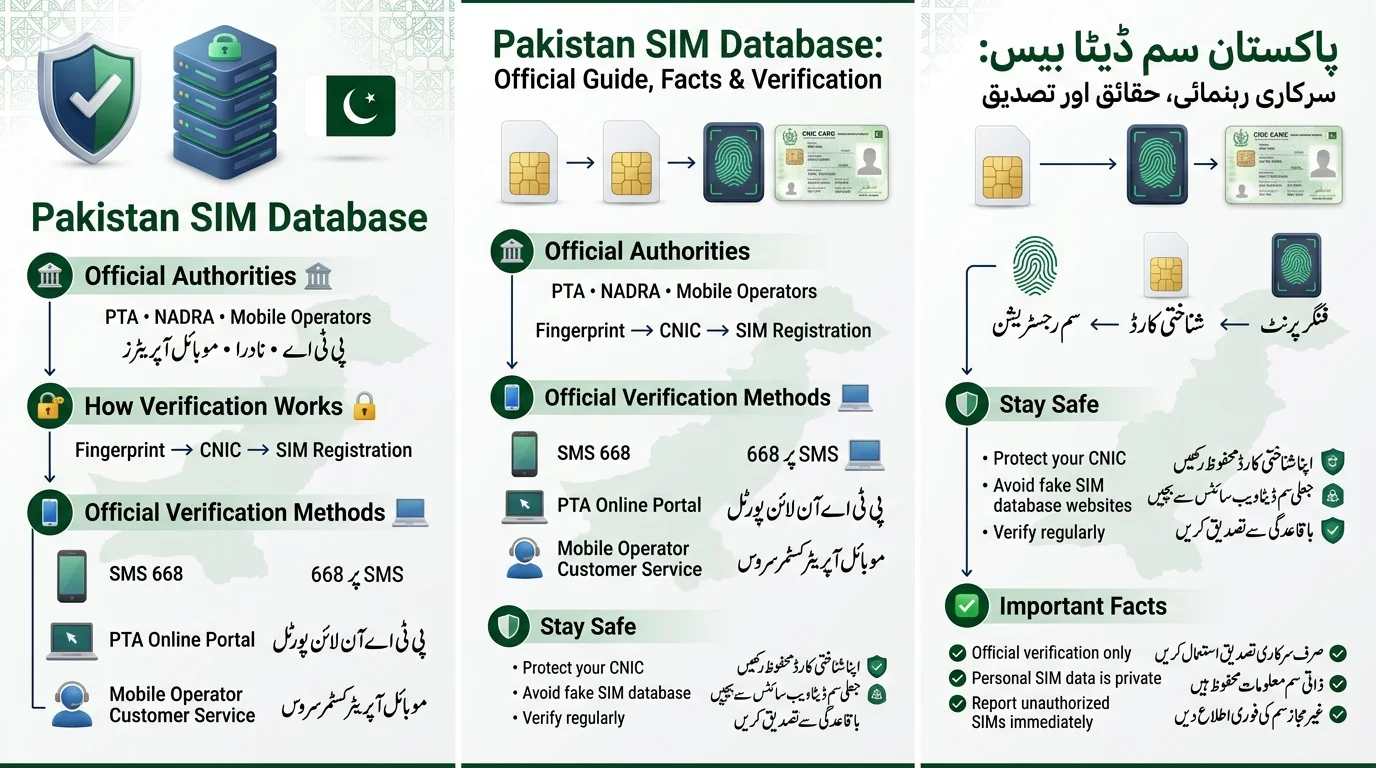
How the Pakistan SIM Information System Works
PTA Subscriber Verification Management System (SVMS)
The PTA’s Subscriber Verification Management System (SVMS) serves as the central ledger for reporting SIM activations, deactivations, and ownership changes. It helps the PTA enforce limits, identify anomalies, and handle verification requests.
NADRA Integration
SVMS integrates with NADRA for SIM activation. The retailer’s CNIC number and the buyer’s fingerprint are verified against NADRA’s records. A mismatch results in SIM activation rejection, making biometric verification essential to the system.
Telecom Operator Databases
Each telecom operator in Pakistan Jazz, Zong, Telenor, Ufone, and SCOM maintains its own subscriber database for various purposes like billing and customer service. These databases are synchronized with the PTA’s central system, allowing users to check their total SIM count across all networks in one unified platform.
Biometric Verification System
In Pakistan, every SIM activation requires a live fingerprint scan, which is instantly matched with NADRA’s database. This process helps reduce anonymous SIM ownership and SIM-based fraud. Additionally, the PTA SIM Information System allows citizens to check how many SIM cards are registered to their CNIC, categorized by mobile network operator.
Why SIM Verification Is Important in Pakistan
- Identity Theft Prevention: Regularly verify your CNIC to prevent unauthorized use for SIM registration.
- Unauthorized SIM Registration: Dishonest retailers may register extra SIMs using a customer’s CNIC without consent; periodic checks can help identify this.
- Mobile Banking Security: A compromised SIM can allow fraudsters to access mobile banking apps and intercept OTPs, jeopardizing bank accounts.
- WhatsApp and Digital Fraud Protection: SIM hijacking can lead to account takeovers on platforms like WhatsApp and social media.
- National Security Compliance: Verified SIM ownership aids law enforcement in tracing criminal activities linked to mobile networks.
How to Check SIMs Registered Against Your CNIC
There are three official methods to check SIM registrations under your CNIC, all of which are free or low-cost:
- SMS Verification Through 668: Send your 13-digit CNIC number as an SMS to 668 to receive a reply with the total number of SIMs registered under your CNIC by operator.
- PTA SIM Information System (Online Portal): Visit the official PTA portal, enter your CNIC, complete a captcha, and submit to see a detailed operator-wise breakdown of SIMs.
- Customer Service Verification: Call your mobile operator’s helpline or visit a service center to ask about the numbers linked to your CNIC.
| Method | Time Required | Cost | Accuracy |
| SMS to 668 | Under a minute | Free or standard SMS rate | High (PTA-sourced, real-time) |
| PTA Online Portal | A few minutes | Free | High (detailed, operator-wise) |
| Customer Service Franchise | 10–30 minutes | Free | High, but limited to that one operator |
- Ensure the CNIC is typed correctly without dashes if the SMS fails.
- Retry accessing the online portal during off-peak hours if it times out.
- Use the 668 method to verify SIM existence from the central PTA database if a franchise agent claims it doesn’t exist.
Official PTA Methods for SIM Verification
- PTA Online Portal: Provides a detailed, printable record of all SIMs linked to your CNIC across networks.
- SMS Verification: Offers a quick check to obtain SIM numbers without needing a browser.
- Customer Support Verification: Ideal for discussing issues with a specific operator directly with a representative.
- Franchise Verification: Necessary for in-person actions like blocking, transferring, or disowning an unregistered SIM.
| Method | Purpose |
| SMS 668 | Check SIMs registered on CNIC |
| PTA SIM Information System | Online verification |
| MNP 667 | Check network portability |
| IMEI 8484 | Check device status |
Check Your Phone’s IMEI Status
PTA monitors mobile devices through the Device Identification, Registration and Blocking System (DIRBS) using unique IMEI numbers. To verify your phone, dial *#06# to get your IMEI, then send it to 8484. Check the response to confirm compliance, as a registered SIM alone does not guarantee mobile network connectivity if the phone is not PTA compliant.
How Many SIMs Can Be Registered on One CNIC?
- The Pakistan Telecommunication Authority (PTA) enforces a limit on the number of SIMs per CNIC to prevent misuse, and this limit may change over time, so it’s best to check the official PTA site for the current cap.
- Most citizens are allowed a limited number of active voice SIMs across all networks combined (Jazz, Zong, Telenor, Ufone, and SCOM).
- Each SIM must pass biometric verification upon activation, ensuring that all counted SIMs are registered to real individuals.
- If a CNIC reaches its SIM limit, any new activation will be automatically blocked. If unauthorized SIMs exceed the limit, users must visit a franchise to have those SIMs removed before registering a new one.
- The exact number of allowed SIMs can be confirmed through PTA’s official portal or via SMS, as the limit is periodically revised.
How to Check SIM Ownership Legally
- The legal way to verify SIM ownership in Pakistan is through your own CNIC using PTA’s official SMS code, the PTA web portal, or customer service — no public tools exist for checking others’ information.
- When checking your own record, you can see the number of SIMs registered to your CNIC and their respective operators, but not personal details of others.
- Data protection and telecom regulations in Pakistan limit access to personal data; unauthorized lookup of someone else’s SIM details can be a criminal offense under PECA 2016.
- Avoid third-party lookup sites that claim to reveal personal information for a fee, as they are unofficial, often inaccurate, and can compromise your personal data.
Difference Between Official and Fake SIM Databases
Official Sources: PTA, NADRA, and mobile operators are the legitimate sources for SIM registration data in Pakistan.
Fake SIM Database Sites: These sites falsely claim to provide personal information linked to phone numbers, often displaying outdated or fabricated data.
Risks of Using Unofficial Databases
- Privacy Violations: Personal information may be stored and sold by unverified entities.
- Identity Theft: Scammers can use submitted data for impersonation.
- Scams: Many sites promote paid services that do not yield genuine results.
How to Identify a Legitimate Verification Source
To ensure safety, use a .gov.pk domain or the PTA’s official portal and the 668 SMS code. Be cautious of any site requesting payment for “detailed owner information,” as it indicates a potential scam.
| Official Systems | Fake Databases |
| Verified data | Unverified data |
| Legal | Often illegal |
| Secure | Security risks |
Common SIM Fraud Scams in Pakistan
- Unauthorized SIM Registration: CNIC copies can be misused to register SIMs without the owner’s knowledge.
- CNIC Misuse: CNIC numbers can be used for various fraudulent activities, including loans and fake business registrations.
- Banking OTP Fraud: Criminals can intercept one-time passcodes if they control a SIM registered in your name, leading to financial theft.
- WhatsApp Account Hijacking: Control of your number allows scammers to access your WhatsApp account and potentially scam your contacts.
- Prize and Loan Scams: Fraudulent communications can lure individuals into sharing sensitive information like CNICs and OTPs.
- SIM Swap Fraud: Scammers can trick operators into transferring your number to a new SIM, cutting off your access.
- Red Flags: Be cautious of unexpected messages about SIM blocking, requests for OTPs or CNICs, sudden loss of network signal, and offers that seem too good to be true.
What to Do If Unknown SIMs Appear on Your CNIC
- Verify the Results: Double-check the SIM’s existence through multiple methods (SMS and online portal).
- Contact the Relevant Operator: Call the helpline for the unknown SIM to report it as unauthorized.
- Visit a Franchise: Go to the operator’s service center with your original CNIC to dispute and request removal of the SIM.
- Request SIM Blocking: Ask the franchise to block the SIM and obtain written or SMS confirmation.
- Report to PTA: If the operator is unresponsive or there’s suspected identity misuse, file a complaint with the PTA.
Quick Checklist
- Re-verify the SIM
- Note the operator and number
- Call the helpline
- Visit the franchise with your CNIC
- Get confirmation of SIM blocking
- File a PTA complaint if necessary
- Recheck your CNIC record later
SIM Verification for All Pakistani Mobile Networks
The text provides information on SIM verification for various telecom networks in Pakistan:
- Jazz: Verify through SMS (668), PTA portal, or customer care.
- Zong: Use the PTA-wide 668 code or contact Zong’s helpline.
- Ufone: Verification via the PTA portal/SMS or Ufone support.
- Telenor: Follow the central verification process and contact Telenor customer service for specific queries.
- SCOM: Included in the PTA count, with verification options through the PTA and SCOM’s helpline for specific issues.
| Operator | SMS Check | Portal Check | Customer Care |
| Jazz | Yes (668) | Yes | Yes |
| Zong | Yes (668) | Yes | Yes |
| Telenor | Yes (668) | Yes | Yes |
| Ufone | Yes (668) | Yes | Yes |
| SCOM | Yes (668) | Yes | Yes |
Privacy and Security Best Practices
- Protecting Your CNIC: Avoid giving out photocopies unless necessary; if you do, note the purpose and date to prevent misuse.
- Avoiding Fraudulent Websites: Do not enter your CNIC on sites other than PTA’s official portal. Use SMS for verification when in doubt.
- Monitoring SIM Registrations: Regularly check your CNIC’s SIM count periodically, like reviewing a bank statement.
- Safe Use of Public Wi-Fi: Refrain from checking sensitive information (SIM ownership, banking details) over unsecured public Wi-Fi.
- Reporting Suspicious Activity: Report any suspicious SMS messages claiming to be from PTA or your operator, and do not respond to them.
Myths and Facts About Pakistan SIM Databases
Myth: Anyone can see SIM owner details online
- Fact: Personal subscriber data is legally protected; only the CNIC holder can check their own SIMs.
Myth: All SIM lookup websites are official
- Fact: Only the PTA’s portal, the 668 SMS service, and mobile operators provide official verification.
You cannot remove unauthorized SIMs
- Fact: Procedures exist with PTA and operators to disown and block SIMs not registered by you.
SIM verification is optional
- Fact: Biometric verification is mandatory for activating any SIM in Pakistan
Conclusion
The Pakistan SIM Database is a collaboration among PTA, NADRA, and mobile operators to link SIMs to verified individuals for security. Use official methods like the 668 SMS code or PTA’s portal for verification, avoiding third-party sites. Regularly check SIMs linked to your CNIC and report any unauthorized registrations. Protect your CNIC copies, avoid suspicious links, and never share OTPs. A quick check of your CNIC’s SIM records can prevent future issues.
پاکستان سم ڈیٹا بیس PTA، نادرا، اور موبائل آپریٹرز کے درمیان ایک تعاون ہے جس میں سیکیورٹی کے لیے تصدیق شدہ افراد سے سمز کو لنک کیا جاتا ہے۔ تصدیق کے لیے سرکاری طریقے جیسے 668 SMS کوڈ یا PTA کا پورٹل استعمال کریں، فریق ثالث کی سائٹس سے گریز کریں۔ اپنے CNIC سے منسلک سمز کو باقاعدگی سے چیک کریں اور کسی بھی غیر مجاز رجسٹریشن کی اطلاع دیں۔ اپنی CNIC کاپیوں کی حفاظت کریں، مشکوک لنکس سے بچیں، اور OTPs کا کبھی اشتراک نہ کریں۔ آپ کے CNIC کے سم ریکارڈز کی فوری جانچ مستقبل کے مسائل کو روک سکتی ہے۔
Frequently Asked Questions (FAQ)
What is the Pakistan SIM Database?
It’s the informal name for the combined records maintained by PTA, NADRA, and mobile operators, linking every registered SIM card to a verified CNIC.
Is the Pakistan SIM Database official?
There’s no single public “database” you can browse. The official system is PTA’s SVMS, accessible only through self-check tools like SMS and the PTA portal.
How do I check SIMs registered on my CNIC?
SMS your CNIC number to 668, or use PTA’s online SIM Information System portal.
What is the PTA SIM Information System?
It’s PTA’s official web-based tool that shows you a breakdown, by operator, of every SIM currently registered to your CNIC.
Is SIM verification free?
Yes. Checking via 668 may incur a small standard SMS charge from your operator, but the PTA portal check itself is free.
Can I check SIM ownership online?
Yes, through PTA’s official online portal, but only for your own CNIC.
What should I do if an unknown SIM appears?
Verify it, contact the operator, visit a franchise to have it blocked, and file a PTA complaint if it isn’t resolved.
Disclaimer
This article provides general information about the Pakistan SIM Database, PTA SIM verification, biometric processes, and telecom services. Key points include:
- Regulations and procedures for SIM verification may change, so users should consult the official PTA, NADRA, or their mobile operator for accurate information.
- It does not provide access to private subscriber data or confidential information.
- Never share sensitive personal information with unauthorized entities.
- For unknown SIM registrations, contact the mobile operator and use official complaint channels.
- The mention of any telecom service or operator does not imply endorsement. Always verify instructions from official sources before proceeding.
Sources & References
- Pakistan Telecommunication Authority (PTA): Official information about telecom regulations, SIM registration, consumer protection, and complaint procedures: https://www.pta.gov.pk/
- PTA SIM Information System: Official platform for checking SIMs registered against your CNIC: https://cnic.sims.pk/
- PTA Complaint Management System: Official platform for submitting telecom-related complaints and escalating unresolved issues: https://complaint.pta.gov.pk/
- National Database and Registration Authority (NADRA): Official information about CNICs, identity verification, and biometric services: https://www.nadra.gov.pk/
- Jazz: Official website for SIM, account, customer support, and verification services: https://jazz.com.pk
[…] relying on unofficial SIM database websites; use PTA’s official […]
[…] are no public databases that allow you to access someone else’s CNIC or personal information through their mobile […]
[…] downloading SIM database files or apps from unofficial […]