
MNP 667 Pakistan: SIM Owner Check & Number Porting Complete Guide
Code 667 in Pakistan is part of the Mobile Number Portability (MNP) process, allowing users to switch mobile networks while retaining their phone number. When a user texts MNP to 667 from their SIM, their current operator provides the registration details for that SIM, which is necessary for porting. It is not a general tool for identifying SIM owners or strangers’ identities. Additionally, 667 differs from 668, which checks all SIMs linked to a user’s CNIC, and 76367, which identifies a number’s current network. The guide emphasizes following the Pakistan Telecommunication Authority’s official guidelines over unreliable third-party websites.
پاکستان میں کوڈ 667 خاص طور پر موبائل نمبر پورٹیبلٹی (MNP) کے عمل کا حصہ ہے، جو صارفین کو اپنا فون نمبر برقرار رکھتے ہوئے موبائل نیٹ ورکس کو تبدیل کرنے کی اجازت دیتا ہے۔ جب کوئی صارف اپنی سم سے MNP کو 667 پر ٹیکسٹ کرتا ہے، تو اس کا موجودہ آپریٹر اس سم کے لیے رجسٹریشن کی تفصیلات فراہم کرتا ہے، جو پورٹ کرنے کے لیے ضروری ہے۔ یہ سم کے مالکان یا اجنبیوں کی شناخت کی شناخت کا کوئی عام ٹول نہیں ہے۔ مزید برآں، 667 668 سے مختلف ہے، جو صارف کے CNIC سے منسلک تمام سمز کو چیک کرتا ہے، اور 76367، جو کسی نمبر کے موجودہ نیٹ ورک کی شناخت کرتا ہے۔ گائیڈ میں غیر معتبر تھرڈ پارٹی ویب سائٹس پر پاکستان ٹیلی کمیونیکیشن اتھارٹی کے آفیشل گائیڈ لائنز پر عمل کرنے پر زور دیا گیا ہے۔
Quick Answer / At-a-Glance
| Question | Answer |
| What is 667? | An official SMS short code used in the Mobile Number Portability (MNP) process |
| What does MNP mean? | Mobile Number Portability |
| Main purpose of 667 | Pre-porting verification confirming a SIM’s registration details before filing a port request |
| 668 purpose | Checking how many SIMs are registered against your CNIC |
| 76367 purpose | Reportedly used to check which network a specific number currently belongs to (see caveat in Section 6) |
| Can 667 reveal a stranger’s private identity? | No, it returns the record for the SIM that sends the SMS, not for any number you type in |
| Is MNP about changing your number? | No, the entire point is to keep your number while changing operators |
What Is MNP 667?
MNP stands for Mobile Number Portability, allowing subscribers to switch mobile operators while keeping their existing phone number.
- Porting Example: A subscriber can move from Jazz to Zong and retain their original number.
- Role of 667: The number 667 is used for pre-NPR verification in the porting process. Subscribers send an SMS to 667 to receive their registered details from the current operator.
- Porting Process: To initiate porting, subscribers must text “mnp” to 667 to obtain their Name, ID, and SIM number, which they then forward to their new operator to complete the request.
- Clarification on 667: 667 is not a SIM owner lookup service; it only provides information about the SIM that sends the text. It does not allow users to identify someone else’s SIM information.
Read Also: 667 & 668 SMS Not Working? Try These Fixes
How to Use MNP 667 in Pakistan
- Use the Relevant SIM: Keep the SIM you want to port active in a phone with a signal.
- Send MNP Message: Text MNP to the short code 667 from the number you wish to port.
- Receive Response: Check the reply from your current operator containing details necessary for verification.
- Follow New Operator’s Instructions: Visit the new operator’s service center to complete necessary forms and biometric verification.
- If No Reply: Ensure you have a good signal, the correct message format, and service availability. Retry or contact customer support if issues persist.
What Information Can You Get Through 667?
The text addresses claims related to third-party websites and emphasizes adherence to PTA’s documented procedure.
- According to PTA guidelines, a reply to a 667 message must include: mobile number (MSISDN), registered subscriber name, CNIC (or equivalent ID), IMSI, activation date, and connection type.
- 667 shows the registered name of the SIM that sends the SMS for verification purposes but does not disclose the name for other numbers.
- The CNIC associated with the specific SIM is included in the reply for its own verification.
- 667 does not identify the current network of a number; this function is separate from the porting-verification process.
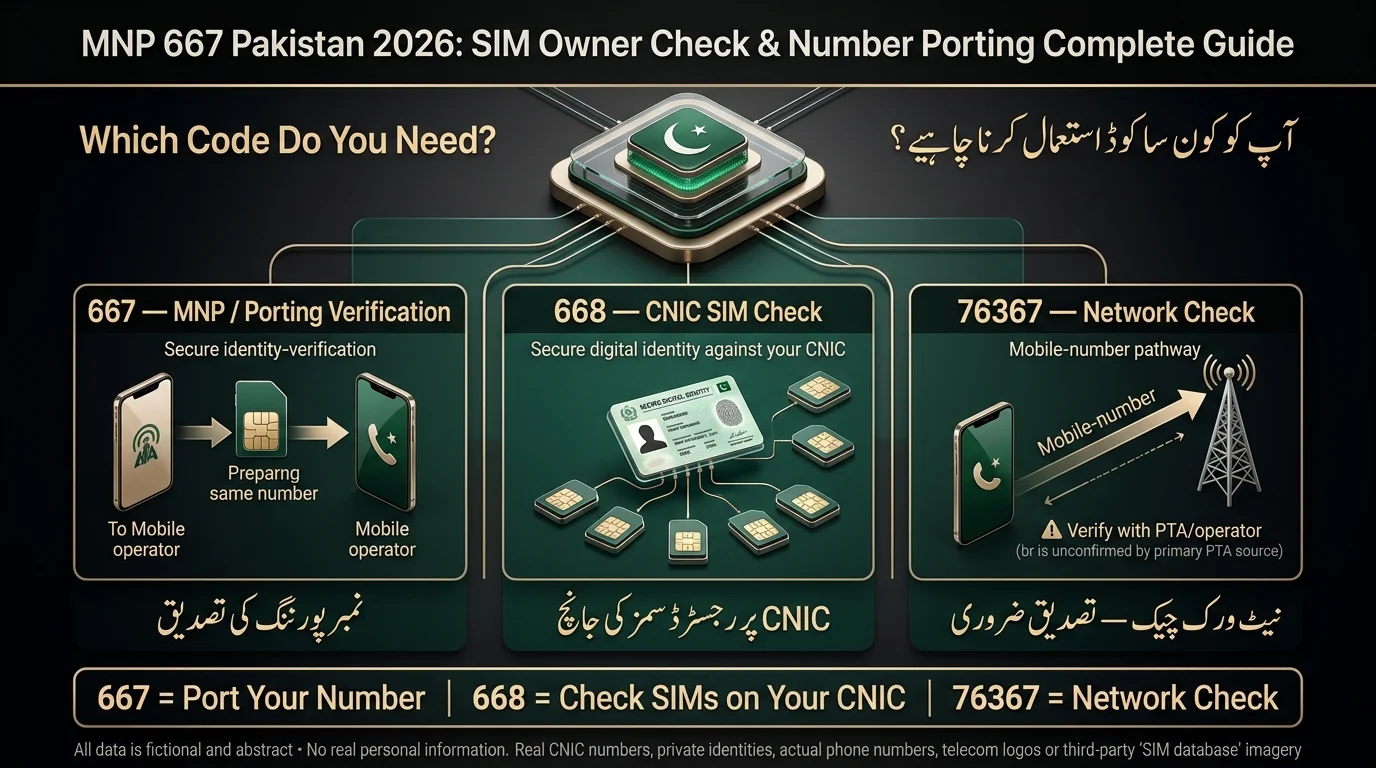
667 vs 668 vs 76367: What’s the Difference?
This section is arguably the most useful for anyone trying to determine which code they actually need.
| Feature | 667 | 668 | 76367 |
| Main purpose | MNP / pre-porting verification | CNIC-level SIM check | Reported network check (unverified against a primary PTA source — see caveat below) |
| Starting point | The SIM/number you’re porting | Your CNIC | A mobile number |
| Checks all SIMs on a CNIC? | No | Yes | No |
| Used for number porting? | Yes, it’s a required step | No | No |
| Identifies current network? | Not its documented purpose | No | Reportedly, yes |
| Public stranger-identity lookup? | No | No | No |
- 667: Use this to obtain the pre-porting verification record for your SIM if you’re porting your number to a new operator.
- 668: This code checks how many SIM connections are registered against your CNIC to identify unauthorized SIMs.
- 76367: Often used to check the current network of a number after porting, but confirm the details with your operator or PTA, as procedures may vary.
- cnic.sims.pk: An alternative to 668 for checking the number of registered SIMs against your CNIC online via PTA’s official web portal.
How Does Mobile Number Portability Work in Pakistan?
- Choose New Operator: Decide on the recipient operator to switch to.
- Submit Porting Request: Visit the recipient operator’s center with your CNIC to fill out the port-in form.
- Subscriber Verification: Send a verification message (667) to obtain your registration record from the current operator.
- Donor Operator Checks: The current operator verifies your identity, checks for dues, and confirms number eligibility.
- Porting Approval: If all checks are clear and biometric verification is done, the request gets approved.
- SIM Activation: Receive and activate a new SIM from the recipient operator once the port is complete.
- Number Moves: Your existing number is now active on the new operator’s network.
MNP Porting Requirements in Pakistan
- Valid Subscriber Information: Your name and ID must match the records with your current operator to avoid rejection.
- SIM Registration: The SIM must be registered, active, and in good standing; disconnected or blocked numbers cannot be ported.
- Biometric Verification: Fingerprint verification at the recipient operator is required, matching NADRA records.
- Porting Eligibility: A minimum subscription period (commonly 60 days) applies; numbers under contract or with unpaid balances may be ineligible.
- Existing/Pending Port Requests: Numbers with pending ownership changes or ongoing port requests cannot be ported again until those processes are completed.
- Operator-Specific Requirements: Additional documentation or steps may be required by individual operators; verify directly with the recipient operator.
How Long Does MNP Porting Take in Pakistan?
The processing time for porting phone numbers typically takes around four business days, excluding any holds, according to PTA guidelines. This timeline includes submission, donor-side verification, and the final switch-over to the new operator. New SIM activation occurs after the port is completed. It’s advisable to check the recipient operator’s current MNP instructions for the most accurate timelines, as processing times may vary.
Why Is My MNP Request Rejected?
Rejections typically fall into two main categories: reasons within your control and reasons beyond it.
| Problem | Likely Reason | Next Action |
| Name doesn’t match | Name Mismatch the name you gave doesn’t match donor operator records | Correct your registration details with your current operator first |
| Primary ID mismatch | The CNIC/NICOP/Passport number provided doesn’t match records | Verify you’re using your correct, current CNIC |
| SIM/number mismatch | The SIM or IMSI details don’t match the number being ported | Recheck the 667 reply details before submitting |
| “667 not used” rejection | The 667 verification message wasn’t sent within the required window before the port request | Resend MNP to 667 and retry promptly |
| Contractual hold | An active contract obligation with your current operator | Settle or clarify the contract terms with your donor operator |
| Outstanding balance | Unpaid postpaid dues on your account | Clear your balance, then reattempt |
| Too new / recently ported | Minimum subscription period not yet met | Wait out the eligibility window before retrying |
| Pending change of ownership or existing port | Another request is already in progress on the number | Wait for that process to resolve, or contact your operator |
What to Do After Rejection
- Request the specific rejection reason from the rejecting operator or their franchise staff.
- Address and resolve the underlying issue.
- Reinitiate the porting request after the issue is resolved.
MNP 667 Not Working? Try These Solutions
- SMS Fails to Send: Check signal and account balance before retrying.
- No Reply From 667: Wait and escalate through your operator’s support if no reply is received.
- Wrong SMS Format: Use MNP only in the message body, without extra characters.
- SIM Has No Signal: Move to a better coverage area and resend the SMS.
- Dual-SIM Phone Issue: Ensure the SMS is sent from the correct SIM slot associated with the number.
- Information Doesn’t Match: Update inaccurate details at your current operator’s service center before retrying.
- Port Request Is Already Pending: A new request may be blocked if there’s an existing one.
- When to Contact Your Operator: If issues persist, contact your operator’s customer support for assistance.
Can 667 Check Someone Else’s SIM Owner Details?
- 667 is not a public people-search database; it only provides the record of the SIM that sends an SMS.
- You cannot use 667 to obtain information about someone else’s number or CNIC.
- Be wary of websites claiming to provide personal details from a phone number, as they’re not part of the official framework.
- For your own SIM or CNIC inquiries, use official channels like 667, 668, or cnic.sims.pk, rather than third-party sites.
What If Someone Tries to Port Your Number?
- Unauthorized porting of your phone number can occur without your consent.
- Pay attention to unexpected MNP-related SMS or notifications; they may indicate a problem.
- Contact your current operator immediately to explain the situation.
- Inquire about the steps needed to stop or reverse the porting request.
- Check your SIM registration status for signs of manipulation.
- Secure important accounts (banking, email, social media) during the issue.
- If unresolved, escalate the matter through PTA’s formal complaint channels.
Signs of a Suspicious Porting Attempt
- An unexpected SMS referencing MNP or a porting request you didn’t initiate
- Your SIM suddenly loses service or stops working without explanation
- Unusual messages from your operator about a change of ownership or network transfer
- Sudden disruption to accounts that rely on SMS-based verification codes
Common Mistakes When Using 667
- Confusion between services 667 (porting verification) and 668 (CNIC-wide SIM check); they serve different purposes.
- 667 only reveals the SIM registered to the sending number, not all SIMs linked to a CNIC.
- Number prefixes do not guarantee the current network, as porting can change a number’s operator.
- Avoid relying on unofficial SIM database websites; use PTA’s official channels.
- Entering someone else’s details will not yield their private information.
- Retail processes vary by operator; confirm procedures locally.
- Follow your current operator’s specific instructions during porting; don’t rely on outdated information.
Is MNP 667 the Same as a SIM Owner Check?
The text outlines three different search intents regarding SIM card inquiries:
- Identifying what is associated with a specific SIM, which is addressed by calling 667.
- Checking how many SIMs are registered against your CNIC, which can be done via 668 or cnic.sims.pk.
- Moving a number to another network involves the full Mobile Number Portability (MNP) process, starting with 667.
For detecting unauthorized SIMs issued in your name, use 668, while 667 is appropriate for those in the process of switching operators. Both services utilize the same underlying data but serve different purposes.
Official Ways to Check SIM Information in Pakistan
- 668 / CNIC Check: Send your CNIC number (without dashes) via SMS to 668 to find out the number of SIMs registered against it by the operator. This service is free of charge according to PTA.
- Web Portal: You can also check the same information online at cnic.sims.pk.
- 667 / MNP Context: To port a SIM, send MNP to 667 from the specific SIM you want to port to verify its registration.
- 76367 / Network Check: This service is supposed to check which network a number belongs to, but its validity and format are unverified—confirm with your operator or PTA.
Important Note: These functions are distinct and should not be confused; using the incorrect service is a common source of confusion.
Final Verdict
If you wish to transfer your current number to a different service provider, begin the MNP process by dialing 667. If you want to find out how many SIM cards are associated with your CNIC, you can use 668 or visit the official cnic.sims.pk website. To check which network a particular number is currently using, 76367 is often referenced, but it’s best to confirm the current process with your provider or the PTA first. Regardless of which code you use, always check with the PTA or your mobile operator for the latest procedures, costs, and eligibility requirements, as telecom processes, fees, and short-code services may change periodically.
اگر آپ اپنا موجودہ نمبر کسی دوسرے سروس فراہم کنندہ کو منتقل کرنا چاہتے ہیں، تو 667 ڈائل کرکے MNP کا عمل شروع کریں۔ اگر آپ یہ جاننا چاہتے ہیں کہ آپ کے CNIC کے ساتھ کتنے سم کارڈز وابستہ ہیں، تو آپ 668 استعمال کرسکتے ہیں یا cnic.sims.pk کی سرکاری ویب سائٹ پر جا سکتے ہیں۔ یہ چیک کرنے کے لیے کہ فی الحال کوئی خاص نمبر کون سا نیٹ ورک استعمال کر رہا ہے، 76367 کا اکثر حوالہ دیا جاتا ہے، لیکن پہلے اپنے فراہم کنندہ یا PTA سے موجودہ عمل کی تصدیق کرنا بہتر ہے۔ اس سے قطع نظر کہ آپ کون سا کوڈ استعمال کرتے ہیں، ہمیشہ تازہ ترین طریقہ کار، اخراجات اور اہلیت کے تقاضوں کے لیے PTA یا اپنے موبائل آپریٹر سے چیک کریں، کیونکہ ٹیلی کام کے عمل، فیس، اور مختصر کوڈ کی خدمات وقتاً فوقتاً تبدیل ہو سکتی ہیں۔
FAQs
What is 667 in Pakistan?
An official SMS short code used as part of PTA’s Mobile Number Portability process, allowing a subscriber to obtain their own SIM’s registration record from their current operator before porting.
What does MNP stand for?
Mobile Number Portability: the ability to switch mobile network operators while keeping your existing number.
How do I use MNP 667?
Send the word MNP via SMS to 667 from the number you want to port, then follow the reply’s information when initiating the port-in request with your new operator.
Is 667 used for SIM owner checking?
Only for the SIM that sends the message, it returns that SIM’s own registered name, CNIC, and related details, not information about any other number.
What is the difference between 667 and 668?
667 is for porting verification of a single SIM in your possession; 668 checks how many SIMs total are registered against your CNIC across all operators.
Can 667 show all SIMs on my CNIC?
No, for that, use 668 or the cnic.sims.pk portal instead.
Can I check another person’s SIM through 667?
No. It only returns the record of the SIM that physically sends the text.
What is 76367 used for?
A network-identification code checks a number’s current operator, but it’s best to confirm the procedure with the operator, as details are unverified by an official PTA document.
Disclaimer
This article serves as general informational content and does not provide legal or professional telecom advice. Changes in short codes, fees, procedures, and eligibility rules by the PTA and mobile operators can occur without notice. It’s crucial to independently verify details regarding specific services, such as 76367, with the PTA or your mobile operator before making important decisions. Additionally, the article warns against using third-party services that claim to access private SIM registration details, as these are not authorized by the PTA.
Sources & References
- Pakistan Telecommunication Authority (PTA) provides guidelines for Mobile Number Portability (MNP) through an official PDF document.
- Additional official PDFs include MNP Regulations from 2005 and FAQs on checking the number of SIMs registered against a CNIC.
- A SIM Information System was launched at the PTA Consumer Forum to facilitate SIM data verification.
- Cellular operators are required to ensure SIM data verification through the new SIM Information System (code 668).
- The official PTA website and media center provide more information.
Note: Claims regarding the 76367 network-check code are unverified and should be confirmed with PTA or a mobile operator.
[…] accesses the full CNIC record across all operators, while 667 checks information for the current SIM card, relevant for number portability and registration […]
[…] 667: Send MNP to 667 to check the registration details of the currently inserted SIM, useful for confirming new or […]
[…] For single SIM confirmation, text MNP to 667. […]
[…] Read ALso: MNP 667 Pakistan: SIM Owner Check & Number Porting […]