Check SIM Owner Details in Pakistan: 12 Official Methods & Codes
The text discusses common queries in Pakistan regarding mobile number registration and SIM ownership, emphasizing the importance of using official channels for verification. There are different methods to check SIM registration against a CNIC, identify the network a number belongs to, and verify ownership for disputes or unauthorized SIMs. The guide outlines official resources such as the PTA SIM Information System, the 668 SMS service, the 76367 network-check code, and operator-specific verification for Jazz, Zong, Telenor, and Ufone. It also highlights the need for caution regarding scam websites and clarifies the limitations of these tools.
متن میں پاکستان میں موبائل نمبر رجسٹریشن اور سم کی ملکیت سے متعلق عام سوالات پر بحث کی گئی ہے، تصدیق کے لیے سرکاری چینلز کے استعمال کی اہمیت پر زور دیا گیا ہے۔ سی این آئی سی کے خلاف سم کی رجسٹریشن چیک کرنے، اس نیٹ ورک کی شناخت کرنے کے مختلف طریقے ہیں جس کا کوئی نمبر ہے، اور تنازعات یا غیر مجاز سموں کی ملکیت کی تصدیق کریں۔ گائیڈ میں سرکاری وسائل جیسے PTA سم انفارمیشن سسٹم، 668 SMS سروس، 76367 نیٹ ورک چیک کوڈ، اور Jazz، Zong، Telenor، اور Ufone کے لیے آپریٹر کے لیے مخصوص تصدیق کا خاکہ پیش کیا گیا ہے۔ یہ اسکام ویب سائٹس کے حوالے سے احتیاط کی ضرورت کو بھی اجاگر کرتا ہے اور ان ٹولز کی حدود کو واضح کرتا ہے۔
Quick Answer: How to Check SIM Owner Details in Pakistan
If you just want the fastest route, here’s the summary before we get into the details.
| What you want to check | Recommended method |
| SIMs registered against your CNIC | PTA SIM Information System (cnic.sims.pk) |
| SIM count by CNIC, via SMS | 668 |
| Which network a mobile number belongs to | 76367 |
| SIM registration/account verification | Your relevant mobile operator |
| Unknown SIM on your CNIC | Operator complaint + PTA escalation |
| Account or registration issue | Operator service centre/franchise |
The text provides an important warning that official services for checking SIM footprints are intended for personal use only. Users can access details related to their own CNIC, such as SIM count and operator information, but cannot retrieve private information about others using their phone numbers. It emphasizes the importance of understanding these limitations for legal reasons and recognizing potential scam sites.
PTA SIM Information System
Method 1: Check SIMs Registered Against Your CNIC Online
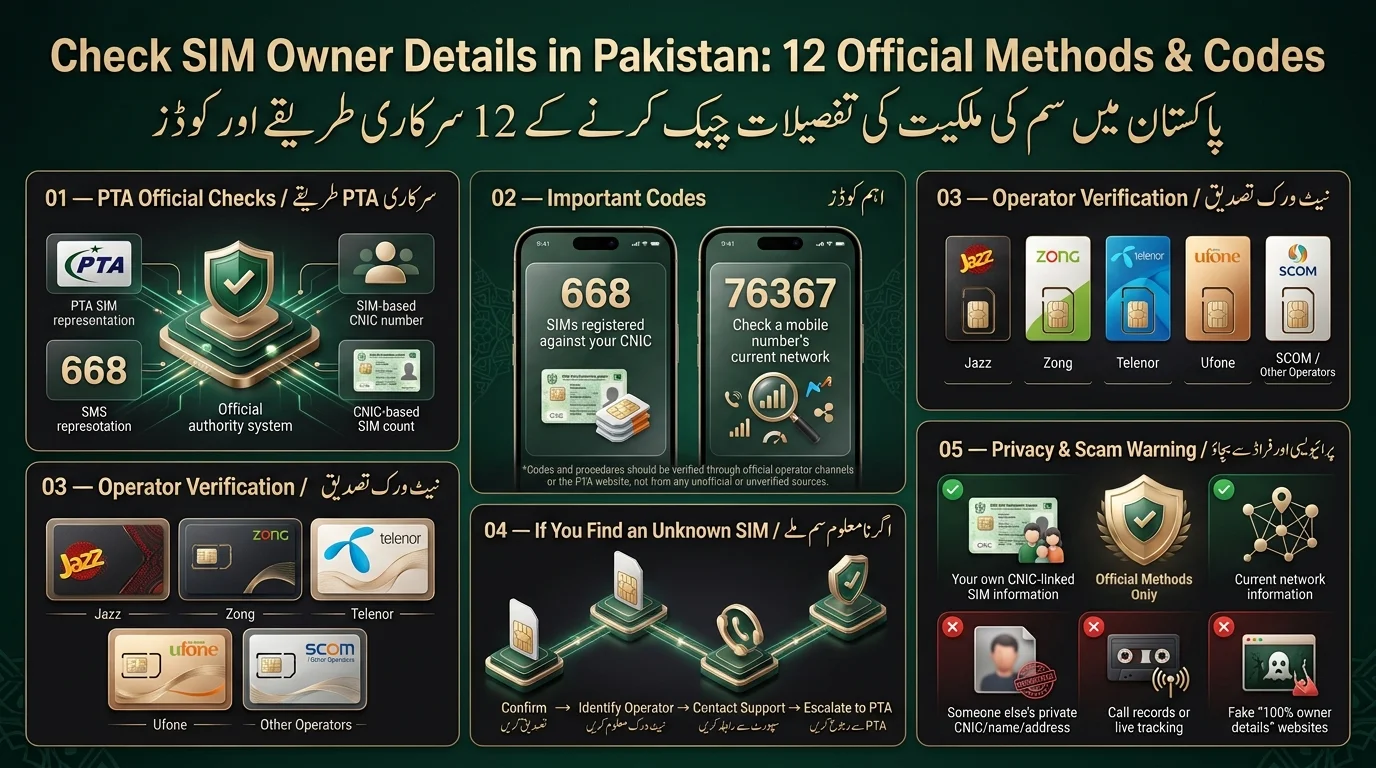
The PTA SIM Information System is a web-based tool that allows citizens to check how many SIMs are registered under their CNIC, sorted by mobile operator. To use the portal, individuals need to visit the official site, enter their 13-digit CNIC (without dashes or spaces), complete a CAPTCHA, and submit their request. The portal displays the number of active SIMs registered with each network (e.g., Jazz, Zong, Telenor, Ufone) for the provided CNIC and does not disclose information about other people’s CNICs. This service is free online, while checking via SMS (668) incurs a charge. Always verify details on the official PTA website for the most current information.
668 SIM Check
Method 2: Check SIMs on Your CNIC Using 668
The 668 service by PTA lets subscribers check the number of SIMs registered against their CNIC via SMS. To use it, send your 13-digit CNIC (no dashes or spaces) to 668, and you’ll receive details on registered SIMs by operator, usually for a small fee. It helps check unauthorized registrations, track old numbers, or conduct a quick audit without internet access. The service does not disclose personal details about the SIMs.
| Feature | 668 | Online PTA system |
| SMS-based | Yes | No |
| Internet required | No | Yes |
| CNIC-based | Yes | Yes |
| Best use | Quick check on the go | Detailed check with a fuller view |
76367 Network Check
Method 3: Check the Network of a Mobile Number Using 76367
- You can check which network a mobile number currently operates on by sending an SMS to 76367.
- Format your message as: “N 03XXXXXXXXX” (replace “03XXXXXXXXX” with the full mobile number).
- The response will identify the current network operator of that number.
- This service does not provide personal information about the subscriber, making it useful for confirming ported numbers.
| Code | Main purpose |
| 668 | CNIC/SIM registration count check |
| 76367 | Mobile number network check |
Operator-Specific SIM Verification
Methods 4–8: Check SIM Registration by Mobile Network
Each licensed telecom operator in Pakistan has its own customer verification channels for account and registration issues not covered by PTA.
- Jazz: Users can verify SIM registration via the Jazz World app, USSD menu, or customer care. For biometric issues, visiting a Jazz franchise with the CNIC is recommended.
- Zong: Subscribers can check registration status using the My Zong app or customer support. Biometric corrections require a visit to a Zong franchise with the CNIC.
- Telenor: Users can confirm registration through the My Telenor app or helpline. In-person verification at a Telenor franchise is needed for registration disputes.
- Ufone: Customers can use the My Ufone app or support line for registration checks. Unresolved issues should be addressed at a Ufone franchise with the CNIC.
- SCOM/Other Operators: Smaller operators like SCOM offer self-service checks through their apps or helplines, with in-person verification for identity corrections. Procedures may vary, so it’s important to check each operator’s current instructions.
Customer Service & Franchise Verification
Method 9: Visit Your Mobile Operator’s Franchise
SMS codes and apps handle routine checks, but certain situations require a face-to-face visit at a franchise.
Visit a franchise if:
- Your CNIC details don’t match the operator’s records.
- A biometric verification issue is blocking your SIM.
- An unknown SIM is registered against your CNIC.
- There’s a dispute over SIM ownership.
- Your SIM is lost and needs replacement.
- You need to report an unauthorized registration.
Bring the following items:
- Original CNIC (not a photocopy).
- The mobile number or SIM in question.
- Relevant supporting documentation (e.g., old bills, complaint references, police report).
- Biometric verification links each SIM to a CNIC to prevent unauthorized registrations, necessitating visits to franchises for re-verification or corrections.
Customer Support Channels
Method 10: Contact Your Mobile Network’s Official Customer Support
Phone-based support is a quick way to check your account status or report issues, but it is limited to your verified account. You should call for the following reasons:
- To confirm your account or registration status.
- To report a suspected unauthorized SIM before visiting a franchise.
- To inquire about biometric re-verification requirements.
Be ready with your CNIC number, the relevant mobile number, and any prior complaint or reference numbers.
| Network | Best for |
| Jazz | Registration/account issues |
| Zong | SIM/account issues |
| Telenor | Verification queries |
| Ufone | SIM/account issues |
| SCOM | Regional/operator-specific support |
PTA Complaint / Escalation
Method 11: Report an Unauthorized SIM Through the Proper Channel
If you find an unknown SIM registered against your CNIC, follow these steps:
- Confirm registration via 668 or the PTA portal.
- Identify the operator that issued the SIM.
- Contact the operator’s customer support to request correction or blocking of the unauthorized SIM.
- Keep any reference or complaint numbers provided.
- If unresolved, escalate the issue to the PTA.
You should escalate to the PTA if:
- The registration is unauthorized, and the operator hasn’t acted.
- The operator refuses to investigate or correct the issue.
- There are repeated fraudulent registrations.
- An identity-related issue remains unresolved.
Submit complaints through PTA’s official channels on their website.
SIM Ownership Verification Through Official Documentation
Method 12: Verify Ownership Through Official Operator Records
The text outlines distinct concepts related to SIM ownership:
- SIM Registration: Linking a SIM card to a CNIC in the operator’s system.
- CNIC Association: The identity document tied to a phone number.
- Account Ownership: Control over the account for billing and service changes.
- Biometric Verification: Confirming a fingerprint matches the registered CNIC.
- Subscriber Information: The detailed record held by the operator, accessible through authorized channels.
In cases of ownership disputes, such as reclaiming a number, a service center visit is required for verification against biometric and CNIC records.
What Information Can You Actually Get?
Legally Checkable Information
- Number and network breakdown of SIMs associated with your CNIC.
- Current network provider for a specific mobile number.
- Registration or verification status linked to your account.
- Account issues addressed through authorized operator channels.
Information Not Available
- Complete CNIC or personal details of others.
- Private home addresses.
- Call logs or records.
- Live phone tracking.
- Access to private subscriber databases.
- Family or household information tied to a number.
Caution with 100% owner details sites
Websites claiming to provide detailed personal information from a mobile number are often scams, seeking to harvest personal data or distribute malware. Always approach such claims with suspicion.
What to Do If You Find an Unknown SIM
Unknown SIM Registered on Your CNIC? Do This
- Confirm the registration by running the check again.
- Determine the operator of the unfamiliar SIM.
- Contact the operator’s customer support or visit a franchise with your CNIC.
- Request removal, blocking, or correction of the unauthorized registration.
- Document everything, including complaint or reference numbers.
- Escalate to PTA if the issue remains unresolved.
Common SIM Check Codes
| Code/method | Purpose | Input |
| 668 | CNIC/SIM registration count check | Your CNIC |
| 76367 | Network check for a mobile number | Mobile number (format: N 03XXXXXXXXX) |
| 667 | Mobile number portability-related service — confirm current use on pta.gov.pk before relying on it | Operator/SIM context |
| PTA online portal | CNIC-based SIM information | Your CNIC |
| Operator channels (apps/helplines/franchises) | Registration and account support | Varies by operator |
Important note: Codes, fees, and hosting domains for services may change. Always verify current procedures on pta.gov.pk or your operator’s official website before use.
Common Problems & Errors
- CNIC Errors: Double-check for typos and ensure no dashes or spaces are included.
- Incorrect SMS Format: Ensure the correct format is used when sending messages to 76367.
- Service Availability: The service may be temporarily down for maintenance; try again later.
- SIM Registration Issues: The SIM may be registered under a different CNIC than expected.
- Biometric Issues: Some SIMs may appear registered but need re-verification.
- Operator Mismatch: Number may show a different operator due to SIM porting.
- Check Shortcode Updates: Shortcodes can change; verify on pta.gov.pk if one stops working.
- Result Differences: 668 and the PTA portal check registration differently than 76367, leading to varied results.
Safety & Privacy Warning
Avoid Fake SIM Owner Lookup Websites
Be cautious of websites and apps that claim to provide CNIC, address, and owner details associated with Pakistani phone numbers. These services are often not legitimate and can pose risks such as phishing attempts, fake payment schemes, malware, and fabricated results. Always use official channels like the PTA’s resources or your mobile operator’s app and helpline for any SIM or CNIC-related inquiries.
Final Verdict
Remember this key point: to check SIMs linked to your CNIC, use PTA’s official methods, either 668 or the online SIM Information System. To find out a number’s network, text 76367. For registration issues or unauthorized SIMs, contact your operator’s support, and escalate to PTA if necessary. No official channel in Pakistan will provide a stranger’s personal details just from a phone number; be wary of sites that claim otherwise. Bookmark this guide, as SIM codes and procedures can change; always verify with pta.gov.pk for important matters.
اس اہم نکتے کو یاد رکھیں: اپنے CNIC سے منسلک سمز کو چیک کرنے کے لیے، PTA کے آفیشل طریقے استعمال کریں، یا تو 668 یا آن لائن سم انفارمیشن سسٹم۔ کسی نمبر کا نیٹ ورک معلوم کرنے کے لیے، 76367 پر ٹیکسٹ کریں۔ رجسٹریشن کے مسائل یا غیر مجاز سمز کے لیے، اپنے آپریٹر کے سپورٹ سے رابطہ کریں، اور اگر ضروری ہو تو PTA کے پاس جائیں۔ پاکستان میں کوئی بھی سرکاری چینل کسی اجنبی کی ذاتی تفصیلات صرف فون نمبر سے فراہم نہیں کرے گا۔ دوسری صورت میں دعوی کرنے والی سائٹس سے ہوشیار رہیں۔ اس گائیڈ کو بک مارک کریں، کیونکہ سم کوڈ اور طریقہ کار تبدیل ہو سکتے ہیں۔ اہم معاملات کے لیے ہمیشہ pta.gov.pk سے تصدیق کریں۔
Frequently Asked Questions
How can I check SIMs registered on my CNIC?
Send your 13-digit CNIC (no dashes) to 668, or use PTA’s official SIM Information System online portal. Both show the count of SIMs registered against your CNIC per operator.
What is the 668 SIM check code?
668 is PTA’s official SMS shortcode that returns the number of SIMs registered against the CNIC you send it, broken down by mobile operator, for a small per-message charge.
What is 76367 used for?
76367 is used to check which mobile network currently carries a specific number, useful for numbers that have been ported between operators.
Can I check the owner of a mobile number in Pakistan?
Not through any public tool. Official systems only show SIM counts against your own CNIC or a number’s current network; they don’t expose another person’s name, CNIC, or address.
Can I check someone else’s SIM details?
No. Accessing another person’s private SIM registration details without authorization isn’t something official channels permit, and doing so through unofficial means can carry legal consequences.
How do I check Jazz SIM registration?
Use the Jazz World app, Jazz customer care, or visit a Jazz franchise with your
CNIC for registration or biometric verification issues.
How do I check Zong SIM registration?
Use the My Zong app, Zong customer support, or visit a Zong franchise for registration checks or corrections.
Disclaimer
- The article provides general information on SIM registration and telecom policies in Pakistan, which may change over time.
- Users are advised to verify details through official channels like the PTA and mobile network operators.
- It does not provide access to confidential information such as CNIC records or call logs.
- Users should only check information they are authorized to access and avoid sharing sensitive data with unauthorized sources.
- For complaints or issues, users should contact their mobile operator and utilize official PTA channels.
- Always confirm current procedures before relying on any shortcodes or online services.
Sources & References
- Pakistan Telecommunication Authority (PTA): Official regulatory information, SIM registration guidance, and complaint channels.
- PTA SIM Information System: CNIC-based SIM information service. Website: [cnic.sims.pk](https://cnic.sims.pk/)
- PTA Complaint Management System: Platform for telecom-related complaints. Website: [complaint.pta.gov.pk](https://complaint.pta.gov.pk/)
- Mobile Operator Customer Support
- NADRA: Information on CNIC and identity verification. Website: [nadra.gov.pk](https://www.nadra.gov.pk/)
Note: Always verify shortcodes such as 668, 667, and 76367 for updates or changes via PTA or the relevant mobile operator.
[…] SIM Ownership Transfer vs Sharing […]