ONIC SIM Information Online in Pakistan: Owner Details & Ownership Check
To check ONIC SIM information linked to your CNIC, use the PTA’s SIM verification system by sending your CNIC number to 668 or visiting the cnic. sims.PK web portal or visit our tool Numpk.com. For ONIC account-specific inquiries, utilize the ONIC app or their official support channels. Avoid third-party websites claiming to access private information, as they are not legitimate. The guide provides information on checking your own SIM data, what to do if discrepancies arise, and the boundaries regarding privacy.
اپنے CNIC سے منسلک ONIC SIM کی معلومات کو چیک کرنے کے لیے، PTA کے سم کی تصدیق کے نظام کو اپنا CNIC نمبر 668 پر بھیج کر یا cnic پر جا کر استعمال کریں۔ sims.PK ویب پورٹل دیکھیں یا ہمارے ٹول Numpk.com پر جائیں۔ ONIC اکاؤنٹ سے متعلق پوچھ گچھ کے لیے، ONIC ایپ یا ان کے آفیشل سپورٹ چینلز کا استعمال کریں۔ نجی معلومات تک رسائی کا دعوی کرنے والی فریق ثالث کی ویب سائٹس سے پرہیز کریں، کیونکہ وہ جائز نہیں ہیں۔ گائیڈ آپ کے اپنے سم ڈیٹا کی جانچ پڑتال، اگر تضادات پیدا ہوں تو کیا کریں، اور رازداری سے متعلق حدود کے بارے میں معلومات فراہم کرتا ہے۔
What Is ONIC SIM Information?
ONIC SIM information can refer to several aspects:
- SIM Number: The mobile number associated with the SIM.
- Registration Status: Whether the SIM is active and registered.
- Network Information: Which telecom network the SIM is under.
- CNIC-linked SIM Count: The number of SIMs registered to a specific CNIC.
- Account Information: Details like login, balance, packages, and settings in the ONIC app.
- Ownership Verification: Confirming legitimate registration of the SIM to the user.
- Activation Status: Status of biometric verification completion.
- Private Owner Information: Personal details of another person, which are not publicly accessible.
Information You Can Usually Verify
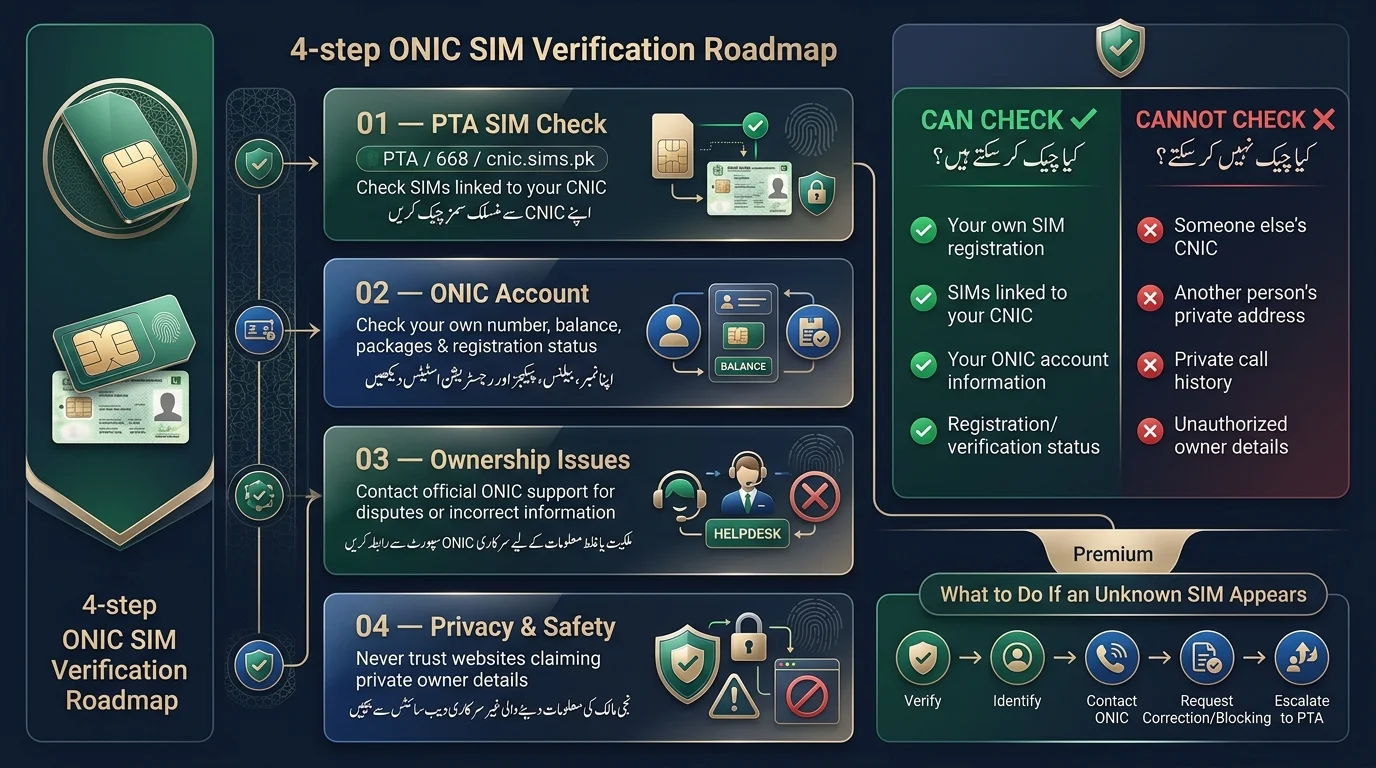
| Information | Can you check it? | Recommended source |
| Your SIM registration | Yes | Official operator / PTA channels |
| SIMs linked to your CNIC | Yes | PTA (668 SMS or cnic.sims.pk) |
| Your ONIC account information | Yes | ONIC app / official ONIC support |
| Registration or verification issue | Yes | ONIC customer support |
| Another person’s CNIC | No | Not a legitimate public lookup |
| Another person’s address | No | Private information |
| Private call history | No | Not a public service |
The text states that individuals have the right to access information about their identity or account through official channels. In contrast, private information tied to someone else’s identity should not be publicly accessible.
How to Check ONIC SIM Information Online in Pakistan
There are four ways to access ONIC SIM information based on your needs:
- PTA’s SIM Information System to check SIMs registered against your CNIC.
- The official ONIC account or app for details about your own ONIC number and account.
- ONIC customer support for registration issues or disputes.
- An official verification point for identity issues needing in-person biometric confirmation.
Method 1: Check SIMs Registered Against Your CNIC
The Pakistan Telecommunication Authority (PTA) has a system allowing citizens to check how many SIMs are registered against their CNIC. Each SIM must be linked to a verified CNIC through biometric confirmation.
To check your SIMs:
- Send your 13-digit CNIC (no dashes) via SMS to 668 to receive information about registered SIMs.
- Alternatively, visit cnic.sims.pk for the same information through a web-based option.
The system provides details on the number of SIMs linked to your CNIC and their respective networks, but it does not disclose information about other individuals’ SIMs or personal details.
Users should only enter their CNIC on official PTA channels to avoid phishing attempts from copycat sites.
Method 2: Check Your ONIC Account/App
The ONIC app allows you to manage your ONIC number by logging in with your registered number. You can view and handle package details, balance, registration status, and account settings.
- Your active SIM/account information
- Package and balance details
- Registration and verification status
- Basic account settings
If there’s an issue in the app, like an incomplete registration status or mismatched details, do not use third-party tools to fix it. Instead, use the in-app support option or contact ONIC directly.
Method 3: Contact ONIC Customer Support
Some issues genuinely need a human, not a self-service tool. Reach out to ONIC support directly if you’re dealing with:
- An ownership dispute over a number
- A registration problem that the app can’t resolve
- SIM information that’s missing or not showing up
- Account information that appears incorrect
- A SIM replacement request
- Any verification issue you can’t clear up yourself
Have these details ready before you contact support:
- Your CNIC number
- The ONIC mobile number in question
- A brief, clear description of the issue
- Any reference or complaint number from a previous contact, if applicable
Having this ready upfront usually gets your issue resolved faster.
Method 4: Visit an Official Verification/Service Point
Some situations, especially those involving disputed ownership or biometric mismatches, cannot be resolved online and may require a visit to an official Ufone/ONIC service point.
What to expect:
- You’ll typically need your original CNIC, not a photo or photocopy
- Biometric (fingerprint) verification is standard for identity confirmation
- Ownership-related issues, like a SIM registered without your consent, are usually resolved at this stage
Not every service point offers every type of service, so it’s worth confirming with ONIC support what a specific location can handle before you make the trip.
How to Check ONIC SIM Owner Details
The text discusses two main situations regarding ONIC SIM ownership:
- Checking Your Own ONIC SIM Ownership: You can verify that an ONIC SIM is registered in your name using the 668 SMS check, the cnic.sims.pk portal, or the ONIC app. If there are discrepancies, contact ONIC support.
- Checking Someone Else’s ONIC SIM Owner Name: There is no legal way to access another person’s ONIC SIM details, such as their CNIC or name, as this information is private. Beware of unofficial websites claiming to provide this data, as they may be misleading and could jeopardize your own personal information. If you need to identify a number owner for legitimate reasons (e.g., harassment or fraud), report it to the appropriate authorities instead of using public lookup sites.
How to Check ONIC SIMs Registered on Your CNIC
- Open the official PTA SIM information channel (SMS to 668 or cnic.sims.pk).
- Enter your CNIC number without dashes or spaces.
- Complete any required verification (like a captcha).
- Review the returned SIM and network information.
- Identify any unknown registrations.
- Contact the relevant operator or PTA for corrections.
Does PTA Show the ONIC Owner’s Full Details?
The system is designed to show how many SIMs are linked to your CNIC and the respective networks, not to provide personal information like names or addresses. Third-party “SIM database” sites claiming to offer such data are unreliable, as they cannot access information that the official PTA system does not provide.
Why Does My ONIC SIM Appear Under Ufone?
- ONIC is a digital mobile brand launched by PTML, which also operates Ufone.
- ONIC uses Ufone’s network infrastructure but is functionally a separate product.
- ONIC SIMs are processed through Ufone’s registration systems, so they appear under Ufone in a SIM check.
- ONIC operates under Ufone’s license and is not a standalone operator.
- Seeing Ufone instead of ONIC in a registration check is normal and does not indicate a problem.
Read Also: Telenor SIM Owner Details
Unknown ONIC SIM Registered on My CNIC? Here’s What to Do
- Verify the SIM information through official channels (668 SMS check or cnic.sims.pk).
- Determine if the number belongs to you or a family member.
- Contact ONIC or operator support for unresolved issues.
- Request the correction or blocking of any unauthorized SIM.
- Escalate the matter to PTA if not resolved by the operator.
- Keep a record of complaints and reference numbers for follow-up.
Can Someone Register an ONIC SIM Using My CNIC?
In Pakistan, ONIC SIMs require biometric verification linked to NADRA records for activation. It’s important to periodically check your CNIC for discrepancies, as no system is entirely free from fraud or error. If you find any issues, report them promptly to avoid complications later.
Common CNIC SIM Verification Problems
| Problem | Possible reason | What to do |
| SIM doesn’t appear in a check | Data or registration issue | Verify again through an official channel |
| Wrong owner information shown | Registration problem | Contact ONIC support |
| CNIC verification fails | Information mismatch | Recheck details or contact support |
| SIM isn’t activated | Activation issue | Contact ONIC directly |
| An unknown number appears on your CNIC | Possible unauthorized registration | Report it immediately |
| The app doesn’t show information | Account or app issue | Update the app or contact support |
Can You Check an ONIC SIM Owner by Mobile Number?
The text explains that individuals cannot access someone else’s private identity information, such as their CNIC or personal details, through any official Pakistani telecom or government system. While some websites claim to provide “Live SIM Owner Details” for a fee, these claims should be treated with skepticism as they likely offer outdated or fake information. Legitimate subscriber data is protected and not accessible by unauthorized sites, which may also be exploiting users’ data and money.
Read Also: Check Jazz SIM Owner Name and Registration Details
How Does ONIC SIM Ownership Transfer Work?
Ownership transfer of a SIM card is necessary when selling, passing it to a family member, or handling it after someone’s death. This process requires identity verification from both parties and must go through ONIC’s official support channels. Document requirements may change, so it’s important to check with ONIC directly. Avoid using unofficial sellers or third-party services, as they aren’t legitimate and could compromise your CNIC information.
Is It Safe to Check ONIC SIM Information Online?
- Use only HTTPS websites linked to official PTA or ONIC domains.
- Do not submit your CNIC to unofficial websites.
- Never share your OTP or account password with anyone.
- Avoid downloading SIM database files or apps from unofficial sources.
- Stay away from websites offering private CNIC or address lookups for others.
- Verify links before entering personal data, as altered domain names can be deceptive.
Never Share Your ONIC OTP
Your one-time password exists to confirm that you are the one logging in or making a change. No legitimate ONIC representative, PTA official, or support agent will ever ask you to read it out or forward it. If someone does, treat it as a scam attempt and end the conversation.
Official vs Unofficial ONIC SIM Information Methods
| Method | Recommended? | Purpose |
| PTA official system (668 / cnic.sims.pk) | Yes | CNIC/SIM verification |
| ONIC official app/account | Yes | Your account and SIM information |
| ONIC customer support | Yes | Registration/account issues |
| Official service point | Yes | Identity/ownership issues |
| Random “SIM database” website | No | Avoid |
| “Owner CNIC lookup” website | No | Avoid |
| “Live SIM location” website | No | Avoid |
Final Verdict
For ONIC SIM information, three official sources cover most needs: PTA to check registered SIMs against your CNIC; ONIC for your personal account and app details; and Official support for unresolved ownership disputes and registration issues. Always verify ONIC SIM ownership through official PTA or ONIC channels. Avoid sites claiming unrestricted access to personal CNIC or SIM details, as legitimate systems do not operate that way, and doing so puts your data at risk.
ONIC SIM کی معلومات کے لیے، تین سرکاری ذرائع زیادہ تر ضروریات کو پورا کرتے ہیں: PTA آپ کے CNIC کے خلاف رجسٹرڈ سمز کی جانچ کرنے کے لیے؛ آپ کے ذاتی اکاؤنٹ اور ایپ کی تفصیلات کے لیے ONIC؛ اور غیر حل شدہ ملکیت کے تنازعات اور رجسٹریشن کے مسائل کے لیے سرکاری مدد۔ ہمیشہ سرکاری PTA یا ONIC چینلز کے ذریعے ONIC SIM کی ملکیت کی تصدیق کریں۔ ذاتی CNIC یا SIM کی تفصیلات تک غیر محدود رسائی کا دعوی کرنے والی سائٹوں سے گریز کریں، کیونکہ جائز نظام اس طرح کام نہیں کرتے ہیں، اور ایسا کرنے سے آپ کا ڈیٹا خطرے میں پڑ جاتا ہے۔
Frequently Asked Questions
How can I check my ONIC SIM information online?
SMS your CNIC number to 668, or use the cnic.sims.pk web portal. For account-specific details like your package or balance, log in to the ONIC app directly.
How can I check ONIC SIMs registered on my CNIC?
Send your 13-digit CNIC to 668, or enter it on cnic.sims.pk after completing the captcha. The reply lists all SIMs, including ONIC, linked to your identity.
Can I check an ONIC SIM owner’s name?
Only for your own SIM, through your ONIC account or an official PTA check. There’s no legitimate public service that reveals another person’s name from their number.
Can I check the ONIC owner’s details by mobile number?
Not for someone else’s number, that private information isn’t available through any official public tool, and sites claiming otherwise shouldn’t be trusted.
Does PTA show ONIC SIM information?
Yes, PTA’s system shows ONIC SIMs registered to your CNIC, since ONIC SIMs are recorded the same way as any other network’s SIMs.
Why does my ONIC SIM appear under Ufone?
Because ONIC operates as a digital brand on Ufone’s network and license, registrations are processed and displayed under Ufone in PTA’s system.
How can I verify my ONIC SIM registration?
Use the 668 SMS check, the cnic.sims.pk portal, or your ONIC app. All three confirm whether your SIM is properly registered.
Disclaimer
This article offers general information about ONIC SIM registration, CNIC-linked SIM verification, and related services. It emphasizes the importance of checking official channels for the latest procedures and notes that the information does not grant access to private records. Caution is advised regarding third-party services claiming unauthorized access to confidential information. References to organizations like ONIC and PTA are for informational purposes only and do not imply affiliation. The article also clarifies that it is not a source of legal or professional advice and encourages contacting relevant operators for disputes or issues with SIM ownership. Lastly, it disclaims responsibility for reliance on unofficial databases or outdated information.
Sources & References
- Pakistan Telecommunication Authority (PTA): The main regulatory body for telecom services in Pakistan, overseeing SIM registration, subscriber verification, and consumer-related issues.
- PTA SIM Information System: An official tool to check SIM registrations linked to your CNIC, ensuring verification through a government channel.
- ONIC Official Website: The primary source for services related to ONIC, including account info, SIM/eSIM services, and customer support.
- NADRA (National Database & Registration Authority): The authority responsible for identity and biometric verification services in Pakistan, crucial for telecom identity verification processes.