Telenor SIM Owner Details: Check SIM Information & CNIC Registration
The text discusses the common queries related to Telenor SIM ownership in Pakistan, specifically how to check SIM registration linked to one’s own CNIC and the inability to access another person’s details, such as name or call history. It highlights the free tools provided by the Pakistan Telecommunication Authority (PTA) that individuals can use to verify their own SIMs. Additionally, it notes that PTCL acquired Telenor Pakistan in December 2025, leading to a merger with Ufone in mid-2026.
متن میں پاکستان میں ٹیلی نار کی سم کی ملکیت سے متعلق عام سوالات پر بحث کی گئی ہے، خاص طور پر اپنے CNIC سے منسلک سم رجسٹریشن کو کیسے چیک کیا جائے اور کسی دوسرے شخص کی تفصیلات، جیسے نام یا کال ہسٹری تک رسائی حاصل نہ کر سکے۔ اس میں پاکستان ٹیلی کمیونیکیشن اتھارٹی (PTA) کی جانب سے افراد کو اپنی سموں کی تصدیق کے لیے فراہم کیے گئے مفت ٹولز کو نمایاں کیا گیا ہے۔ مزید برآں، یہ نوٹ کرتا ہے کہ پی ٹی سی ایل نے دسمبر 2025 میں ٹیلی نار پاکستان کو حاصل کیا، جس کے نتیجے میں 2026 کے وسط میں یوفون کے ساتھ انضمام ہوا۔
How to Check Telenor SIM Owner Details
Here’s the short version, for anyone who doesn’t want to read the whole article.
| Method | Best for | What it checks |
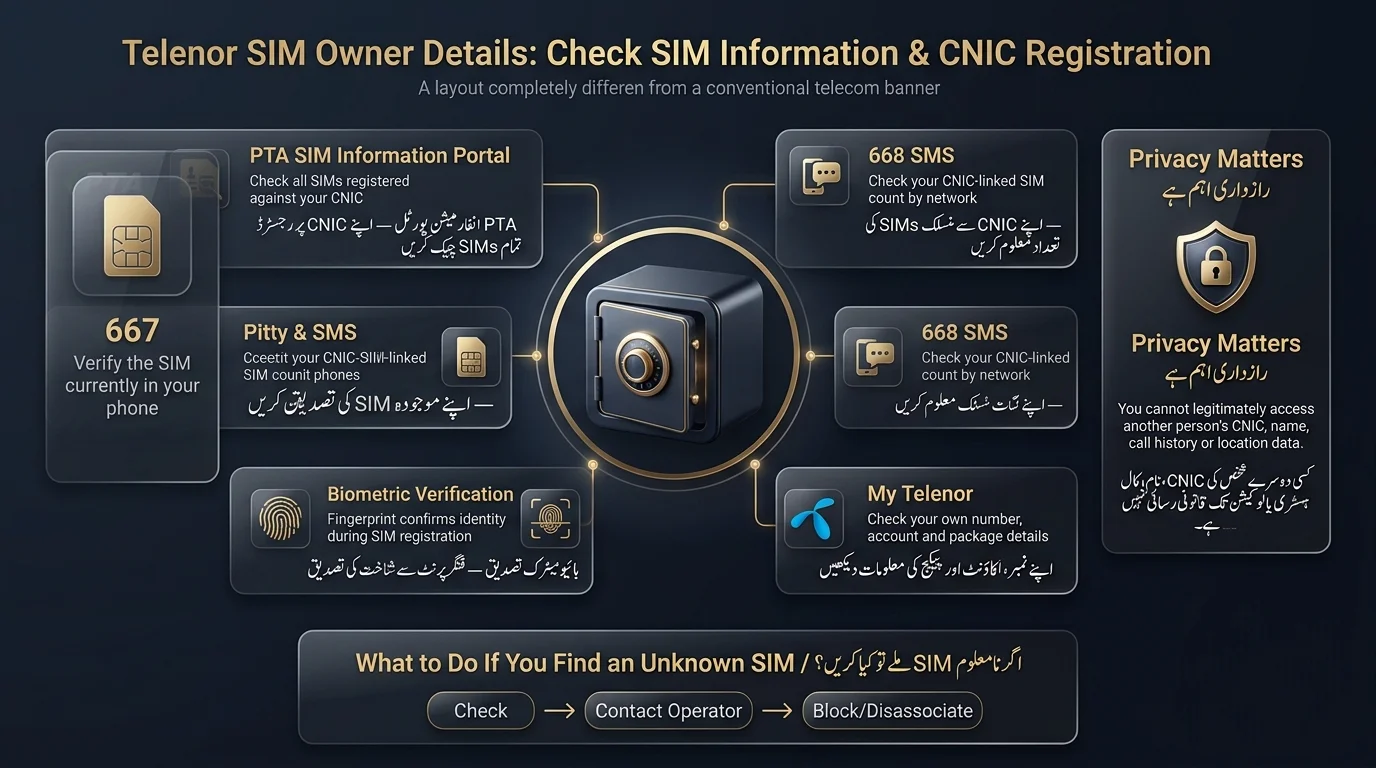
| PTA SIM Information portal (cnic.sims.pk) | CNIC-linked SIMs | All SIMs registered against your CNIC, across every operator |
| 668 (SMS) | CNIC SIM count | Network-wise SIM count tied to your CNIC |
| 667 (MNP code) | SIM ownership/network verification | Confirms the SIM currently in your hand and its registered network |
| Biometric verification (BVS) | Identity verification | Whether your SIM passed the fingerprint/biometric registration |
| My Telenor app/portal | Existing customers | Your own account, number, and package details |
To check the number of Telenor SIMs registered on your CNIC, send your 13-digit CNIC to 668 or visit the PTA SIM Information portal. For a quicker option to confirm the registration of your current number, use 667. Official channels will not disclose anyone else’s private information.
What do Telenor SIM Owner Details Mean?
The term SIM owner details refers to several important concepts related to mobile numbers and their registration:
- SIM Ownership: The legal registration of a specific SIM to a CNIC (Computerized National Identity Card).
- SIM Registration: The record maintained by the PTA and mobile operators linking a mobile number to an identity document.
- CNIC Registration: The total number of active SIMs registered to a single CNIC across all networks.
- Biometric Verification (BVS): The process of confirming that the person activating a SIM matches the identity on the CNIC.
- Mobile Number Ownership: Verifying that a mobile number is genuinely registered to you.
It’s important to note that owner details do not include access to sensitive information such as:
- Full CNIC numbers of strangers
- Home addresses
- Call logs or SMS history
- Location data
- Private accounts of others
Legitimate tools for SIM verification exist to confirm registration and identify unauthorized SIMs, but they are not designed for accessing others’ private data. Attempts to obtain such data without authorization are considered illegal under Pakistani law
How to Check Telenor SIMs Registered on Your CNIC
Checks Through PTA SIM Information System
- Visit the official PTA SIM Information web portal (cnic.sims.pk).
- Enter your 13-digit CNIC number and complete the CAPTCHA.
- View the list of SIMs registered against your CNIC and check the breakdown for Telenor’s prefixes (0340–0347).
- Accessible from outside Pakistan.
Checks Through 668
- Send your CNIC number via SMS to 668.
- Wait for an automated reply listing your SIM count by operator.
- There is a small SMS charge for this service.
Information Provided by 668
- Number of SIMs linked to your CNIC per network.
- Identification of each operator (Telenor, Jazz, etc.).
- Confirmation of the SIMs tied to the entered CNIC.
- No personal information about other subscribers is provided.
Can You Check Telenor SIM Owner Name by Number?
- You can confirm your own phone number registration using legitimate channels like the My Telenor app, SMS services (668/667), or the PTA portal with your CNIC or SIM.
- There is no official service that allows someone to look up another person’s phone number to obtain their name, CNIC, or address.
- Tools from PTA are based on your identity, not for searching others’ information.
- Websites claiming to provide personal information (name, CNIC, address, etc.) from just a phone number are typically unreliable and may collect your data fraudulently.
- Genuine private information is not publicly searchable, so such claims should be treated with skepticism.
How to Check Telenor SIM Ownership Through 667
667 is the short code in Pakistan for Mobile Number Portability (MNP) and SIM verification. It allows users to check specific information about the SIM currently in their phone, like the network it’s registered on. However, it does not provide access to private information such as CNIC databases, addresses, call records, or location data. The service is designed to verify details related to one’s own mobile number.
Read Also: 667 & 668 SMS Not Working? Try These Fixes
When Should You Use 667 Instead of 668?
| If you want to… | Use |
| Check all SIMs registered on your CNIC | PTA portal / 668 |
| Verify the specific SIM you’re currently holding | 667 |
| Check your own account details and usage | My Telenor |
How Telenor SIM Biometric Verification Works
In Pakistan, SIM registration and re-verification require biometric confirmation through fingerprint matching. This process ensures that a SIM card is physically linked to the individual holding the CNIC, rather than being just a paper record.
- To activate a new SIM, you can’t get a Telenor SIM without a live fingerprint match against your CNIC at an authorized outlet.
- For replacing a lost or damaged SIM, the replacement process also runs through biometric confirmation, so a random person can’t request a duplicate SIM on your number.
- Ownership-related procedures, transfers, and re-verifications generally require the same biometric step.
Telenor Biometric Verification Status
To verify if your SIM’s biometric status is current, use Telenor’s official channels or the mentioned SMS/portal tools. Avoid third-party websites claiming to offer a “biometric database,” as they are not legitimate.
What If Biometric Verification Fails?
If your fingerprint doesn’t match, or verification comes back unsuccessful:
- Visit an authorized Telenor franchise or service centre in person.
- Bring your original CNIC (not a photocopy).
- Request a re-verification.
- Follow the staff’s instructions; this sometimes means a fresh biometric scan or an update to your CNIC record with NADRA first.
How to Check Your Telenor SIM Information Through My Telenor
If you’re already a Telenor customer, the My Telenor app or web portal is usually the simplest way to check details about your own line.
What Can My Telenor Show?
- Your account information
- Your registered mobile number
- Active packages and bundles
- Usage and other account-related details
When Should You Use My Telenor?
The text highlights the appropriate tool to use for personal account checks, such as balance, package status, and profile details, while noting that CNIC-wide SIM counts should be verified using 668 and the PTA portal.
Is Telenor Still Operating in Pakistan in 2026?
- Telenor Group sold Telenor Pakistan to PTCL, with the sale closing on December 31, 2025, after obtaining necessary regulatory approvals.
- Telenor Pakistan and Orion Towers became wholly owned subsidiaries of PTCL.
- A merger between Telenor Pakistan and PTCL’s Ufone brand was completed on July 1, 2026, after receiving approval from the Islamabad High Court.
- The core verification process for Telenor SIMs remains unchanged, and existing SIM registrations are still valid.
- Users should stay informed about potential changes in branding or systems due to the merger.
What to Do If an Unknown Telenor SIM Is Registered on Your CNIC
- Verify Your CNIC-Linked SIMs: Use the PTA check (668 or the portal) to get an accurate list of registered SIMs.
- Identify the Unexpected SIM: Determine the network and assess if the SIM is old or registered by someone you know.
- Contact the Relevant Operator: Reach out to the customer support of the network associated with the unknown SIM.
- Request Blocking/Disassociation: If the SIM isn’t yours, follow the operator’s process to block or remove it from your CNIC, usually requiring an in-person visit.
Protect Your CNIC
A few habits go a long way:
- Don’t hand over copies of your CNIC unless you genuinely need to.
- Never share an OTP with anyone, even someone claiming to be from your operator or PTA.
- Avoid “SIM database” websites that ask for your CNIC to run a lookup.
- Report anything suspicious to your operator and to PTA promptly.
What Is Required to Register a Telenor SIM?
Getting a new Telenor SIM legitimately requires:
- A valid, original CNIC
- Biometric (fingerprint) verification at the point of activation
- The subscriber’s physical presence was required by the process
- Registration through an official Telenor retailer or franchise
- Completion of the SIM activation step before the number goes live
A SIM cannot be activated using your CNIC without your fingerprint matching NADRA’s records.
Periodic CNIC-linked SIM checks (via 668 or the PTA portal) are important for monitoring any unauthorized registrations.
If a registration attempt fails due to mismatched CNIC details, you should first correct your CNIC record with NADRA and then retry registering at an authorized outlet.
How to Transfer Telenor SIM Ownership
To properly transfer a SIM from one CNIC to another in Pakistan, follow these steps:
- Confirm that an ownership transfer is necessary instead of just re-registering a new SIM.
- Complete official verification with both the current and new CNIC holders.
- Meet the standard CNIC documentation requirements.
- Undergo biometric verification for the new owner.
- Visit an authorized Telenor outlet in person to complete the transfer.
Avoid any online SIM transfer services that do not require biometric verification.
Read Also: How to Transfer SIM Ownership Online in Pakistan
Telenor SIM Verification Not Working? Try These Fixes
- 668 Not Responding: Ensure your 13-digit CNIC is sent correctly and check your SMS balance. If the issue persists, use the PTA web portal or contact their helpline.
- SIM Display Issues: Wait and recheck if your SIM isn’t displaying correctly after system updates. If the problem continues, contact PTA or your operator’s support.
- Biometric Verification Fails: Go to a Telenor service point with your original CNIC for re-verification.
- Number Not Registered: An ownership transfer may be necessary. Follow the official process for this rather than attempting to fix it remotely.
- Website Issues: If the PTA portal is down, use the 668 SMS option or contact the PTA’s helpline/WhatsApp for assistance.
Read Also Related Article
Final Verdict
Remember these key points: For CNIC-linked SIMs, use the official PTA process (668 or PTA SIM Information portal) to check registrations under your identity. Rely on Telenor’s official channels or the My Telenor app for details on your SIM. Report unauthorized SIMs through your operator and PTA’s official complaint methods, avoiding third-party services. Don’t trust websites claiming to provide private information from mobile numbers; if it’s not from PTA, NADRA, or your operator, it’s not official and should not be trusted.
ان اہم نکات کو یاد رکھیں: CNIC سے منسلک سمز کے لیے، اپنی شناخت کے تحت رجسٹریشن چیک کرنے کے لیے آفیشل PTA پروسیس (668 یا PTA SIM انفارمیشن پورٹل) کا استعمال کریں۔ اپنی سم کی تفصیلات کے لیے ٹیلی نار کے آفیشل چینلز یا مائی ٹیلی نار ایپ پر انحصار کریں۔ فریق ثالث کی خدمات سے گریز کرتے ہوئے اپنے آپریٹر اور PTA کے سرکاری شکایتی طریقوں کے ذریعے غیر مجاز سموں کی اطلاع دیں۔ موبائل نمبروں سے نجی معلومات فراہم کرنے کا دعویٰ کرنے والی ویب سائٹس پر بھروسہ نہ کریں۔ اگر یہ PTA، نادرا، یا آپ کے آپریٹر کی طرف سے نہیں ہے، تو یہ سرکاری نہیں ہے اور اس پر بھروسہ نہیں کیا جانا چاہیے۔
Frequently Asked Questions
How can I check my Telenor SIM owner details?
Use the PTA portal or send your CNIC to 668; both show SIMs registered against your identity, broken down by operator.
How can I check Telenor SIMs on my CNIC?
Send your 13-digit CNIC to 668, or use the official PTA SIM Information portal to see a full, operator-wise breakdown.
How does the 668 SIM check work?
You text your CNIC to 668, and PTA’s system replies with a count of SIMs registered against it, per network.
Can I check Telenor SIM details online?
Yes, the official PTA web portal lets you check CNIC-linked SIM registrations from any browser, including from abroad.
Can I check the owner of a Telenor number by number?
Only for your own number, through official channels. There’s no legitimate public lookup for someone else’s identity.
Can I find someone’s CNIC from their Telenor number?
No. Legitimate PTA and Telenor tools don’t expose another person’s CNIC from just a phone number.
What is 667 used for?
It’s the MNP/ownership check that confirms details about the specific SIM currently in your phone.
What is Telenor biometric verification?
A fingerprint-based process confirming the person activating or re-verifying a SIM matches the CNIC it’s registered against.
Disclaimer
The article provides general information about Telenor SIM ownership, CNIC registration, and verification processes such as biometric and PTA SIM verification. It emphasizes that while efforts are made to keep the information accurate, telecom procedures and policies may change, and readers should verify important details through official sources. The article clarifies that it is not affiliated with any telecom authority and warns against sharing sensitive personal information to avoid unauthorized access or violations of privacy. Users should address disputes and complaints through the relevant telecom operator or official complaint channels. Lastly, it notes that users are responsible for verifying official requirements before making decisions related to SIM registration or ownership.
Sources & References
The article references several authoritative sources regarding telecommunications in Pakistan:
- Pakistan Telecommunication Authority (PTA): The regulator for telecom services, overseeing SIM registration, biometric verification, and consumer complaints.
- PTA SIM Information System: Allows users to check registered SIMs against their CNIC and view the SIM count by network.
- PTA Complaint Management System (CMS): Enables consumers to submit and track telecom-related complaints.
- Pakistan Telecommunication (Re-organization) Act, 1996: Establishes the legal framework for telecom regulations in Pakistan.
- Pakistan Telecommunication Company Limited (PTCL): Provided information on the acquisition of Telenor Pakistan, which was completed on December 31, 2025.
- Telenor Group: Confirmed the sale of Telenor Pakistan to PTCL on December 31, 2025.
- Ufone/PTCL Group: Included details on the integration of Telenor Pakistan and Ufone following the acquisition.