Check Onic SIM Information Online in Pakistan: SIM Owner Details & Ownership Check
To check your Onic SIM information in Pakistan, start with your Onic account or app, and use official channels like PTA’s CNIC-linked SIM check. Avoid websites that claim to provide personal information about others, as they are not legitimate. The guide explains official methods to check your Onic SIM details, what information can be obtained, and actions to take if discrepancies arise. This information is for educational purposes only and is not legal advice; always verify procedures with official sources as they may change over time.
پاکستان میں اپنی Onic سم کی معلومات چیک کرنے کے لیے، اپنے Onic اکاؤنٹ یا ایپ سے شروع کریں، اور PTA کے CNIC سے منسلک سم چیک جیسے آفیشل چینلز کا استعمال کریں۔ ایسی ویب سائٹس سے بچیں جو دوسروں کے بارے میں ذاتی معلومات فراہم کرنے کا دعوی کرتی ہیں، کیونکہ وہ جائز نہیں ہیں۔ گائیڈ آپ کی Onic SIM کی تفصیلات چیک کرنے کے سرکاری طریقوں کی وضاحت کرتا ہے، کیا معلومات حاصل کی جا سکتی ہیں، اور اگر تضادات پیدا ہوتے ہیں تو کیا کرنا ہے۔ یہ معلومات صرف تعلیمی مقاصد کے لیے ہے اور قانونی مشورہ نہیں ہے۔ ہمیشہ سرکاری ذرائع سے طریقہ کار کی تصدیق کریں کیونکہ وہ وقت کے ساتھ بدل سکتے ہیں۔
What Is Onic SIM Information?
Onic is a digital mobile brand in Pakistan using Ufone’s network. Users register Onic SIMs via a mobile app with video verification. Key information includes the mobile number, linked CNIC, and account details in the app. Onic SIMs are also tracked in Pakistan’s national SIM registry, visible in official checks.
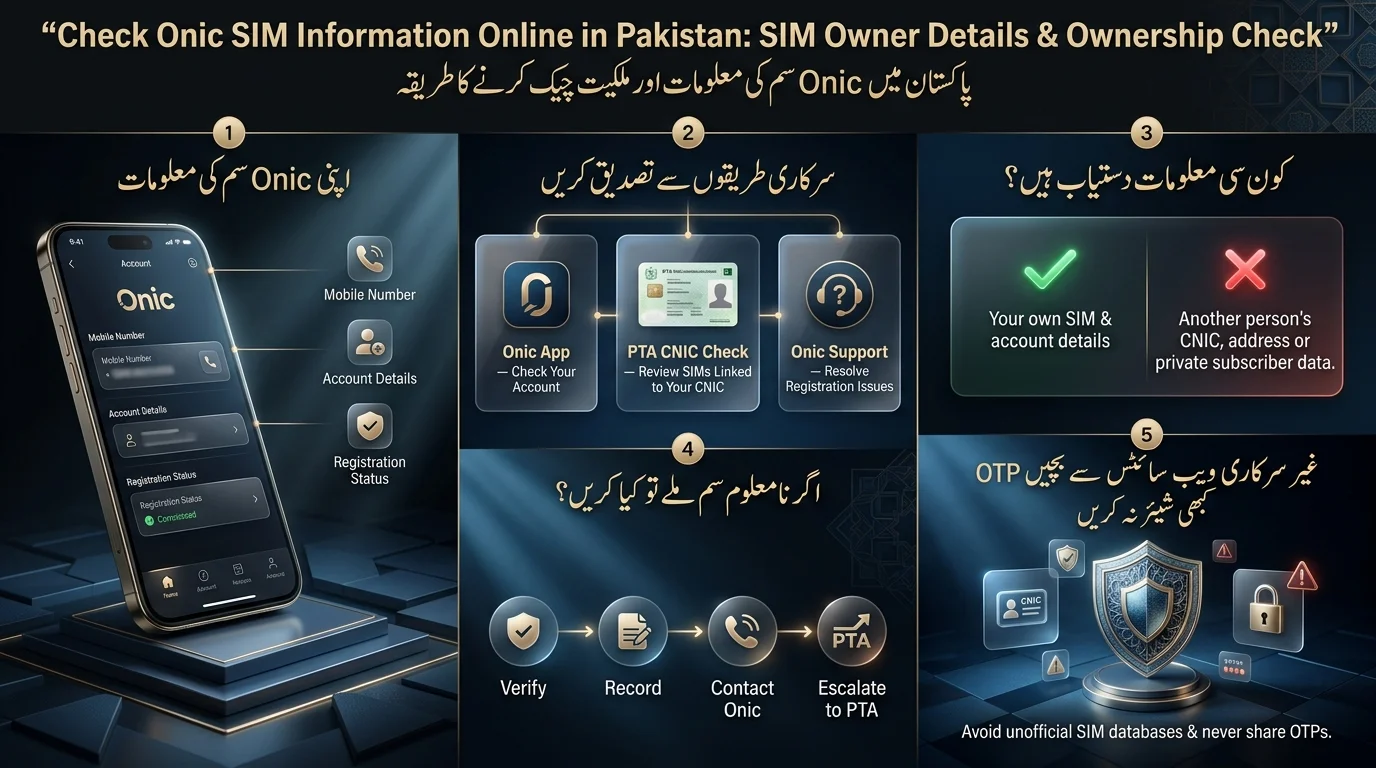
Onic SIM Information vs SIM Owner Details
The terms SIM information and SIM owner details are often confused but have different meanings. SIM information refers to operational details of a connection, such as activation date and network affiliation, while SIM owner details relate to identity-level data, specifically the CNIC linked to a SIM. Officially, individuals can only access owner-level information tied to their own CNIC.
Why People Search for Onic SIM Owner Details
The text outlines various reasons people look up SIM information, including confirming new registrations, checking the status of old SIMs, associating unfamiliar numbers with their CNICs, resolving issues with lost or stolen SIMs, and performing routine checks on their digital identity. It also mentions that identifying the owner of an unknown number is not supported by official tools and is addressed separately.
How to Check Onic SIM Information Online
There are three main routes for assistance: the Onic app, official PTA CNIC verification, and Onic customer support. Choosing the right one can save time.
Method 1: Check Through the Onic App
For anything tied to your own Onic account, the app is the most direct source.
- Open the Onic app on your phone.
- Sign in using your registered mobile number and complete any verification step it asks for.
- Navigate to the account or profile section, where your SIM and registration details are displayed.
- Review your registered number, account status, and any linked details shown there.
- If anything looks incorrect a wrong status, a mismatch, or missing information don’t try to fix it yourself through third-party tools. Contact Onic support directly instead.
This method covers most day-to-day needs: an Onic SIM information check online, confirming your Onic SIM details, or simply verifying your account is active.
Method 2: Use Official PTA SIM Verification
The Pakistan Telecommunication Authority (PTA) has a national registry called the SIM Information System, which records all SIMs issued against a CNIC from various operators, including Onic. This registry offers a comprehensive view of all SIMs associated with an individual’s identity across multiple operators like Jazz, Zong, Ufone, Telenor, and SCOM. It is useful for identifying any unknown SIMs. If discrepancies are found, such as unregistered SIMs, users should contact the issuing operator or the PTA instead of unofficial sites for resolution.
Method 3: Contact Onic Support
Contact Onic’s official customer support for issues like incorrect account information, registration disputes, lost access to your account, or needing ownership records corrected. They can verify your identity and make changes that self-service options cannot handle.
How to Check Onic SIM Owner Details by CNIC
- You can check how many SIMs are registered to your CNIC through Pakistan’s telecom regulator, which includes Onic SIMs alongside other operators.
- The CNIC SIM check provides a count and basic information about the registered SIMs, including the operator and registration status, but does not include personal activity details like call logs or messages.
- If an unknown Onic SIM appears on your CNIC, verify the result through another official channel, record the details, contact Onic to report it, and request correction. If unresolved, escalate the issue to the PTA.
Can You Check an Onic SIM Owner by Mobile Number?
- Obtaining the owner’s name from an Onic number is not possible through legitimate channels in Pakistan; these systems are not designed for reverse lookups.
- There are no public databases that allow you to access someone else’s CNIC or personal information through their mobile number.
- Unofficial websites claiming to provide SIM owner information can pose significant risks, including data harvesting and phishing attempts.
- Only verify your own SIM and account details through official channels; attempts to access others’ subscriber records using their phone numbers are illegal and unreliable.
Onic SIM Registration Check: How It Works
Why CNIC and Biometric Verification Matter
In Pakistan, every SIM card is linked to a verified CNIC through biometric identification, such as fingerprint scans or facial verification. This process is essential for connecting a SIM to a confirmed identity, facilitating fraud prevention and account recovery.
What Happens After SIM Registration?
Once a SIM is verified, it becomes linked to your account in the operator’s system, activated for service, and recorded in the shared records of the operator and PTA. It remains part of your account, visible in the app and included in future CNIC-based registry checks.
Does Onic Use the Same SIM Registration Rules?
Onic’s onboarding process is app-based and video-verified, eliminating the need for a franchise visit. However, it operates under the same regulatory framework as all licensed telecom operators in Pakistan, meaning that a SIM issued by Onic follows the same CNIC-linkage and registration rules as those issued by traditional operators.
Onic SIM Information Check Without the App
If you can’t access the Onic app, you have several options: perform a CNIC-based SIM check through PTA, contact Onic customer support, go through account recovery, or use other official verification methods. Contact Onic directly if you’ve lost your phone and SIM, can’t retrieve your account, your registration details are incorrect, there’s a dispute over SIM ownership, or you’re facing unresolved activation problems. In these situations, a support agent can assist more effectively than self-service tools.
668 vs 667 vs Onic App vs PTA: What’s the Difference?
Pakistan’s telecom ecosystem has a few different official tools, and it’s easy to mix them up. Here’s how they compare:
Read Also: 667 & 668 SMS Not Working? Try These Fixes
| Method | Main Purpose | Best Use |
| Onic App | Manage your own Onic account and SIM details | Checking or updating your own Onic account |
| PTA CNIC Verification | CNIC-linked SIM registry check across all operators | Auditing every SIM registered to your CNIC |
| 668 (SMS) | Official short code for a CNIC-based SIM count | Quick check of how many SIMs are on your CNIC |
| 667 (MNP-related) | Mobile number portability / SIM-in-hand verification | Confirming details of the SIM currently in your phone |
| Onic Support | Account and registration troubleshooting | Fixing disputes, errors, or lost account access |
- Always verify official contact numbers and website addresses for PTA, as they may change and be mimicked by unofficial sites.
- To see your own Onic account information, use the Onic app.
- For auditing all SIMs registered to your CNIC across operators, use the official PTA CNIC verification route.
- For fixing registration errors, disputes, or account access issues, go to Onic support.
What Onic SIM Information Can You Actually See?
| Information | What to Expect |
| Your Onic number | Visible through your account, once logged in |
| Account information | Available through official Onic account channels |
| CNIC-linked SIM association | Visible via official PTA verification |
| SIM registration status | Shown where officially provided by the operator or PTA |
| Another person’s CNIC | Not publicly available |
| Another person’s home address | Not publicly available |
| A private subscriber database | Does not legitimately exist for public access |
Why Some Information Is Restricted
Limits on accessing subscriber information protect privacy and prevent fraud and harassment. Pakistan’s telecom regulations and PECA 2016 ensure individuals control their CNIC-linked identities, blocking unauthorized access.
ONIC SIM Ownership Check Not Working? Fix These Problems
- ONIC SIM Not Showing: This may be due to recent activation, account mismatch, ongoing verification, or temporary system issues. Wait before assuming there’s a problem.
- Incorrect CNIC Information: Contact Onic support with correct CNIC details for official correction instead of using the app. Escalate to PTA if the issue isn’t resolved.
- Onic App Not Showing SIM Details: Update the app, ensure correct account login, log out and back in, and contact support if the problem continues.
- SMS Verification Issues: Check for incorrect number formatting, poor network, service outages, or retry after a short wait.
- SIM Registered to Someone Else: Resolve through official channels like the operator or PTA; do not use unofficial databases.
- Lost Access to SIM: Use the operator’s account recovery or request a SIM replacement through official support.
How to Fix an Unknown Onic SIM Registered to Your CNIC
- Verify the Registration: Confirm the CNIC result through a second official source.
- Record Relevant Information: Note the unrecognized SIM’s number, registration date, and status.
- Contact Onic: Report the unrecognized SIM to Onic customer support for investigation.
- Request Ownership Correction or Disowning: Formally ask to disown or correct the SIM ownership if confirmed not yours.
- Escalate if Unresolved: If Onic doesn’t resolve the issue, escalate to PTA.
Do not pay anyone claiming to delete or change SIM records through unofficial means, as legitimate corrections must go through the operator or regulator.
Is Checking Onic SIM Owner Information Legal and Safe?
- Checking your own SIM registered under your CNIC is legal and encouraged through official PTA tools.
- Accessing someone else’s private information (CNIC, address, subscriber data) without authorization is illegal and not supported by official channels.
- Avoid unofficial SIM database websites that promise instant results, as they may collect personal data or require payment without delivering actual information.
How to Protect Your CNIC From SIM Fraud
To protect yourself from SIM-related fraud, follow these key habits:
- Regularly audit SIMs registered against your CNIC.
- Limit sharing your CNIC, and only when necessary.
- Avoid uploading your CNIC to unfamiliar websites.
- Never share OTPs, even with supposed support agents.
- Keep your account passwords private and report any suspicious registrations immediately.
- Utilize available security features to secure your mobile account.
Warning Signs of SIM-Related Fraud
- Unfamiliar SIM activation
- Your SIM losing network unexpectedly
- Unknown account notifications
- Unfamiliar SIMs on CNIC checks
- Unrequested OTP codes
Investigate any of these signs promptly.
Final Verdict
Utilize the Onic app for managing your personal account details, the official PTA CNIC verification method to check every SIM associated with your identity, Onic support for any issues related to registration or ownership, and a verify-then-report approach for unfamiliar SIMs. There is no legitimate shortcut to access another person’s private information; official systems do not provide that data, and no unofficial site can genuinely offer it either. Steer clear of any websites that claim to give instant access to a private SIM-owner database. When it comes to information linked to your own identity, only rely on official channels.
اپنے ذاتی اکاؤنٹ کی تفصیلات کا انتظام کرنے کے لیے Onic ایپ کا استعمال کریں، اپنی شناخت سے وابستہ ہر سم کو چیک کرنے کے لیے سرکاری PTA CNIC تصدیق کا طریقہ، رجسٹریشن یا ملکیت سے متعلق کسی بھی مسئلے کے لیے Onic سپورٹ، اور غیر مانوس سموں کے لیے تصدیق کے بعد رپورٹ کرنے کا طریقہ استعمال کریں۔ کسی دوسرے شخص کی نجی معلومات تک رسائی کا کوئی جائز شارٹ کٹ نہیں ہے۔ سرکاری نظام وہ ڈیٹا فراہم نہیں کرتے ہیں، اور کوئی بھی غیر سرکاری سائٹ اسے حقیقی طور پر پیش نہیں کر سکتی۔ کسی بھی ایسی ویب سائٹ سے دور رہیں جو نجی سم مالک کے ڈیٹا بیس تک فوری رسائی دینے کا دعوی کرتی ہیں۔ جب بات آپ کی اپنی شناخت سے منسلک معلومات کی ہو تو صرف سرکاری چینلز پر انحصار کریں۔
Frequently Asked Questions
How can I check my Onic SIM information online?
Log in to the Onic app to view your own account and SIM details, or run an official PTA CNIC-based check to see everything registered against your identity across all operators.
How can I check an Onic SIM by CNIC?
Use PTA’s official CNIC verification channel. Since Onic runs on the shared national registry, any Onic SIM registered to you will appear in the result alongside your other connections.
Can I check an Onic SIM owner’s name by mobile number?
No. There’s no official service that reveals a stranger’s identity from just their phone number, and sites claiming otherwise aren’t legitimate.
Can I check Onic SIM details without the app?
Yes, an official PTA CNIC check doesn’t require the Onic app, and Onic support can also assist directly.
How do I know whether my Onic SIM is registered in my name?
Run a CNIC-based check through official PTA channels; it will confirm which SIMs, including any Onic connection, are tied to your identity.
What should I do if an unknown Onic SIM is registered against my CNIC?
Verify the result, document the details, report it to Onic, request correction or disowning, and escalate to PTA if it isn’t resolved.
Does 668 work for checking SIM information?
668 has historically been used as an official PTA short code for CNIC-based SIM checks. Confirm the current active code and process on PTA’s official website, since details can change.
Sources & References
The text discusses the Pakistan Telecommunication Authority (PTA) and its initiatives related to SIM verification and consumer protection. Key points include:
- Users can access their SIM data through the SIM Information System (668).
- The SIM Information System was launched at the PTA Consumer Forum.
- The PTA’s official website guides SIM/CNIC verification and consumer protection.
- The Prevention of Electronic Crimes Act (PECA) 2016 is referenced for issues related to unauthorized access to personal data.
- There is industry reporting on Onic’s app-based, video-verification SIM registration model as part of Ufone’s digital brand.