CNIC SIMs PK: Check every SIM on your CNIC at cnic.sims.pk
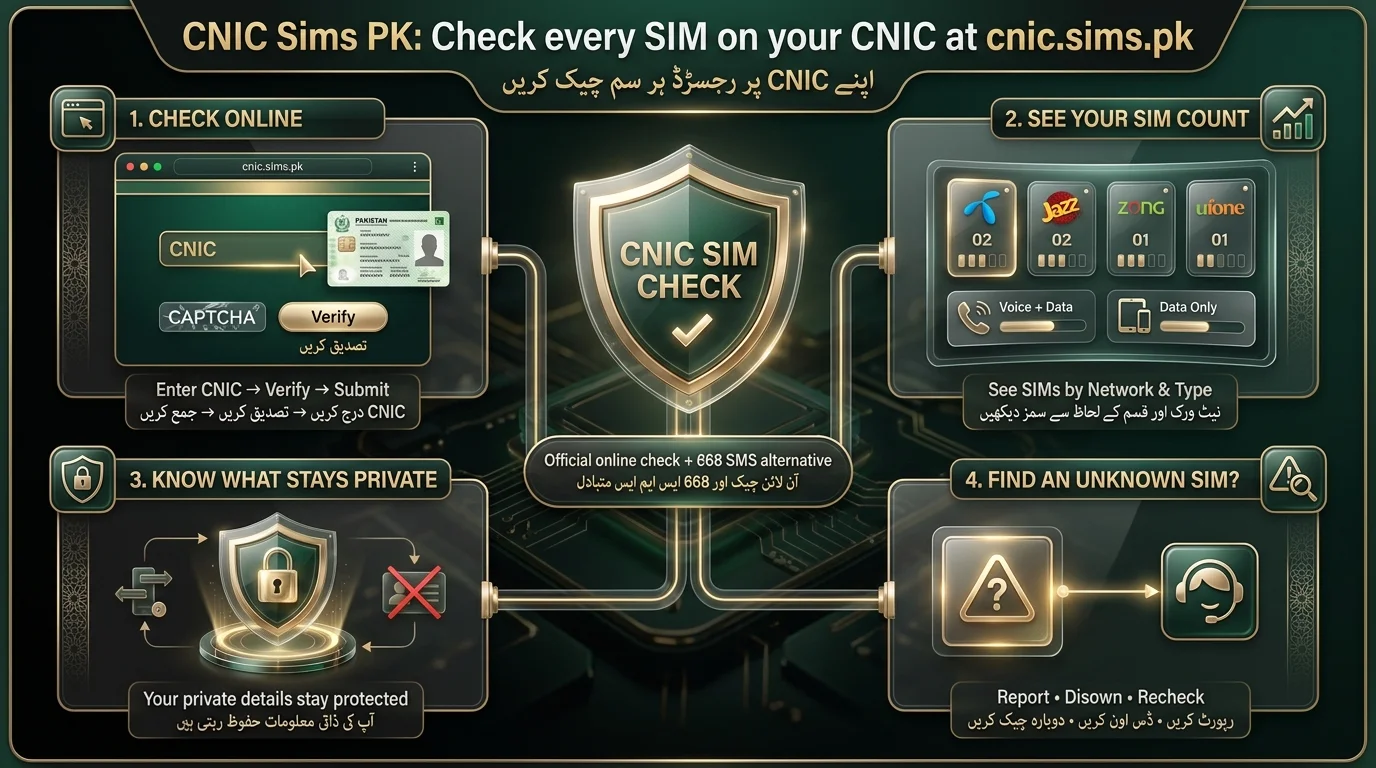
CNIC Sims PK, accessible at cnic.sims.pk, is the Pakistan Telecommunication Authority’s (PTA) official and free online portal for checking SIM registrations linked to Pakistani identity cards (CNIC, NICOP, POC). Users can enter their CNIC details on the website or send an SMS with their CNIC number to short code 668 to receive SIM registration information. It is important to check this regularly to identify unauthorized SIMs that could lead to misuse and legal responsibilities. The service provides a breakdown of registered SIMs by network and type (voice-plus-data or data-only).
What Is CNIC Sims PK?
CNIС Sims PK refers to the website cnic.sims.pk, a self-service portal created for checking SIM registration linked to national identity documents in Pakistan. The portal allows users to quickly see how many SIMs are registered in their name without visiting an operator’s franchise or calling customer service. This service aims to enhance security and consumer protection by helping users verify their telecom connections and report any fraudulent registrations. It is recommended for all Pakistani CNIC, NICOP, or POC holders to use this service regularly.
What Can You Check?
The text outlines the following main points:
- Total number of SIMs registered against a specific CNIC.
- Network operators associated with each SIM (e.g., Jazz, Zong, Telenor, Ufone).
- A breakdown of SIMs linked to the individual’s CNIC.
- General registration information provided by the portal during the check.
What You Cannot Check
- You cannot access someone else’s private CNIC information by entering their number or ID.
- The portal does not provide a searchable database of subscribers.
- Personal details such as address or identity cannot be retrieved using just a phone number.
- Claims by any website or app suggesting otherwise should be considered suspicious and illegal.
Is cnic.sims.pk the Official PTA SIM Portal?
The official web channel for the SIM Information System in Pakistan is cnic.sims.pk, provided by the PTA, along with the 668 SMS shortcode. Users should be cautious to ensure they are on the correct site, as many phishing and copycat sites exist that claim to offer SIM owner details for a fee. Legitimate services are free, only require your own CNIC, and never ask for payment or personal information beyond this. It’s important to verify the website address and be skeptical of sites promising more than just basic SIM counts.
How to Recognize the Correct Website
- Verify the domain is exactly cnic.sims.pk, with no additional words or suffixes.
- Ensure the connection is secure with HTTPS (padlock icon).
- Avoid websites offering access to private “phone owner” or “CNIC owner” databases.
- Don’t download unfamiliar apps for checking SIMs.
- Never share OTPs with third parties, even if they claim to be from PTA or an operator
How to Check SIMs on Your CNIC Online
- Open the Website: Go to cnic.sims.pk directly by typing the address into your browser.
- Enter CNIC: Input your 13-digit CNIC number without dashes or spaces. Overseas Pakistanis should use their NICOP or POC number where applicable.
- Complete CAPTCHA: Verify that you are not a robot through the provided challenge.
- Submit Request: After verification, submit the form to query the SIM Information System.
- Review SIM Information: Check the results for the count of SIMs, typically organized by operator, and ensure they match your known SIMs.
- The layout and fields of the interface may change; always refer to the live version for accurate information.
- Manually enter the address cnic.sims.pk, bookmark it for future access, and input your 13-digit CNIC without dashes.
- Complete the CAPTCHA and submit to view your full CNIC SIM information, which includes counts for each operator, divided into voice and data, along with the date of the check.
- You can confirm that you are within the SIM limit of eight (five voice and three data) per CNIC, as set by the Supreme Court on 5 November 2015.
- The results provide evidence of any unknown SIMs based on the date checked and operator records.
- The portal is accessible via a browser with no installation or account needed, ensuring security.
What the Results Mean
| Result | Meaning |
| Network/operator | The mobile network(s) associated with your registration |
| SIM count | The number of SIMs shown against your CNIC |
| Total registrations | Overall registration information across all operators |
| Unexpected SIM | A registration you don’t recognize — this should be investigated |
How Many SIMs Are Registered on My CNIC?
Pakistan has a regulatory cap on SIM registrations allowing a maximum of five connections per CNIC holder, regardless of the operator. This limit was established to prevent misuse of SIMs following Supreme Court directives. If already at this limit, individuals must block or transfer an existing SIM to obtain a new one. Biometric verification at retail counters can lead to unauthorized SIMs being registered under someone’s identity, highlighting the importance of periodic checks to catch and block such connections before they are misused.
| Question | Short answer |
| Can multiple SIMs be registered to one CNIC? | Yes, up to the regulatory limit |
| Can different networks appear? | Yes, the count spans all operators |
| Can I check the total? | Yes, through cnic.sims.pk or the 668 SMS service |
| What if the count is wrong? | Contact the relevant mobile operator to investigate |
cnic.sims.pk vs 668 SMS SIM Check
Both methods access the same SIM Information System, ensuring matching results. The key difference lies in convenience and access. There are four official routes, each addressing a different question.
| Route | What it returns | Cost and reach |
| cnic.sims.pk portal. | Every SIM counted per operator, voice and data split out; no activation dates. | Free, from any country and any browser. |
| SMS your 13-digit CNIC to 668. | Per-operator SIM counts, with no dates attached. | About Rs 2 including tax, from a Pakistani SIM. |
| SMS the word MNP to 667. | Registration status of the SIM in hand, against a masked identity. | Standard SMS rate, from the SIM you are holding. |
| SMS N and the number to 76367. | The current network of that number, and nothing else. | About Rs 2, from a Pakistani SIM. |
The text discusses the legal limitations on returning owner names for SIM information and highlights the official methods for checking SIM details based on user circumstances.
- For online checks, use cnic.sims.pk if you have internet access and are on a smartphone or computer.
- For offline checks, use 668 if you have no internet access or are using a basic phone.
Can You Check SIM Owner Details Using CNIC?
- The official SIM checking services (cnic.sims.pk or 668) allow individuals to see the number of SIMs registered to their CNIC, not to find out who owns a specific phone number or access private information of others.
- The purpose of this service is to enable users to verify their own telecom footprint and ensure that all SIMs linked to their identity are authorized.
- Be cautious of unofficial third-party websites claiming to provide access to someone else’s CNIC or SIM database, as these can compromise privacy and expose users to fraud or malware.
- Genuine official services do not disclose personal information about other individuals.
What CNIC SIM information does the portal show, and what stays hidden?
The portal displays the number of SIMs issued by each operator linked to a CNIC, categorized into voice-plus-data and data-only, with the current date. It maintains subscriber anonymity by not revealing names or full phone numbers. As of June 2026, the registry contains 208,057,255 active SIMs, and no records are accessible for public search.
What does the cnic.sims.pk result actually show?
The text outlines a dated counts table with one row per operator showing Voice + Data, Data Only, and Total counts. All networks are included, even those with zero counts, and ONIC’s counts are combined with Ufone (both by PTML). There is no SCO row, and the portal is labeled “PMD SIM Information System”.
| Column | What it holds |
| Network | One row per operator every network listed, even at zero |
| Voice + Data | Full-service SIM count on that network |
| Data Only | Data-device SIM count on that network |
| Total | That network’s combined count |
The portal does not show SIM activation dates, only per-network counts for the date. As of 30 August 2026, it lacks activation dates, owner names, and phone numbers. The 667 MNP check can verify activation dates but only for the sender’s SIM. It also helps confirm the Supreme Court’s limit of 8 SIMs per CNIC (5 voice and 3 data).
Can you use a NICOP or POC on cnic.sims.pk?
The portal allows NICOP or POC holders to check their records like CNIC holders, making it easy for overseas Pakistanis to monitor SIM usage without needing a local SIM. Expats can regularly verify their records to spot any unfamiliar SIMs and take immediate action if needed. Two key practices for overseas users include keeping their prepaid numbers active through an app or periodic top-ups and ensuring their identity documents remain valid. This helps avoid issues, as many SIMs are associated with expired CNICs, ensuring they return home to a clear record.
What If You Find an Unknown SIM on Your CNIC?
- Investigate any unfamiliar SIM registrations against your CNIC.
- Identify the telecom operator associated with the unknown SIM.
- Contact the operator’s customer service to report the unauthorized SIM.
- Request to disown the SIM to block it from your CNIC.
- If unresolved, escalate the issue through the PTA’s complaint channel.
- Recheck your CNIC after resolution to ensure the unauthorized SIM is removed.
cnic.sims.pk Not Working? 10 Common Problems & Fixes
- Website Issues: If the website isn’t loading, check your internet connection and URL; it may also have temporary outages.
- CAPTCHA Problems: If CAPTCHA fails, refresh the page, clear your cache, or use a different browser.
- CNIC Rejection: Ensure the CNIC is entered correctly with 13 digits only.
- No Results: This might be a technical issue or no active SIMs. Retry before concluding it’s an error.
- Slow Website: Try accessing during off-peak hours or switch networks.
- Mobile Browser Issues: Use “desktop mode” or a different browser app.
- New SIM Registration: Newly registered SIMs may take time to show up.
- Disowned SIM Still Showing: Confirm with the operator if the removed SIM still appears after waiting.
- Portal Unavailable: Use the 668 SMS method as an alternative if the website is down.
- Further Assistance: Contact PTA’s consumer helpline or your mobile operator for support.
Can Overseas Pakistanis Use CNIC Sims PK?
- The service cnic.sims.pk is accessible online from anywhere, making it convenient for overseas Pakistanis compared to the SMS method (668), which requires a local Pakistani SIM.
- NICOP holders can usually use their NICOP numbers instead of a CNIC on the portal, while POC holders should verify compatibility as it may vary.
Is It Safe to Enter Your CNIC Online?
Entering your CNIC on the official portal (cnic.sims.pk) is safe if you ensure you are on the genuine site. The main risks come from counterfeit sites and social-engineering attempts.
Do
- Use the genuine portal.
- Check the domain.
- Use a secure (HTTPS) connection.
- Keep CNIC information private.
- Avoid suspicious pop-ups.
Don’t
- Share your OTP with anyone.
- Don’t send CNIC photos to unknown sources.
- Use dubious “SIM database” sites.
- Install unfamiliar APKs for SIM checks.
- Pay for SIM owner details; the official service is free.
For more on digital identity protection, refer to PTA’s consumer guidance and Pakistan’s cybersecurity resources.
cnic.sims.pk vs Other SIM Checking Methods
| Method | Best use |
| cnic.sims.pk | Online CNIC SIM check |
| 668 SMS | Quick SMS-based SIM count |
| Operator franchise visit | Resolving ownership or registration disputes in person |
| PTA complaint channel | Escalating unresolved issues |
Common mistakes to avoid
- Typing dashes in the CNIC field when only digits are required.
- Giving up after a single failed CAPTCHA instead of retrying.
- Ignoring the breakdown of voice and data and focusing on totals.
- Running checks annually rather than monthly.
- Paying for access to a service that is free from the government.
- Entering someone else’s CNIC for unauthorized lookup, which violates PECA Section 16.
- The lookup carries a digital fingerprint, making it traceable.
Final Verdict
cnic.sims.pk is a free portal to check which SIMs are registered against your CNIC. Users without internet can use the 668 SMS service for the same information. If you find any unknown registrations, resolve them with your operator or escalate to the PTA. To use the portal, enter your 13-digit CNIC (or NICOP/POC) in the browser, complete the CAPTCHA, and click submit. The results display the number of SIMs by network, along with activation dates. Keep a screenshot of the results for your records. The portal is accessible from anywhere and doesn’t require a Pakistani SIM. Be cautious of fake websites; always enter the correct URL manually and bookmark it.
Frequently Asked Questions
What is cnic.sims.pk?
It’s PTA’s online SIM Information System portal, where you can check how many SIMs are registered against your CNIC.
Is CNIC Sims PK free?
Yes, checking through the official website is free of charge.
Is cnic.sims.pk an official website?
Yes, it functions as part of PTA’s official SIM Information System alongside the 668 SMS service.
How can I check SIMs registered on my CNIC?
Visit cnic.sims.pk, enter your CNIC, complete verification, and submit — or send your CNIC to 668 by SMS.
Can I check my SIMs online without sending an SMS?
Yes, the cnic.sims.pk website provides a fully online alternative to the SMS method.
How many SIMs can be registered on one CNIC?
Regulations generally cap this at a maximum of five SIMs per CNIC across all operators combined.
Can I check someone else’s SIMs using their CNIC?
No, official checking only works for verifying your own registrations; it does not expose other people’s records.
Does cnic.sims.pk show the owner’s name?
No, it shows SIM count and operator information tied to the CNIC entered, not personal owner details of others.
How do I disown a SIM?
Report the unauthorized SIM to the issuing operator, who will guide you through their official disowning/verification process.
Why is cnic.sims.pk not working?
It could be a temporary outage, slow connection, or CAPTCHA issue. Try again later or use the 668 SMS method instead.
Disclaimer
- This article provides general information and does not constitute legal or professional advice. The PTA, NADRA, and mobile operators may change SIM registration requirements, fees, and procedures without notice.
- Before making any decisions, verify the latest information through the official cnic.sims.pk portal and authorized PTA, NADRA, or mobile operator channels.
- This website operates independently and has no affiliation with or endorsement from the PTA, NADRA, or any telecom operator.
Sources & References
The text outlines sources for checking the number of SIMs registered against a CNIC in Pakistan, including:
- Pakistan Telecommunication Authority (PTA): Official FAQ for checking SIMs.
- INCPak: Methods for verifying registered SIMs.
- ProPakistani: Guides on checking SIMs and reporting on regulations regarding SIM issuance limits.
- Zameen.com Blog: Information about the PTA SIM Information System.
It emphasizes the importance of verifying details on the PTA’s official website due to potential updates in portal interfaces and regulations. The information was cross-checked as of September 2026.