Unknown SIM Registered on My CNIC? Here’s What to Do
If you find an unfamiliar SIM registered against your CNIC, take a methodical approach. First, verify the registration using the PTA SIM Information System. Identify the operator, report the unauthorized registration to them, and request to disown or block the SIM. Make sure to keep your complaint reference number, and escalate the issue to the PTA if it remains unresolved.
اگر آپ کو اپنے شناختی کارڈ (CNIC) پر رجسٹرڈ کوئی ایسی سم (SIM) ملے جس کے بارے میں آپ کو علم نہ ہو، تو منظم انداز میں کارروائی کریں۔ سب سے پہلے، پی ٹی اے (PTA) کے ‘سم انفارمیشن سسٹم’ کے ذریعے رجسٹریشن کی تصدیق کریں۔ متعلقہ آپریٹر کی شناخت کریں، انہیں اس غیر مجاز رجسٹریشن کی اطلاع دیں اور سم سے اپنا تعلق ختم کرنے یا اسے بلاک کروانے کی درخواست کریں۔ اپنی شکایت کا ریفرنس نمبر ضرور محفوظ رکھیں، اور اگر معاملہ حل نہ ہو تو اسے پی ٹی اے (PTA) کے پاس لے جائیں۔
Found an Unknown SIM on Your CNIC? Do This First
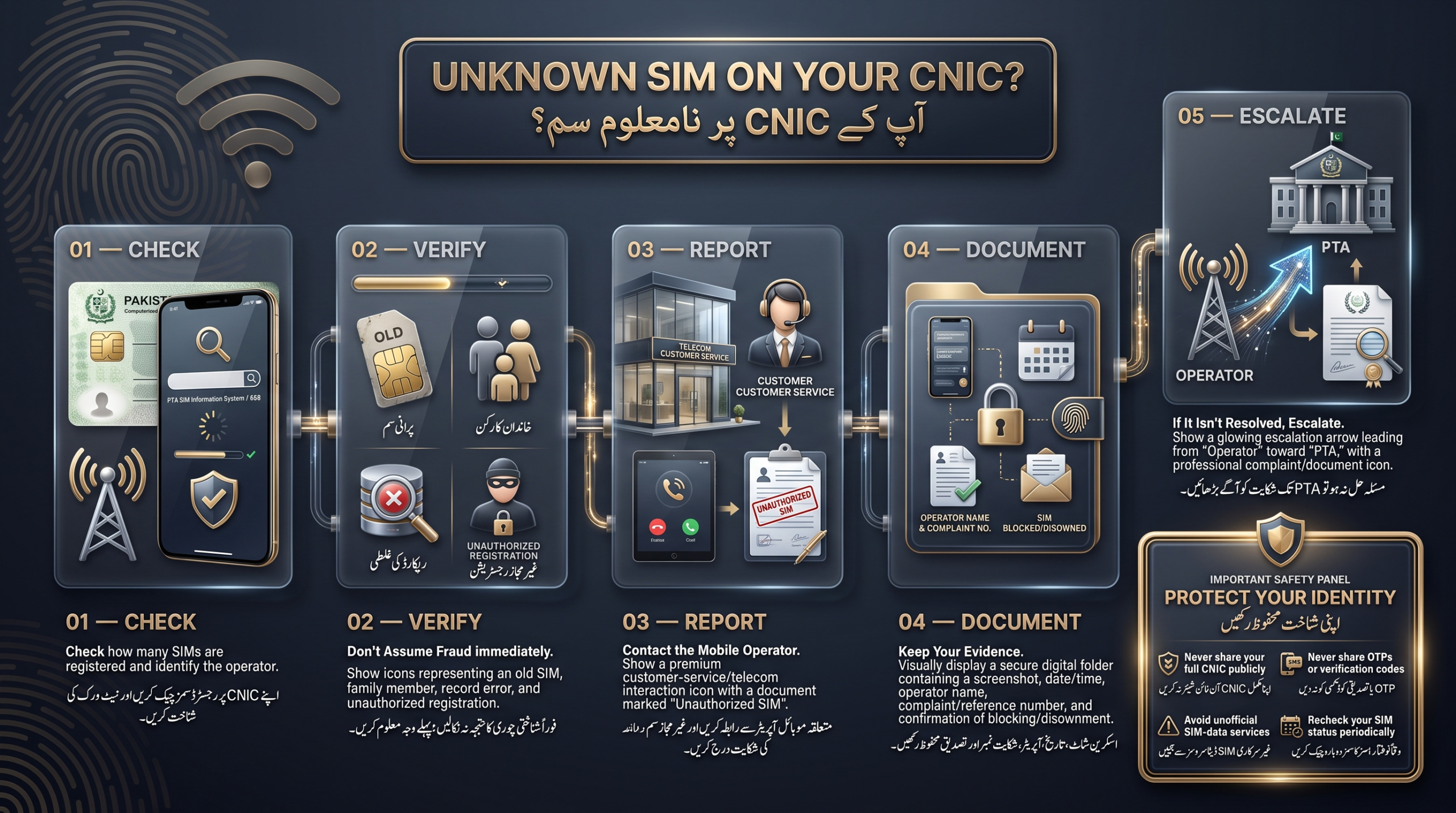
- Check your CNIC using the PTA SIM Information System.
- Record the total number of registered SIMs and their operators.
- Identify the network linked to any unauthorized registrations.
- Contact the respective operator through official channels.
- Inform them that the SIM was not authorized by you.
- Request disowning, blocking, or correction of the record.
- Keep your complaint/reference number and escalate to PTA if unresolved.
These steps help document your concerns regarding unauthorized SIM registrations.
How to Check Which SIMs Are Registered on Your CNIC
Check Online Through PTA’s SIM Information System
The Pakistan Telecommunication Authority (PTA) has a web portal at cnic.sims.pk to check the number of SIMs registered against your CNIC and their respective operators. To use the service, you need to:
- Visit the PTA SIM Information System page.
- Enter your CNIC number (without dashes or spaces).
- Complete the CAPTCHA verification.
- Submit the form to view results by operator and total count.
This system only provides information about SIMs registered to your CNIC and is not a public database for accessing private subscriber information. Be cautious of any services claiming to offer personal details like call records or live location, as they are likely unreliable.
What Does the Result Mean?
The text emphasizes the importance of carefully interpreting the number of registered SIMs against your CNIC. It mentions that having more registered SIMs than you personally use does not automatically indicate fraud; it suggests the need for investigation. The extra entry could be an old SIM, one used by a family member, or a registration you did not authorize. Overall, the count serves as a starting point for further inquiry rather than a conclusive judgment.
Can I Also Use 668?
The Pakistan Telecommunication Authority (PTA) offers an SMS-based service to check SIM registrations. By sending your CNIC number (without dashes) to 668, you can find out how many SIMs are registered under your name and their respective operators. This service incurs a small SMS charge (around PKR 2 plus tax). Individuals in Pakistan can register up to five SIMs under one CNIC, making it important to check if you’re nearing that limit.
I Don’t Recognize the SIM: Does That Mean Someone Stole My Identity?
- Forgotten SIM: People may forget about old or rarely used SIMs due to switching phones or operators.
- Family or Household SIM: A SIM may be registered in one person’s name but used by another family member.
- Old or Unexpected Registration: Administrative errors or old records might not match current usage and can be clarified with the operator.
- Unauthorized Registration: If none of the previous explanations apply and you didn’t authorize the SIM, report it as unauthorized.
- Key Takeaway: An unfamiliar SIM registration warrants investigation but is not automatically indicative of identity theft. Approach the situation calmly to find the correct explanation.
Why Is a SIM Registered on My CNIC That I Never Bought?
- Forgotten Old SIM: Users may forget about secondary numbers or temporary SIMs over time.
- Family Member’s SIM Under Your CNIC: A relative might be using a SIM registered under your CNIC without your knowledge.
- Previous SIM or Replacement Issues: If a SIM was replaced, the records may not reflect the change, leading to a need for correction with the operator.
- Misuse of CNIC Information: Someone could have fraudulently registered a SIM using your CNIC, which should be reported.
- Operator Record Errors: Sometimes, discrepancies arise from data-entry mistakes or outdated records, which can typically be corrected with a request.
How to Remove an Unknown SIM From Your CNIC
- Identify the Mobile Network: Use the PTA SIM check to determine the network (Jazz, Telenor, Ufone, or Zong) associated with the unexpected SIM.
- Contact the Operator: Reach out through official channels like their helpline, app, or customer service center. Avoid unofficial sources.
- State Your Unauthorized SIM Claim: Clearly communicate that a SIM is registered under your CNIC without your authorization.
- Complete Verification Process: Be prepared to verify your identity with your CNIC and possibly a biometric verification.
- Request Confirmation: Before ending the interaction, ask whether the SIM has been blocked and disowned, and request a reference number.
- Follow Up: Recheck the PTA SIM status after a few days to ensure the issue is resolved.
What Information Should You Keep as Evidence?
Good documentation aids in faster escalation and provides leverage if the operator is unresponsive.
Keep a record of the following:
- Screenshot of the SIM-check result.
- Date and time of the check.
- Network/operator name.
- Date of your complaint.
- Complaint or reference number.
- Relevant SMS notifications.
- Franchise or customer-service contact details used.
- Confirmation of SIM disownment or blocking.
Privacy warning: Do not share your complete CNIC number or sensitive screenshots publicly; share only with the operator and PTA through official channels.
What If the Mobile Operator Doesn’t Remove the SIM?
- Follow-up: Contact the operator with your complaint/reference number for a status update.
- Ask for the Reason: If unresolved, inquire why. It could be due to a verification hold or oversight.
- Escalate to PTA: If not resolved in a reasonable time, escalate to PTA’s Consumer Protection Directorate via their helpline (0800-55055) or online complaint form.
- Keep the Paper Trail: Retain all documents related to your complaint, including the original issue, follow-ups, and responses, as they may be important if the situation escalates.
- When to Seek Further Help: For serious issues beyond simple errors, such as fraud or threats, report to law enforcement or cybercrime authorities in addition to the operator and PTA.
Can an Unknown SIM Registered on My CNIC Cause Legal Problems?
In Pakistan’s regulatory framework, the registered subscriber of a SIM is presumed responsible for that connection, making it crucial to correct unauthorized registrations promptly. The presence of an unexpected SIM on your CNIC does not imply wrongdoing, as mistakes and errors can occur. What matters is taking action by documenting and reporting any unauthorized registrations to protect yourself.
What NOT to Do If You Find an Unknown SIM
- Avoid using random SIM database websites, as they aren’t official and don’t provide private subscriber data.
- Do not share your CNIC number with unknown services for detailed information.
- Refrain from paying unofficial agents for SIM-owner information, as it’s not a legitimate service.
- Never publish your full CNIC number online when seeking help.
- Don’t jump to conclusions about identity theft with unfamiliar SIMs; investigate first.
- Address any unauthorized registrations promptly, as they won’t correct themselves.
- Do not share OTPs, verification codes, or account details, even with those claiming to be from your operator or PTA; legitimate staff won’t ask for this information.
668 vs PTA SIM Information System: What’s the Difference?
| Feature | PTA Online System | 668 (SMS) |
| CNIC-based SIM check | ✓ | ✓ |
| Official PTA channel | ✓ | ✓ |
| Useful for checking registrations | ✓ | ✓ |
| Operator information | ✓ | ✓ |
| Full private subscriber database | No | No |
| Best use | Checking from a computer or with internet access | Quick checking when you only have SMS access |
Use the two official channels for SIM count information, as they are reliable and avoid third-party websites.
How to Protect Your CNIC From Unauthorized SIM Registration
- Check Registered SIMs Periodically: Verify your SIMs every few months to catch issues early.
- Keep Track of Active Numbers: Maintain a list of your numbers, their operators, and purposes.
- Dispose of Old SIMs Properly: Cancel or block unused connections to avoid linked issues with your CNIC.
- Don’t Share CNIC Information Unnecessarily: Provide your CNIC only to legitimate organizations through official channels.
- Be Careful With Online SIM/CNIC Websites: Avoid third-party sites asking for your CNIC for “checking” services.
- Act Quickly When Something Looks Wrong: Report discrepancies immediately to create a documented record and facilitate resolution.
Conclusion
Discovering an unknown SIM linked to your CNIC can be alarming, but it doesn’t necessarily indicate identity theft. Start by checking the registration through the PTA SIM Information System or by dialing 668. If you don’t recognize the SIM, contact the mobile operator to investigate and request it be blocked. Keep your complaint reference number for evidence. If unresolved, escalate your issue to PTA and maintain a record of all communications. Always safeguard your CNIC, OTPs, and personal information, and regularly check linked SIMs to protect your identity.
اپنے شناختی کارڈ (CNIC) سے منسلک کسی نامعلوم سم (SIM) کا پتہ چلنا تشویشناک ہو سکتا ہے، لیکن اس کا مطلب لازمی طور پر شناخت کی چوری (identity theft) نہیں ہے۔ سب سے پہلے PTA کے ‘سم انفارمیشن سسٹم’ کے ذریعے یا 668 پر کال کر کے رجسٹریشن کی تصدیق کریں۔ اگر آپ اس سم کو نہیں پہچانتے، تو متعلقہ موبائل آپریٹر سے رابطہ کر کے معاملے کی چھان بین کروائیں اور سم بلاک کرنے کی درخواست دیں۔ ثبوت کے طور پر اپنی شکایت کا ریفرنس نمبر اپنے پاس محفوظ رکھیں۔ اگر مسئلہ حل نہ ہو تو اسے PTA تک پہنچائیں اور تمام مواصلاتی رابطوں کا ریکارڈ رکھیں۔ اپنی شناخت کے تحفظ کے لیے ہمیشہ اپنے شناختی کارڈ، OTPs اور ذاتی معلومات کو محفوظ رکھیں اور وقتاً فوقتاً اپنے شناختی کارڈ سے منسلک سمز کی جانچ پڑتال کرتے رہیں۔
Frequently Asked Questions
How can I find an unknown SIM registered on my CNIC?
Use the official PTA SIM Information System online, or send your CNIC number to 668 via SMS. Either method shows you the total number of SIMs registered against your CNIC and which operator each belongs to.
How do I remove a SIM I don’t recognize from my CNIC?
Identify the operator from your PTA check, contact that operator directly, clearly state that the SIM wasn’t authorized by you, and request that it be disowned or blocked. Keep your complaint/reference number.
Can someone register a SIM using my CNIC?
Yes, unauthorized registrations can occur, whether through misuse of a physical copy of your CNIC or other fraudulent means. If you find one, report it to the operator and escalate to PTA if it isn’t resolved.
What should I do if 668 shows an extra SIM?
Identify which operator the extra SIM belongs to from the SMS reply, then contact that operator to have the registration investigated and, if unauthorized, removed.
Can I see the exact mobile number of every SIM on my CNIC?
The PTA system shows the count and operator breakdown of SIMs registered to your CNIC, rather than serving as a public lookup tool. For specific registration details, contact the operator with CNIC verification.
Does an unknown SIM mean my CNIC has been stolen?
A warning sign should be investigated, not assumed to indicate identity theft. Consider simpler explanations, like a forgotten SIM or a family member’s connection, first.
What if the operator refuses to remove the SIM?
Follow up using your complaint/reference number, ask for the reason if it’s still unresolved, and escalate to PTA’s Consumer Support Centre if the operator doesn’t act within a reasonable time.
How often should I check SIMs registered against my CNIC?
A periodic check every few months is reasonable, and you should always check right after losing a SIM, replacing a SIM, or noticing anything unusual with your mobile service.
Disclaimer
The article offers general information and emphasizes that it is not legal or professional advice. It notes that procedures related to SIM registration and CNIC verification in Pakistan may change and differ by operator. Readers are encouraged to verify current procedures through PTA’s official website and their mobile operator, and to consult a legal professional if they suspect fraud or identity theft.
Sources & References
- The Pakistan Telecommunication Authority (PTA) has an official website: [pta.gov.pk](https://www.pta.gov.pk).
- Key resources include a PTA press release about the launch of a Consumer Support Centre (February 18, 2020) and various guides on checking the number of SIMs issued against a CNIC and managing consumer grievances.
- Useful articles from ProPakistani, Zameen.com, and Icons.com.pk provide information on how to check SIMs linked to your ID card online.
- Current figures such as SMS charges and the maximum number of SIMs per CNIC may change, so it’s recommended to verify details on PTA’s official site or directly with mobile operators.