How to Reactivate a Blocked SIM Card in Pakistan
Waking up to a blocked SIM in Pakistan can be frustrating due to loss of communication and mobile data. SIMs may be blocked for reasons such as incomplete biometric verification, PTA compliance, inactivity, security issues, or reported theft. To restore a blocked SIM, visit your mobile operator’s franchise or customer service center with your CNIC and complete the required biometric verification. Common causes for blocking include prolonged inactivity, unpaid bills, and incorrect PIN or PUK attempts. Resolving the specific issue is necessary for reactivation.
مواصلات اور موبائل ڈیٹا کے ضائع ہونے کی وجہ سے پاکستان میں بلاک شدہ سم کا جاگنا مایوس کن ہو سکتا ہے۔ نامکمل بائیو میٹرک تصدیق، پی ٹی اے کی تعمیل، غیرفعالیت، سیکورٹی کے مسائل، یا چوری کی اطلاع جیسی وجوہات کی بنا پر سمز کو بلاک کیا جا سکتا ہے۔ بلاک شدہ سم کو بحال کرنے کے لیے، اپنے CNIC کے ساتھ اپنے موبائل آپریٹر کی فرنچائز یا کسٹمر سروس سینٹر پر جائیں اور مطلوبہ بائیو میٹرک تصدیق مکمل کریں۔ مسدود کرنے کی عام وجوہات میں طویل عرصے تک غیرفعالیت، بلا معاوضہ بل، اور PIN یا PUK کی غلط کوششیں شامل ہیں۔ دوبارہ فعال ہونے کے لیے مخصوص مسئلے کو حل کرنا ضروری ہے۔
What Does It Mean When a SIM Card Is Blocked?
“Blocked” is often used loosely to describe several different states, and the fix depends on which one applies to you.
Difference Between Blocked, Suspended, and Deactivated SIMs
- Temporary Block: Triggered by failed biometric re-verification or compliance issues; outgoing services may stop, but incoming calls work for a short period.
- Network Suspension: At this stage, the operator cuts off all services, including calls, SMS, and mobile data, after the subscriber fails to resolve an earlier warning or issue.
- Permanent Deactivation: At the final stage, the operator permanently deactivates the number and removes it from the subscriber’s active account. You generally cannot recover the number after permanent deactivation, and the operator may eventually reassign it to another subscriber.
| SIM Status | Meaning | Can It Be Fixed? |
| Blocked | Restricted because of billing, security, or account issues | Usually Yes |
| Locked | Wrong PIN entered; PUK code required | Yes |
| Suspended | Service temporarily stopped | Yes |
| Expired | SIM inactive beyond the allowed period | Sometimes |
Understanding your current status is important for resolution, as temporary blocks can be easily fixed, whereas permanent deactivation is irreversible.
Common Signs Your SIM Is Blocked
The text outlines common issues with mobile network connectivity, including:
- No network signal or signal bar without connectivity
- Only emergency calls can be made
- Messages indicating “SIM registration failed” or “SIM not provisioned”
- Inability to send SMS or make/receive calls despite the SIM being inserted
It reassures that most cases are traceable to fixable causes and advises not to panic.
Read Also: SMS to 668: How to Check SIMs Registered on Your CNIC
Why SIM Cards Get Blocked in Pakistan
- Biometric Verification Problems: SIMs can get blocked due to improper biometric verification against the subscriber’s CNIC, or mismatches between the CNIC and the actual user. The PTA has increased enforcement of this requirement.
- Long-Term Inactivity: Operators may flag and block SIMs that remain unused for an extended period, such as around six months, as part of their number management policies.
- PTA Compliance Issues: Operators may suspend SIMs that lack proper registration or exceed the permitted number of SIMs under a single CNIC until the subscriber resolves the issue.
- Lost or Stolen SIM: When you report a SIM as lost or stolen, the operator can block it to prevent unauthorized use. You can usually request a replacement or reactivation through the operator’s official process.
- Security and Fraud Concerns: Operators may block SIMs that trigger security or fraud alerts while they investigate suspicious activity. Resolving these cases may require additional verification and can take longer than routine reactivation.
| Reason | Can Be Reactivated? | Estimated Time |
| Biometric verification failure | Yes | Same day to 24 hours |
| Inactivity block | Yes, within the recovery window | 24–48 hours |
| PTA compliance / excess SIMs | Yes, after disowning excess lines | 1–3 days |
| Lost/stolen (self-reported) | Yes | Same day, with replacement SIM |
| Security/fraud flag | Sometimes, pending investigation | Several days to weeks |
| Permanent deactivation | No | Not applicable |
How to Check Why Your SIM Card Was Blocked
To check why your mobile line is blocked, consider the following methods:
- Contact Customer Support. Call the helpline for your operator (Jazz: 111, Zong: 310, Ufone: 333, Telenor: 345) to get specific reasons for the block.
- Visit a Franchise/Service Center. Staff can access your account and explain the status of your block.
- Check the Official Mobile App. Use your operator’s app (Jazz World, My Zong, My Ufone, My Telenor) to see your account and SIM status if accessible.
- PTA Verification. Use PTA’s SMS code or web portal to find out which SIMs are registered under your CNIC, useful for identifying compliance-related issues.
Pro Tip: Understand the reason for the block before heading to a franchise to save time.
5 Common Reasons Your SIM Card Stopped Working
A SIM card may stop working for several reasons:
- SIM Inactivity: Carriers may deactivate SIM cards that remain unused for an extended period, particularly prepaid SIMs. In many cases, you can reactivate the number if it has not reached permanent deactivation.
- Incorrect PIN or PUK: Entering the wrong PIN three times can lock your SIM and require a PUK code to unlock it. Entering the wrong PUK code repeatedly can permanently block the SIM.
- Unpaid Bills: Carriers may suspend postpaid services when you fail to pay your bills. Paying the outstanding amount usually restores the service, although some cases may require additional action.
- Security Restrictions: Carriers may block a SIM when they detect suspected fraud or suspicious activity. You may need to complete identity verification or resolve the security issue before the carrier can unblock it.
- Expired SIM: Many carriers deactivate SIMs after prolonged inactivity, but reactivation is possible if the number hasn’t been reassigned.
How to Determine the Exact Issue
Determine the cause before trying to reactivate your SIM to prevent unnecessary actions.
Make sure to look at the message that appears on the screen.
| Message | Meaning |
| Incorrect PIN | Wrong PIN entered several times |
| PUK Required | SIM is locked |
| SIM Not Registered | SIM has been deactivated |
| No Service | Network or account issue |
| Invalid SIM | SIM may be damaged or inactive |
To address issues with your SIM card, consider the following questions:
- Have you recently used the SIM?
- Did you miss a payment?
- Did you change phones recently?
- Did you enter the wrong PIN?
- Did your carrier send any warning messages?
Documents Required for SIM Reactivation
- Original CNIC: Required for biometric matching at the franchise.
- Proof of SIM Ownership: Needed if the SIM isn’t linked to your CNIC in the records.
Additional Documents (if necessary)
- Police Report (FIR): Required if the SIM was lost or stolen.
- Affidavit: May be needed for ownership disputes or lost documents.
- Replacement SIM Request Form**: To be filled out at the franchise.
| Document | Required For | Notes |
| Original CNIC | All cases | Must be original, not a copy |
| Police FIR | Lost/stolen SIM | Increases processing speed |
| Affidavit | Ownership disputes | Franchise staff can guide you |
| Replacement SIM form | Physical SIM replacement | Filled on-site |
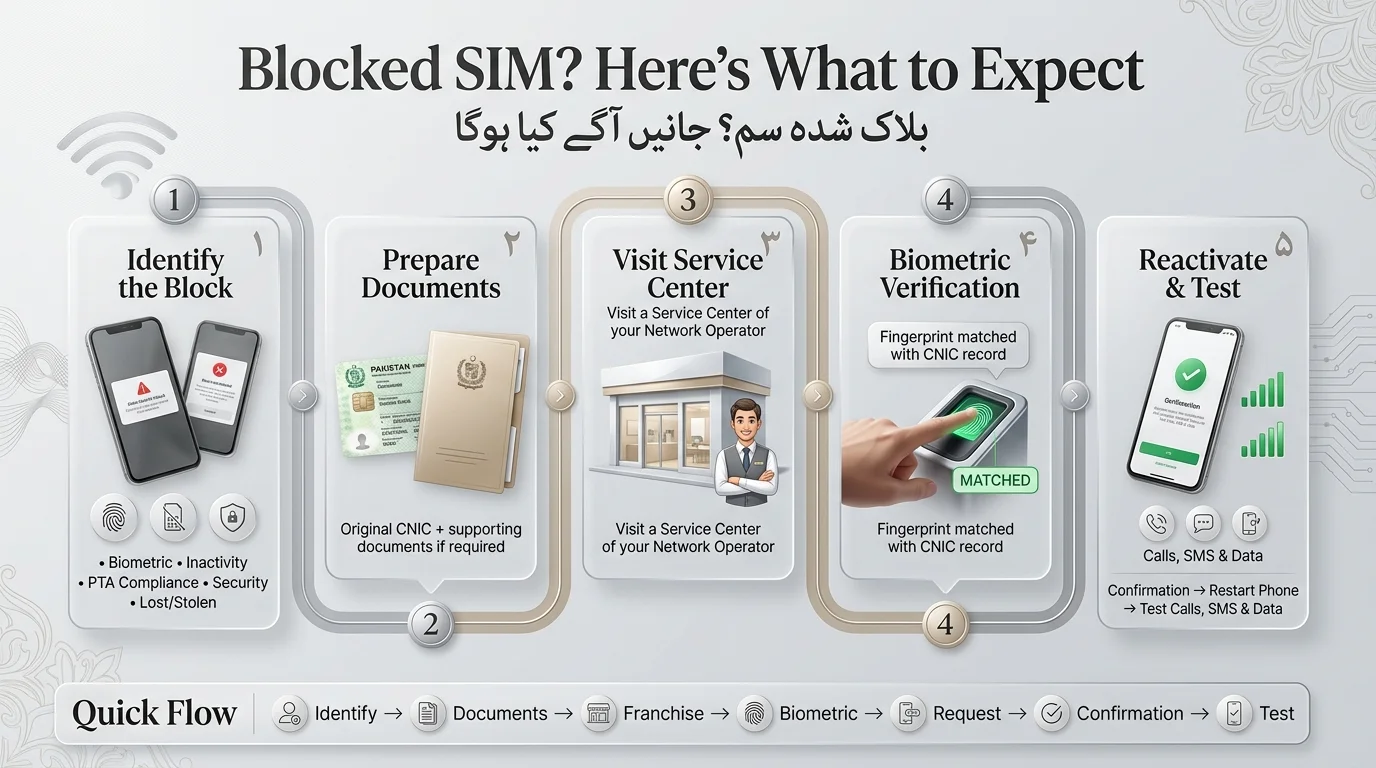
How to Reactivate a Blocked SIM Card (Step-by-Step)
- Identify Block Type: Determine if the block is biometric, inactivity, compliance, security, or theft-related.
- Gather Required Documents: Bring your original CNIC and any additional supporting documents based on the block type.
- Visit Nearest Franchise: In-person reactivation is usually required for biometric and most compliance issues.
- Complete Biometric Verification: Staff will scan your thumbprint and match it with your CNIC record.
- Submit Reactivation Request: After successful verification, the franchise will submit the reactivation request.
- Wait for Confirmation: You’ll receive an SMS or a timeframe for confirmation of reactivation.
- Test Network Services: Restart your phone and check for signal, call capabilities, SMS, and mobile data.
Quick Reference Flow: Identify block → Gather documents → Visit franchise → Biometric verification → Submit request → Await confirmation → Test services.
Read Also: Check Jazz SIM Owner Name and Registration Details
Reactivate a Jazz SIM Card
- Reasons for Jazz SIM blocking: Failed biometric re-verification, prolonged inactivity, excess SIMs under one CNIC, self-reported loss.
- Reactivation Process: Visit a Jazz franchise or Mobilink service center with your original CNIC. The staff will conduct biometric verification to confirm your identity.
- Documents Required: Bring your original CNIC. If you lost or someone stole your SIM, you may also need to provide a police FIR.
- Processing Time: Jazz may restore a SIM within 24 hours after completing biometric verification, depending on the reason for the block.
- Common Issues: An expired CNIC can delay the process. Renew your CNIC through NADRA before requesting reactivation. For assistance, contact Jazz customer support by dialing 111.
How to Reactivate a Zong SIM Card
- Reasons for Zong SIM blocking: Biometric mismatches, inactivity, and PTA compliance flags.
- Restoration steps: Visit a Zong franchise with your original CNIC for biometric re-verification, or text “help” to 310 for SMS assistance.
- Required documents: Original CNIC and an affidavit if there’s an ownership issue.
- Processing timeline: Usually same day to 48 hours, depending on franchise workload and additional checks.
- Troubleshooting tips: If verification fails, it may be due to scanner or fingerprint quality issues—try a different franchise or a different finger. Contact Zong support at 310 (from a Zong number) or 111-222-111 (from any other line).
How to Reactivate a Ufone SIM Card
To unblock a Ufone SIM, visit a service center with your CNIC for biometric verification. Activation may take up to 24 hours. For issues like damaged fingerprints, contact the staff or call Ufone’s helpline at 333.
How to Reactivate a Telenor SIM Card
To reactivate a Telenor SIM, visit a Telenor franchise with your original CNIC.
Verification requires a biometric thumbprint match with your CNIC.
Processing time is typically the same day to 24 hours.
For customer support, dial 345 from a Telenor number or 111-345-100 from a landline or other networks.
SIM Reactivation Charges in Pakistan
- Reactivating a SIM through biometric re-verification for an existing number is typically free for major operators, as it’s a compliance requirement.
- Fees apply only when a physical replacement SIM is issued due to loss, theft, or damage.
- Replacement SIM costs are modest and set by the operators, so it’s best to check current rates before your visit.
| Network | Reactivation Fee (existing SIM) | Replacement SIM Fee | Processing Time |
| Jazz | Free | Nominal fee, confirm at franchise | Same day–24 hrs |
| Zong | Free | Nominal fee, confirm at franchise | Same day–48 hrs |
| Ufone | Free | Nominal fee, confirm at franchise | Same day–24 hrs |
| Telenor | Free | Nominal fee, confirm at franchise | Same day–24 hrs |
How Long Does SIM Reactivation Take?
- Temporary blocks (biometric or minor compliance issues) typically resolve in 24 hours after a successful franchise visit.
- Inactivity blocks take 24–48 hours to resolve as the operator needs to reverse the dormancy flag.
- Stolen SIM reactivation can be same-day with a police report and biometric verification, but may take longer if under investigation.
- PTA compliance cases (like exceeding SIM limits) can take 1–3 days as you may need to disown excess lines.
- Security/fraud investigations may take longer and are variable in duration.
SIM Still Not Working After Reactivation? (Troubleshooting Guide)
- No Signal After Reactivation: Restart phone, toggle Airplane Mode, or manually select network operator.
- SIM Registration Failed: Wait a few hours and restart device; contact support if unresolved after 24 hours.
- Calls Not Connecting: Check balance or active package; blocked SIM may need a package refresh.
- SMS Issues: Verify message center number; contact support if needed.
- Mobile Internet Issues: Ensure APN settings are correct; consider a factory reset of network settings.
- Device Compatibility: Check SIM seating and ensure device isn’t IMEI-blocked.
Troubleshooting Checklist
- Restart device
- Toggle Airplane Mode
- Reseat SIM card
- Manually select network operator
- Check active package/balance
- Verify APN settings
- Confirm IMEI isn’t blocked
- Contact support if issues persist after 24 hours.
Can a Permanently Blocked SIM Card Be Reactivated?
- Recovery Possibility: If the operator flags a SIM or places it under a warning, completing biometric re-verification may help restore or retain the number before permanent deactivation.
- No Recovery After Deactivation: Once the operator permanently deactivates a number, you generally cannot restore it through customer service.
- Old Number Process: After permanent deactivation, the operator may place the number in a holding period before making it available for reassignment.
- Number Recycling: Operators may eventually reissue recycled numbers to new subscribers. Therefore, unlink old numbers from your online accounts and update your registered contact information to reduce the risk of unauthorized access.
What Happens to WhatsApp, Banking Apps, and OTPs When Your SIM Is Blocked?
- WhatsApp Verification Issues: A blocked SIM can prevent you from receiving WhatsApp verification codes and may cause problems when you log back into your account or verify a device.
- Banking OTP Problems: You cannot receive SMS-based one-time passwords from banks when your SIM remains blocked, which can prevent you from accessing mobile banking services.
- Easypaisa and JazzCash Access: A blocked SIM can restrict access to mobile wallets linked to the number, making it difficult to complete transactions or check your balance.
- Two-Factor Authentication Risks: Accounts that use SMS-based 2FA, including email and social media accounts, may become difficult to access while the SIM remains inactive.
- Security Advice: Use app-based authenticator apps where possible, and update your registered phone numbers promptly when you replace, transfer, or deactivate a SIM.
How to Prevent Your SIM Card From Being Blocked Again
- Complete biometric verification proactively to avoid issues.
- Use your SIM regularly to prevent inactivity flags.
- Keep your ownership information updated with your telecom provider.
- Report lost SIMs immediately to reduce fraud risk and expedite replacement.
- Avoid suspicious activities, such as lending your SIM or registering it for others.
Prevention Checklist
- Confirm biometric verification status
- Use the SIM at least monthly
- Keep CNIC and telecom records updated
- Report loss/theft immediately
- Stay within your CNIC’s SIM registration limit
- Avoid registering SIMs for others
Final Verdict
In Pakistan, most blocked SIM cards can be reactivated. Key requirements for Jazz, Zong, Ufone, and Telenor include your original CNIC, biometric verification at a franchise, and a quick network test after activation. Remember, reactivation time varies based on block reasons, with biometric issues resolving the fastest. Contact your network provider promptly to avoid permanent loss of your number, as deactivated numbers cannot be recovered once recycled.
پاکستان میں زیادہ تر بلاک شدہ سم کارڈز کو دوبارہ فعال کیا جا سکتا ہے۔ Jazz، Zong، Ufone اور Telenor کے لیے کلیدی تقاضوں میں آپ کا اصل CNIC، فرنچائز میں بائیو میٹرک تصدیق، اور ایکٹیویشن کے بعد فوری نیٹ ورک ٹیسٹ شامل ہیں۔ یاد رکھیں، ری ایکٹیویشن کا وقت بلاک وجوہات کی بنیاد پر مختلف ہوتا ہے، بائیو میٹرک مسائل سب سے تیزی سے حل ہوتے ہیں۔ اپنے نمبر کے مستقل نقصان سے بچنے کے لیے فوری طور پر اپنے نیٹ ورک فراہم کنندہ سے رابطہ کریں، کیونکہ غیر فعال نمبروں کو دوبارہ استعمال کرنے کے بعد بازیافت نہیں کیا جا سکتا۔
Frequently Asked Questions
Can I reactivate a blocked SIM online?
Biometric blocks often need an in-person fingerprint match to resolve.You can resolve some minor issues through the app or helpline, but most SIM reactivation requests require you to visit the operator’s franchise in person.
How long before a SIM is permanently deactivated?
Generally, this varies by operator and the reason for the block. However, SIMs usually go through a warning period before they are permanently deactivated. Therefore, it’s best to act as soon as you notice service issues rather than waiting.
Can I recover my old mobile number?
You can recover the number only if the operator has not permanently deactivated or recycled it. Once the operator reassigns the number to a new subscriber, you cannot recover it.
Do I need biometric verification again if I already did it once?
If you registered your SIM before biometric verification became mandatory, or if your record shows incomplete verification, you must complete the biometric verification process again.
What if my CNIC has expired?
You’ll need to renew your CNIC through NADRA first. Operators cannot complete biometric matching against an expired identity card.
What happens if I lost my SIM along with my phone?
Report a lost SIM to your operator to block it, then visit a franchise with your CNIC (and police FIR if needed) for a replacement SIM.
Disclaimer
The article provides general information about SIM reactivation in Pakistan, emphasizing that procedures and requirements may change. It advises users to check the latest information with their mobile operator or the Pakistan Telecommunication Authority (PTA) before taking any action. Additionally, it notes that not all blocked SIMs can be reactivated. In particular, permanently deactivated or recycled numbers may not be recoverable. Therefore, users should verify their SIM status before taking further steps. Finally, the information does not guarantee any specific outcome and disclaims responsibility for issues arising from reliance on it.
Sources & References
- Pakistan Telecommunication Authority (PTA): Guides SIM registration, biometric verification, and telecom services.
- Jazz: Customer support and SIM replacement/reactivation information.
- Zong: Customer service and SIM-related support.
- Ufone: SIM registration, verification, and customer support.
- Telenor Pakistan: SIM-related customer support and services.
- NADRA: Information on CNIC and identity verification.
- DIRBS/PTA: Device and IMEI compliance information.
- Important Note: Always use official sources for SIM reactivation and replacement, and never share personal data with unauthorized parties.