All SIM Check Codes in Pakistan: How to Check SIM Details Without Internet
Pakistan’s telecom regulator has introduced SMS- and USSD-based tools to check the number of mobile SIM cards registered to your CNIC, identify a number’s network, and verify whether any unauthorized SIMs have been issued in your name. This guide outlines the major SIM check codes and their functions, and emphasizes that checking your own CNIC-linked SIMs is legitimate, while attempting to access someone else’s private information is not permitted. A quick-reference table of the main codes is included, along with detailed explanations.
جب آپ PTA اور موبائل آپریٹر کی آفیشل سروسز استعمال کرتے ہیں تو پاکستان میں سم کی تفصیلات چیک کرنا آسان ہے۔ **668، 667، اور 76367** جیسے کوڈز آپ کو اپنے CNIC سے منسلک سمز کو چیک کرنے، آپ کے فون میں موجود سم کی تصدیق کرنے اور بغیر انٹرنیٹ کے موبائل نمبر کے موجودہ نیٹ ورک کی شناخت کرنے میں مدد کر سکتے ہیں۔ اگر آپ کو اپنے CNIC کے خلاف رجسٹرڈ غیر مجاز سم ملتی ہے، تو متعلقہ آپریٹر سے رابطہ کریں اور اسے بلاک کرنے یا نامنظور کرنے کی درخواست کریں، اور اگر ضرورت ہو تو اس مسئلے کو PTA تک بڑھا دیں۔ ہمیشہ آفیشل چینلز کا استعمال کریں، اپنے CNIC اور OTP کی حفاظت کریں، اور تھرڈ پارٹی سم تلاش کرنے کی خدمات سے بچیں جو آپ کی ذاتی معلومات کو خطرے میں ڈال سکتی ہیں۔
Quick Answer: The Main SIM Check Codes at a Glance
| Code / Method | What It Checks | Internet Needed? | Best For |
| 668 | Count of SIMs registered against a CNIC, broken down by operator | No (SMS) | Auditing all SIMs on your own CNIC |
| 667 | Information tied to the specific SIM currently in your phone | No (SMS) | Checking the SIM you’re actually holding |
| 76367 | The current (post-portability) network of a mobile number | No (SMS) | Confirming which operator a ported number now belongs to |
| cnic.sims.pk | Same CNIC-to-SIM count data as 668, via a web portal | Yes | Overseas users or anyone without a local SIM to send SMS from |
| Operator USSD/SMS codes | Own number, balance, or account information for a specific network | No | Quick checks on your own connection |
| PTA Helpline (0800-55055) / Complaint portal | Escalation, complaints, disowning unauthorized SIMs | No / Yes | When operator-level steps don’t resolve an issue |
- No internet required: Codes 668, 667, 76367, and most USSD codes work via SMS or USSD on basic phones.
- Internet required: Accessing the PTA SIM Information System and online complaint system requires an internet connection.
- Important note: SIM services may change, so check PTA’s website and official operator channels for the latest information.
What Is a SIM Check Code?
SIM check code encompasses several technologies:
- USSD Codes: Short sequences (e.g., *668#) for real-time network responses.
- SMS Short Codes: Text messages sent to short numbers (e.g., 668) that trigger automated replies.
- PTA Verification Services: Regulator-run systems that verify data against the national identity database.
- Operator-Specific Codes: Unique codes for account or balance information used by different operators (Jazz, Zong, Telenor, Ufone, SCO/SCOM).
Codes may change over time, so it’s important to verify with the operator’s official support if issues arise.
An Important Distinction
The text outlines three distinct types of checks related to SIM cards and phone numbers:
- SIM Number Check: Verifying details about a specific SIM card or phone number, such as its network association.
- SIM Owner Check: Discovering who a phone number is registered to, which can only be done for one’s own registration through official channels.
- CNIC SIM Check: Checking how many SIMs are registered to a particular CNIC, intended for personal identity record checks.
It emphasizes the importance of distinguishing these checks to avoid confusion and misleading information.
668: The CNIC SIM Count Code
What Is 668 Used For?
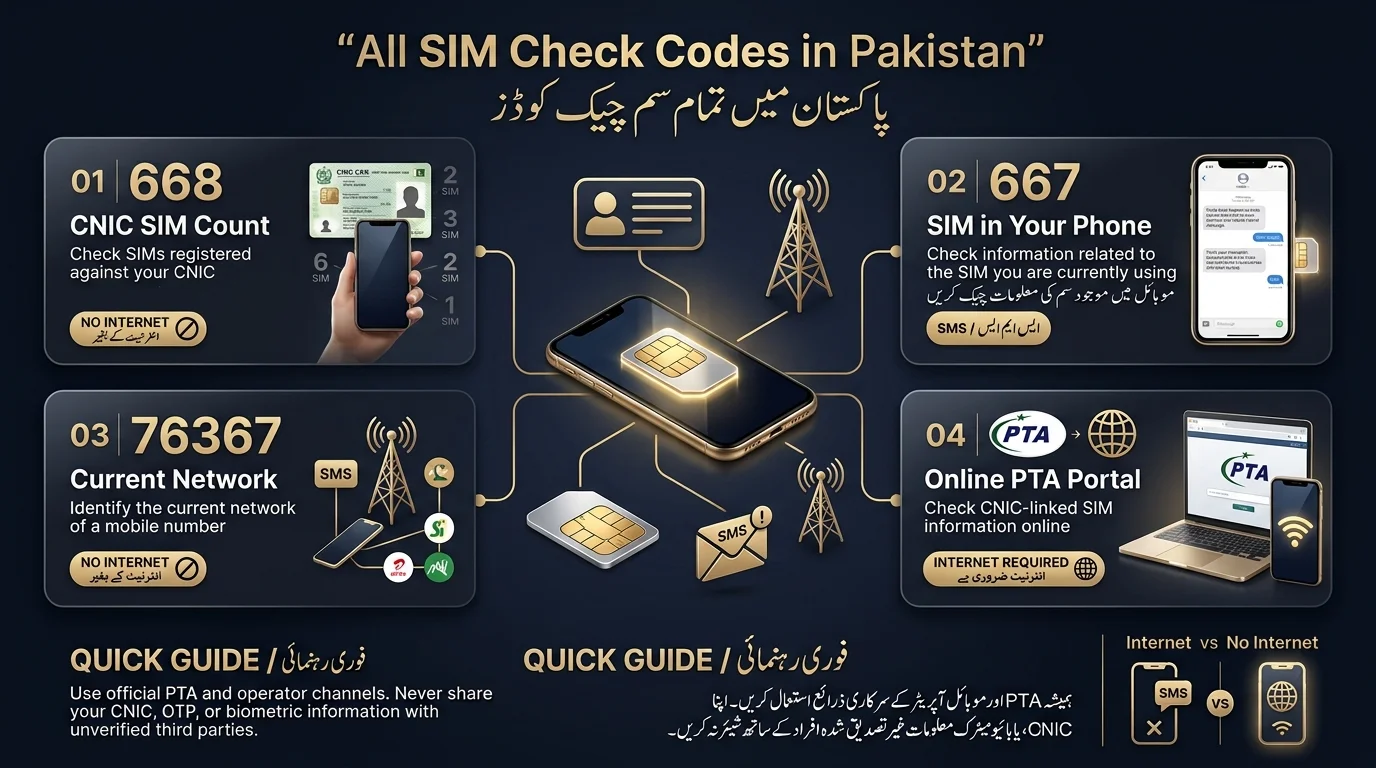
Code 668 is an SMS shortcode introduced by Pakistan’s telecom regulator to help mobile subscribers check how many SIM cards are registered under their CNIC and identify the mobile operators. This initiative aims to ensure SIMs are linked to verified identities, supported by public awareness campaigns encouraging users to verify their records.
How to Check SIMs Through 668
- Open the messaging app on your phone.
- Type your 13-digit CNIC number as one continuous string, with no dashes and no spaces.
- Send it as a plain text message to 668.
- Wait roughly 30 seconds to a couple of minutes for a reply, depending on network load.
- Review the response, which lists the number of SIMs registered against your CNIC for each operator.
Does 668 Require Internet?
The service works over standard SMS and is compatible with any phone, including basic keypad models, on any Pakistani network, provided SMS service is available.
What Information Does 668 Provide?
The reply provides a count of SIMs linked to your CNIC per operator but does not include phone numbers or personal details. There is usually a small fee for the query. The information is current as of the moment checked, and newly activated SIMs may not be immediately reflected.
What If an Unknown SIM Appears?
If the count is higher than you expect:
- Note down the operator(s) showing the discrepancy.
- Visit that operator’s franchise or customer service center with your original CNIC.
- Ask them to identify the unfamiliar SIM and either transfer it to its rightful owner or block/disown it.
- Keep a screenshot of your 668 response and any reference numbers from the franchise visit as evidence.
- If the operator doesn’t resolve it, escalate to PTA’s consumer complaint channels.
Regularly check your registered SIMs, as any fraudulent SIM linked to a stolen CNIC remains your legal responsibility until identified and removed.
667: Checking the SIM You’re Currently Holding
What 667 Is Used For
668 accesses the full CNIC record across all operators, while 667 checks information for the current SIM card, relevant for number portability and registration status.
How It Differs from 668
| 668 | 667 | |
| Scope | Every SIM linked to your CNIC | The one SIM currently in your device |
| Purpose | Auditing your CNIC for unknown SIMs | Confirming details of the SIM you’re using |
| Method | SMS | SMS |
| Internet needed | No | No |
- 667 Checks: Users send 667-related requests from the SIM they want to verify rather than from an external phone number.
- Operator-Specific Replies: Mobile operators may use different reply formats for 667, and available guidance can vary. Confirm the current procedure with your network’s official customer support.
- Privacy Protection: Neither 667 nor 668 provides a legitimate way to retrieve a stranger’s private identity details from their phone number. Avoid websites or services that claim they can reveal another person’s CNIC, name, or other confidential information.
76367: Checking a Number’s Current Network
In Pakistan, mobile number portability allows users to keep their phone numbers when switching operators, making it difficult to determine the current network based on the original prefix. To identify the current operator of a number, users can send the number to the shortcode 76367, following a specific format (usually N followed by the 11-digit number). This service functions via SMS without requiring an internet connection and only provides information about the current operator, not the owner of the number.
SIM Verification & BVS Codes
The Biometric Verification System (BVS) links a SIM to the fingerprint of its registered CNIC holder, typically verified in person at a franchise or remotely through SMS/USSD codes.
| Network | Verification Method | Purpose |
| Jazz | Operator-specific SMS/USSD (confirm current code with Jazz support) | SIM/BVS verification |
| Zong | Operator-specific SMS/USSD (confirm current code with Zong support) | SIM/BVS verification |
| Telenor | Operator-specific SMS/USSD (confirm current code with Telenor support) | SIM/BVS verification |
| Ufone | Operator-specific SMS/USSD (confirm current code with Ufone support) | SIM/BVS verification |
| SCO/SCOM | Operator-specific method (confirm with SCO customer service) | SIM verification in AJK and Gilgit-Baltistan |
Verification codes can change frequently and may differ across websites. Always confirm the current code with the operator’s official helpline, app, or website.
Jazz, Zong, Telenor, and Ufone SIM Check Basics
Each major mobile operator in Pakistan has its own SMS/USSD codes for account tasks (checking number, balance, package, SIM verification, ownership transfer).
These codes are separate from PTA’s 668/667/76367 system.
To find the correct codes, users can:
- Dial the operator’s help USSD code.
- Check the official app or website.
- Contact customer support.
- Visit a franchise for CNIC changes or biometric re-verification.
- This applies to Jazz, Zong, Telenor, Ufone, and SCO/SCOM.
- For residents of Azad Jammu & Kashmir and Gilgit-Baltistan, SCO is the main contact for SIM registration and verification.
How to Check SIM Details Without Internet
| Method | Internet Needed? | Works on a Keypad Phone? |
| 668 SMS | No | Yes |
| 667 SMS | No | Yes |
| 76367 SMS | No | Yes |
| Operator USSD codes | No | Yes |
| PTA web portal (cnic.sims.pk) | Yes | No |
| Any “online SIM lookup” site | Yes | No |
You can check a SIM without mobile data using USSD codes or SMS, which work on any phone, including keypad models. These checks also don’t require Wi-Fi, as they operate through the carrier’s basic network.
How to Check All SIMs Registered Against Your CNIC
There are two methods to check SIM registration linked to a CNIC in Pakistan:
- Method 1: 668 SMS: Send your 13-digit CNIC (without dashes) to 668 from a Pakistani mobile number to receive an SMS with the SIM count per operator.
- Method 2: PTA’s Online SIM Information Portal: Use the official online portal to enter your CNIC and view registration information.
The key difference is that the SMS method requires a local SIM, while the online portal needs internet access.
Can You Check SIM Owner Details by Number?
The text discusses common misconceptions regarding SIM registration information. Official channels allow users to:
- Check how many SIMs are registered against their own CNIC.
- Access basic registration information about their own SIM.
- Determine which network a number belongs to.
- Verify status through their operator’s authorized channels.
However, it emphasizes that official channels do not provide:
- Another person’s CNIC number or private details.
- A public database of SIM owners.
Third-party sites claiming to offer this information pose privacy and legal risks. Users should respect privacy boundaries and avoid relying on these services.
SIM Check Code Troubleshooting
- Invalid Code or No Reply: Ensure the shortcode is correct and the CNIC is 13 digits, without dashes or spaces. Check if the code is current with PTA or your operator.
- SMS Not Sending: Verify signal strength, SMS balance, correct SIM usage on dual-SIM devices, and ensure the SIM is active and registered.
- No Response After Sending: Wait a few minutes, as response times can vary, and try resending if needed.
- Recently Activated SIM: Understand that new SIM registrations may take time to propagate in the system.
- Overseas Issues: SMS-based codes require a Pakistani SIM. Use the web-based PTA portal if you don’t have one.
What to Do If an Unknown SIM Is Registered on Your CNIC
- Recheck the discrepancy using 668 or the online portal to confirm it’s not an error.
- Identify the operator linked to the unfamiliar entry.
- Contact the operator directly for assistance.
- Complete identity verification with your original CNIC.
- Request to block or disown the unauthorized SIM.
- Keep documentation of responses, complaint numbers, and communication details.
- Escalate the issue to PTA if the operator does not resolve it.
- Take the issue seriously to prevent potential fraud or harassment linked to your identity.

SMS/USSD Codes vs. the Online SIM Check Portal
| Feature | SMS/USSD Codes | Online Portal |
| Internet required | No | Yes |
| Works on any phone | Yes (including keypad phones) | Generally needs a smartphone/computer |
| Works from outside Pakistan | Limited (needs a Pakistani SIM) | Yes |
| CNIC SIM-count check | Yes (668) | Yes |
| Speed | Fast (seconds to minutes) | Fast |
The PTA-run SIM Information Portal helps users with internet access, including overseas Pakistanis, check SIMs linked to their CNIC without requiring a Pakistani SIM to send an SMS.
Read Also: 667 & 668 SMS Not Working
Is It Safe to Enter Your CNIC for SIM Checking?
- Use official channels for any queries related to your SIM, including the PTA’s systems and your operator’s official app or website.
- Avoid entering your CNIC number on third-party SIM lookup websites to protect your identity data.
- Never share One-Time Passwords (OTPs) with anyone, even if they claim to be from your operator or PTA.
- Do not provide biometric fingerprint data to unauthorized individuals.
- Refrain from using SIM lookup tools to investigate someone’s identity or location, as this may lead to legal issues.
- For legitimacy concerns, refer to the PTA’s official website and helpline.
Conclusion
To check SIM details in Pakistan, use official PTA and mobile operator services with codes like 668, 667, or 76367. These can help verify SIMs linked to your CNIC and identify the current network without internet. If you find an unauthorized SIM, contact the operator to block or disown it, and escalate to PTA if necessary. Always use official channels, protect your CNIC and OTP, and avoid third-party services to safeguard your personal information.
پاکستان میں سم کی تفصیلات چیک کرنے کے لیے، 668، 667، یا 76367 جیسے کوڈز کے ساتھ آفیشل PTA اور موبائل آپریٹر سروسز استعمال کریں۔ یہ آپ کے CNIC سے منسلک سمز کی تصدیق اور انٹرنیٹ کے بغیر موجودہ نیٹ ورک کی شناخت میں مدد کر سکتے ہیں۔ اگر آپ کو کوئی غیر مجاز سم ملتی ہے، تو آپریٹر سے رابطہ کریں کہ اسے بلاک کریں یا اسے مسترد کریں، اور اگر ضروری ہو تو PTA کے پاس جائیں۔ ہمیشہ سرکاری چینلز کا استعمال کریں، اپنے CNIC اور OTP کی حفاظت کریں، اور اپنی ذاتی معلومات کی حفاظت کے لیے فریق ثالث کی خدمات سے گریز کریں۔
Frequently Asked Questions
What is the SIM check code in Pakistan?
There isn’t a single universal code; different codes serve different purposes. 668 checks the SIM count against your CNIC, 667 relates to the SIM in your phone, and 76367 identifies a number’s current network.
How can I check all SIMs on my CNIC?
Send your 13-digit CNIC (no dashes) to 668 via SMS, or use PTA’s online SIM Information portal if you don’t have a Pakistani SIM to send from.
What is the 668 code used for?
It’s PTA’s SMS-based service for finding out how many SIM cards are registered against your CNIC, broken down by mobile operator.
Does 668 require internet?
No, it works over standard SMS and functions on any phone, including basic keypad models.
What is the 667 SIM code?
It’s generally used to check information related to the specific SIM currently in your phone, distinct from the CNIC-wide count that 668 provides. Confirm the current format with your operator, as it can vary.
What is 76367 used for?
Identifying which network a mobile number is currently on is useful after number portability, since a number’s prefix no longer guarantees its current operator.
Disclaimer
This article provides general information about SIM registration in Pakistan. The Pakistan Telecommunication Authority (PTA) sets the applicable rules, fees, and verification procedures, and it may update these requirements without notice. Some operator-specific codes or procedures may not have independent verification, so users should confirm them directly with the PTA or the relevant mobile operator.
Always use official PTA and mobile operator channels when checking SIM registration or resolving account issues. Never share sensitive information, including your CNIC number, OTPs, passwords, or biometric details, with unverified websites, individuals, or third-party services.
Sources & References
- Pakistan Telecommunication Authority (PTA): The PTA operates the SIM Information System 668, which allows users to check SIMs registered against their CNIC through an SMS-based query service that may involve applicable charges.
- PTA Official Announcements: PTA publishes guidance and announcements covering cellular operator verification requirements and procedures for blocking SIMs that do not meet applicable registration requirements.
- PTA Consumer Complaint Management System: Users can submit telecom-related complaints through the PTA’s official consumer complaint system.
- National Database and Registration Authority (NADRA): NADRA provides official CNIC and identity-related services used for identity verification.
- Prevention of Electronic Crimes Act (PECA) 2016: The National Assembly of Pakistan documents the legal framework established under PECA 2016.
- Independent Consumer Guides: We also reviewed independent consumer-guide websites for information about SIM verification methods. Because these sources may not reflect the latest official procedures, users should independently verify their information through PTA or the relevant mobile operator.