SCO SIM Owner Details Check: Complete Guide for AJK and Gilgit-Baltistan
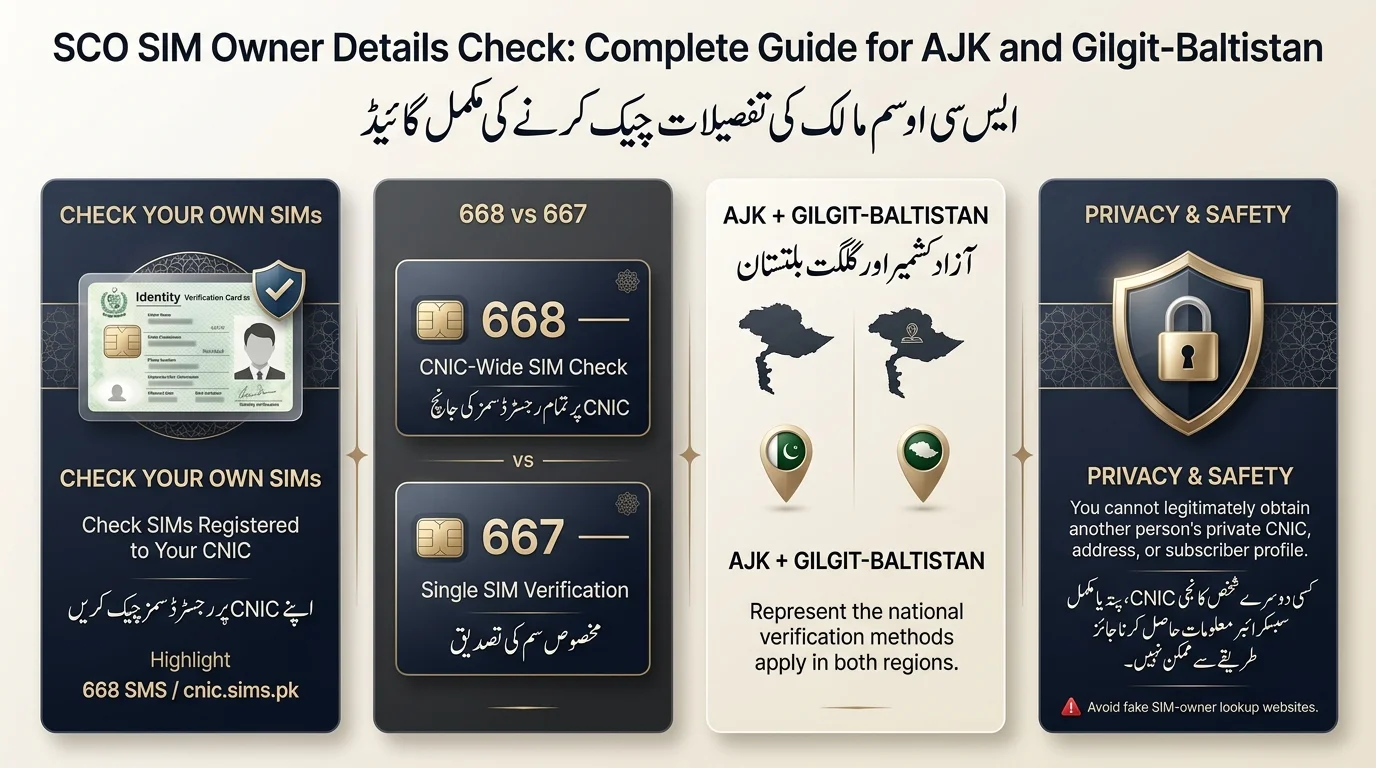
To check how many SIMs are registered against your CNIC, send your 13-digit CNIC number (without dashes or spaces) as an SMS to 668. You’ll receive a breakdown of all SIMs linked to your identity, including SCO connections, within about 30 seconds. Alternatively, visit PTA’s free web portal at cnic.sims.pk.
It’s crucial to understand the difference between two actions:
- Checking your own SIMs: This is a free, legitimate service provided by PTA.
- Obtaining someone else’s info: This is not possible through official channels, and attempting to do so can lead to fraud or legal issues.
If you encounter issues, such as an unfamiliar SIM or no SMS response, contact SCO directly or visit a service center. Ensure you have your 13-digit CNIC, your SCOM SIM (if checking by phone), and your original CNIC for any in-person inquiries.
What Is SCO and What Is SCOM?
SCO (Special Communications Organization) is a public-sector telecom operator in Pakistan, established in 1976 and headquartered in Rawalpindi. It was created to develop telecom infrastructure in Azad Jammu & Kashmir (AJK) and Gilgit-Baltistan (GB). SCO operates its GSM/cellular mobile service under the brand name SCOM. The terms SCO SIM and SCOM SIM are often used interchangeably to refer to the same mobile connection.
Is SCO the Same as SCOM?
SCO is the parent organization, and SCOM is its mobile-phone brand. Purchasing a SIM from an SCO franchise means you are getting an SCOM connection.
Where Does SCOM Operate?
SCOM’s network footprint is concentrated in two regions:
- Azad Jammu & Kashmir
- Gilgit-Baltistan
SCO also maintains infrastructure and a fibre-optic backbone spanning thousands of kilometres across these mountainous regions, along with a presence in Islamabad to serve AJK/GB residents living or working in the capital.
SCO SIM Owner Check: Choose the Right Method
Different people land on this topic for different reasons. Use this table to find your route quickly:
| What you want to know | Recommended route |
| How many SIMs are registered against my CNIC? | Official PTA verification (668 SMS or cnic.sims.pk) |
| Is my own SCOM SIM registered correctly? | 667 (MNP) from the SIM itself, or SCO customer service |
| An unknown SCOM SIM appears against my CNIC | SCO service centre/customer support, then formal dispute |
| I need help with SIM registration | SCO franchise or service centre |
| I want another person’s private information | Not available through any legitimate channel |
How to Check SCO SIM Owner Details Using Your CNIC
Prepare Your CNIC: Use your own 13-digit CNIC number without dashes or spaces. Avoid third-party websites for verification.
Official SIM Verification Channels
- SMS: Send your CNIC number to 668.
- Web: Visit cnic.sims.pk to verify, especially useful if overseas.
- For single SIM confirmation, text MNP to 667.
Review the Result: You’ll receive information on the number of SIMs registered against your CNIC by operator, but no personal details of others.
Unknown SCO SIM: If an unknown SCO SIM appears, follow a specific response plan found in Section 11.
668 vs 667 for SCO/SCOM SIM Verification
Both 668 and 667 are part of PTA’s national SIM verification framework but serve different purposes.
- 668: Used for CNIC-level checks; provides information on all SIMs registered to an identity across operators, valuable for individual registration insights.
- 667: Used with the keyword MNP for confirming the registered network and status of a specific SIM in hand; useful for verifying used phones or SIMs.
668 vs 667 Comparison
| Feature | 668 | 667 |
| Main purpose | CNIC-wide SIM registration check | Single SIM/network verification |
| Requires your own identity | Yes | Yes (SIM must be in your possession) |
| Shows a stranger’s private data | No | No |
| Best for | How many SIMs are on my CNIC? | Is the SIM in my hand genuine/registered? |
Websites often share inconsistent information about SCOM verification codes, some claiming codes like 667 reveal personal details. Approach these claims skeptically and verify current instructions with SCO’s official website or the PTA before acting
Can I Check SCO SIM Owner Details by Mobile Number?
This is one of the most common searches, so it’s worth answering plainly.
Can I Find the Owner’s Name From an SCO Number?
There are no legitimate public tools that allow you to find a stranger’s name using their phone number. Websites claiming to do this for SCO, SCOM, or any Pakistani network are not authorized.
Can I Get Someone’s CNIC or Address?
No. You should not expect to obtain another subscriber’s:
- CNIC number
- Home address
- Full identity profile
- Any private subscriber record
These protections exist for good reason; they prevent stalking, harassment, and identity-based fraud.
What If I Need to Verify a Number for a Legitimate Reason?
To address genuine and lawful needs such as fraud complaints or safety concerns, use the following channels:
- Official SCO customer service (helpline, email, live chat).
- SCO service centers with proper documentation.
- Formal complaint mechanisms for escalation involving law enforcement or regulatory issues.
Private lookups outside these channels are not reliable or lawful substitutes.
SCO SIM Owner Details Check in AJK
In Azad Jammu & Kashmir, the verification methods (668, 667, cnic.sims.pk) function the same way, without the need for a region-specific code.
Major AJK Locations with SCO Presence
- Muzaffarabad
- Mirpur
- Rawalakot
- Kotli
- Bagh
- Bhimber
- Hattian Bala
- Haveli
- Poonch (Rawalakot area)
- Sudhnati (Sudhanoti)
- Dhirkot and Neelum Valley (including tourist-area coverage)
When Should an AJK User Visit an SCO Service Centre?
- An unfamiliar SIM appears on your CNIC that you didn’t authorize
- You need a registration correction (e.g., a spelling error or outdated detail)
- A biometric or ownership dispute needs to be resolved in person
- You need account-related support that can’t be handled over the phone
SCO SIM Owner Details Check in Gilgit-Baltistan
National verification tools for SIMs are consistent across Gilgit-Baltistan, with SCOM SIMs registered in the region appearing in checks through 668 or cnic.sims.pk, similar to other parts of Pakistan.
Major GB Locations with SCO Presence
- Gilgit
- Skardu
- Hunza (Karimabad)
- Ghanche / Khaplu
- Shigar
- Diamer (Chilas)
- Nagar
- Ghizer (Gahkuch, Gupis)
- Astore
- Jaglot, Jutial
SCOM is recognized for enhancing mobile coverage in remote, high-altitude areas of Pakistan, extending infrastructure further than most private operators in the region.
When Should a GB User Visit an SCO Service Centre?
The main points of the text are:
- Common issues include unknown SIM registrations, ownership corrections, biometric problems, and account issues that cannot be resolved through self-service tools.
- In very remote areas, limited signal makes in-person visits more reliable than SMS-based checks.
SCO Customer Service Centres for SIM Verification
SCO operates customer service centres in AJK and GB regions. AJK locations include Muzaffarabad, Bagh, Mirpur, Kotli, Rawalakot, and Bhimber, while GB locations include Gilgit, Skardu, Gahkuch, Khaplu, Karimabad, and Gupis. For accurate addresses and contact details, visit SCO’s official directory at sco.gov.pk, as information from third-party sources may be outdated. Always confirm the nearest active centre before visiting.
SCO Franchises for SIM Ownership Issues
SCO operates franchise outlets for services such as new SIM registration, account assistance, ownership corrections, and general support. Historical franchise locations include Gilgit, Bagh, Chilas, Skardu, Mirpur, Kotli, Muzaffarabad, Rawalakot, Astore, and Hunza. It’s important to verify current franchise locations and hours on SCO’s official website before traveling, especially to remote areas for SIM-related issues.
What If an Unknown SCO SIM Is Registered on Your CNIC?
- Confirm Registration: Re-check the SIM status using 668 SMS or the web portal for accuracy.
- Family Member Usage: Verify if a relative registered the SIM under your CNIC, either with or without permission.
- Contact SCO: Reach out to the SCO through official channels to report the unrecognized SIM.
- Visit SCO Service Centre: Bring your original CNIC for in-person verification to dispute or remove the SIM.
- Escalate if Necessary: If unresolved, ask about the formal complaint process and keep records of all interactions.
Official SCO Customer Support for SIM Problems
SCO Contact Numbers
- 355: Customer care helpline (available 24/7 from SCOM numbers)
- 111-726-726 (111-SCO-SCO): Universal Access Number
- 1218: Feedback number
- 565: CDMA helpline for AJK
- 726: CDMA helpline for GB
Email Support
- complaints@sco.gov.pk
- feedback@sco.gov.pk
- info@sco.gov.pk
Other Support Options
- E-Care self-service portal for account management
- Live chat and social media support
- Physical customer service centers for in-person issues
Note: Phone numbers and support channels should be verified on sco.gov.pk, especially if the information is older than a few months. Last verified in August 2026.
What Information Can You Legally Check?
| Information | Publicly available? |
| Your own SIM registration status | Yes, through official verification (668 / cnic.sims.pk) |
| SIM count against your own CNIC | Yes, through the official process |
| Another person’s full CNIC | No |
| Another person’s address | No |
| A general private subscriber database | No legitimate one exists |
| Official SCO support/contact information | Yes, published by SCO itself |
SCO SIM Owner Check Not Working? Try These Fixes
- CNIC Result Issue: Resend SMS, check CNIC entry, confirm signal, or use the cnic.sims.pk web portal.
- SIM Count Discrepancy: Verify using the web portal and contact the operator if the issue continues.
- Missing SCOM SIM: Ensure biometric verification was done; if active but not showing, contact SCO support.
- Lost SIM: Report to SCO to block the SIM immediately.
- SIM Registered Under Wrong CNIC: Resolve directly with SCO and potentially PTA, as there’s no self-service solution.
- Verification Not Responding: Retry after some time, switch methods, or contact SCO if persistent issues occur.
Beware of Fake SCO SIM Owner Check Websites
The text highlights the existence of unofficial websites claiming to provide personal details such as full names, CNICs, and addresses, warning that no legitimate service offers such tools. Key recommendations for protection include:
- Avoid uploading CNIC photos to unfamiliar sites.
- Do not pay for access to fake private SIM databases.
- Never share OTPs with anyone or any verification sites.
- Use only SCO’s official channels and PTA’s tools (668, cnic.sims.pk) for CNIC-related inquiries.
Final Verdict
To check your own SCO/SCOM SIM registrations, use PTA’s official tools: SMS to 668 or the cnic.sims.pk website. Be wary of sites claiming to provide others’ private details. For registration issues or unfamiliar SIMs on your CNIC, contact SCO’s customer service centers in AJK and Gilgit-Baltistan. Always verify current procedures and information through sco.gov.pk or PTA before taking action.
اپنی SCO/SCOM سم رجسٹریشن چیک کرنے کے لیے، PTA کے آفیشل ٹولز کا استعمال کریں: 668 یا cnic.sims.pk ویب سائٹ پر SMS کریں۔ دوسروں کی نجی تفصیلات فراہم کرنے کا دعوی کرنے والی سائٹس سے ہوشیار رہیں۔ اپنے CNIC پر رجسٹریشن کے مسائل یا غیر مانوس سموں کے لیے، AJK اور گلگت بلتستان میں SCO کے کسٹمر سروس سینٹرز سے رابطہ کریں۔ کارروائی کرنے سے پہلے ہمیشہ sco.gov.pk یا PTA کے ذریعے موجودہ طریقہ کار اور معلومات کی تصدیق کریں۔
Frequently Asked Questions
What is SCO SIM owner verification?
The text describes the process of verifying which SIM cards, including SCOM connections, are registered to an individual’s CNIC using the official tools provided by the PTA.
Is SCO the same as SCOM?
SCO is the government organization; SCOM is the brand name for its mobile/GSM service. They refer to the same underlying operator.
How do I check SCOM SIMs registered to my CNIC?
Send your 13-digit CNIC to 668, or use the free cnic.sims.pk portal.
Can I check an SCO SIM owner by number?
No, there is no legitimate way to look up someone’s name or CNIC using just a phone number.
What is 668 used for?
Checking the full list of SIMs (across all operators, including SCO) registered against your CNIC.
What is 667 used for?
Verifying the SIM currently in your possession by sending “MNP” to 667 from that SIM.
Can I check an SCO SIM online?
Yes, through PTA’s cnic.sims.pk portal, accessible from inside or outside Pakistan.
Does SCO operate in AJK?
Yes, Azad Jammu and Kashmir is one of the two primary regions covered by the Shanghai Cooperation Organization (SCO).
Disclaimer
The article provides general information about Pakistan’s SIM registration framework and SCO’s contact details as of August 2026. It emphasizes that telecom information is subject to change and encourages verification with SCO or the Pakistan Telecommunication Authority (PTA) for the most current details. Additionally, it warns against attempting to access another individual’s private information outside of authorized channels, as this may violate Pakistani law, including the Prevention of Electronic Crimes Act (PECA) 2016.
Sources & References
- Special Communications Organization (SCO): A key telecommunications entity in Pakistan, with official resources available on its Wikipedia page, LinkedIn, and official website.
- SCO Contacts: Information on franchise contact numbers in Azad Jammu and Kashmir (AJK) and Gilgit-Baltistan can be found in various articles.
- SCO SIM Information: Guides are available for users on how to block SCOM SIMs and details about SCOM internet packages.
- Customer Support: The SCOM helpline number is provided for customer service inquiries.
- SIM Verification: General guidance on the PTA’s national SIM Information System and the importance of verifying SIM ownership through official channels to avoid misinformation from unofficial sources.
- Legal Context: References the Prevention of Electronic Crimes Act (PECA) of 2016 regarding unauthorized access to subscriber data.
[…] Authority (PTA) has informed telecom operators, including Jazz, Zong, Ufone, Telenor, and SCO, that they can block or deactivate mobile connections after 180 consecutive days of no calls, SMS, […]